STUUBZZZ
LTX 2.5 vs MiniMax H3 vs Kandinsky 6 in ComfyUI: 99 clips, 10 rounds, names hidden
 Watch the video · LTX 2.5 vs MiniMax H3 vs Kandinsky 6, I Tested 99 Videos
In 99 ComfyUI clips on one RTX 5090, picked with the names hidden, a community build of Kandinsky 6 Pro won 5 of 10 rounds, LTX 2.5 won 3 and MiniMax H3 won 2. Pro was the slowest: 201.6 seconds per 5-second clip against 24.6 for LTX 2.5, each at its own size. LTX 2.5 is my everyday pick.
- For everyday work I'd use LTX 2.5, and Kandinsky 6 Pro for the shot that has to be right: in my 99-clip ComfyUI test on one RTX 5090 (2026-10-30), Pro won the most rounds but took about 8 times as long per clip, each model at its own size.
- In my 99-clip ComfyUI test on one RTX 5090 (2026-10-30, 10 rounds, 3 seeds per model per round, one person's picks with the names hidden, though rounds 1 and 2 weren't fully blind), Kandinsky 6 Pro won 5 rounds, LTX 2.5 won 3, MiniMax H3 won 2 and Kandinsky 6 Lite won 0 of 3.
- Median render of a 5-second clip with sound on an RTX 5090 (2026-10-30), each model at its own size, finish not counted: LTX 2.5 24.6 s at 1280×704, MiniMax H3 39.5 s at 1344×768, Kandinsky 6 Pro (community build) 201.6 s and Kandinsky 6 Lite 57.1 s at 864×480.
- The Kandinsky 6 Pro in my 99-clip test was realrebelai's community W4A8 build: a quantised file with 4-bit weights and 8-bit compute, 17 GB and marked experimental. It was not Kandinsky Lab's official 60 GB file, which could look better.
- On a Whisper word check of 6 clips each (2026-10-30), LTX 2.5, MiniMax H3 and Kandinsky 6 Pro all got 51 of 51 spoken words right, but LTX 2.5 said the whole two-person exchange twice on all 3 seeds.
What are LTX 2.5, MiniMax H3 and Kandinsky 6?
LTX 2.5 is Lightricks' video model, which renders a clip and its sound together. MiniMax H3 is MiniMax's video model with sound, generating the picture and the audio in the same pass. Kandinsky 6 is a family of diffusion models from Kandinsky Lab (Kandinsky 6.0 in its repo), out in October 2026: Pro has 29 billion parameters, Lite 3 billion, and both make 5-second clips with 44 kHz sound and lip sync.
All three are free to download and run in ComfyUI, a free, open-source program that runs image and video models on your own computer. Here, LTX 2.5 ran in my Stubelius Ultimate LTX 2.5, H3 in my Stubelius Ultimate H3 in its fast 4-step PDMD mode, and Kandinsky in Kandinsky Lab's own template.
| Model | Build | File | Steps |
|---|---|---|---|
| LTX 2.5 | Official distilled int8 | 21.5 GB | 8 |
| MiniMax H3 | Official First/Last Frame int8 | about 21 GB | 4 |
| Kandinsky 6 Pro | realrebelai's community W4A8, distilled, experimental | 17 GB (official: 60 GB) | 10, CFG 1 |
| Kandinsky 6 Lite | Official distilled | 6.4 GB | 10, CFG 1 |
How did I run the test?
I gave all three models the same first frame and the same scene in 10 rounds, rendered 3 seeds per model per round, and picked one winner per round with the names hidden. That made 90 clips, plus 9 from Kandinsky Lite on rounds 1, 3 and 7: 99 in all, none failed.
- Every clip is 5 seconds, a picture to video with sound.
- First frames came from Qwen-Image 2.1. Each scene was written in the model's own prompt format: H3's three fields, LTX's prose, Kandinsky's video and audio captions.
- Kandinsky's own upscaler and prompt beautifier stayed off.
- Every clip got the same finish to 1080p, DLSS 5 with Color Lock. It adds 15.1 to 27.7 seconds per clip, not counted in the render times.
- The pick page showed each round's clips as letter and seed, with the letters shuffled per round.
Tested 2026-10-30 on an RTX 5090 (32 GB), 96 GB RAM, Windows 11, ComfyUI 0.43.0 (how I test). Render time is ComfyUI's own; peak VRAM is the whole card by nvidia-smi.
Which model won each round?
Kandinsky 6 Pro won 5 of the 10 rounds, LTX 2.5 won 3 and MiniMax H3 won 2; Kandinsky 6 Lite won none of its 3. Every pick was mine, one clip per round, by eye at full size with the names hidden, from 3 seeds per model. That is one person's eye on ten rounds, not science.
| Model | Wins | Rounds won |
|---|---|---|
| Kandinsky 6 Pro | 5 of 10 | 3, 5, 7, 8, 9 |
| LTX 2.5 | 3 of 10 | 1, 4, 10 |
| MiniMax H3 | 2 of 10 | 2, 6 |
| Kandinsky 6 Lite | 0 of 3 | none (ran on 1, 3, 7) |
| Round | Winner (seed) | What the clips showed |
|---|---|---|
| 1 Talking † | LTX 2.5 (202) | Asked for a still camera, H3 pulled back on 2 seeds, LTX on 1, Kandinsky Pro on none. LTX's delivery felt most alive. |
| 2 Two people | MiniMax H3 (101) | LTX said the whole exchange twice on all 3 seeds; H3 said it once. Not fully blind. |
| 3 Fast action | Kandinsky 6 Pro (303) | On 2 H3 seeds the camera loses the runner's head. Kandinsky Pro keeps all of her in the shot. |
| 4 Camera orbit | LTX 2.5 (303) | LTX went around the statue on all 3 seeds, H3 on 1, and Kandinsky Pro mostly slid sideways. |
| 5 Hands † | Kandinsky 6 Pro (101) | H3 jumped in close on one seed and LTX's guitar drifted around the frame. Kandinsky Pro's hands and guitar stayed in place. |
| 6 Pouring † | MiniMax H3 (101) | Nobody got it clean: Kandinsky Pro turned almost the whole glass dark, LTX's coffee hung in the top half, H3's cup changed shape. H3 looked most like coffee in milk. |
| 7 Anime † | Kandinsky 6 Pro (101) | All stayed 2D. H3's strainer became a flat disc; one LTX seed threw noodles overhead. Kandinsky Pro looked most like an anime shot. |
| 8 Crowd † | Kandinsky 6 Pro (101) | None of them melted, and all three kept everybody moving. |
| 9 Text | Kandinsky 6 Pro (303) | All spelled OPEN LATE right. LTX's sign panned partly out of frame on all 3 seeds; H3 ran a car across it on one seed and lost it on another. Kandinsky Pro kept it readable on every seed. |
| 10 Storm and sound | LTX 2.5 (202) | Flash at 0.56 s, thunder at 0.55 s. Kandinsky Pro's seed 202 was close too (2.08 s, 2.10 s), but I went with LTX. |
† These notes are a reading from four moments of each clip and the measurements, and may not be why my eye chose. Two rounds weren't perfectly blind: before round 2 I had seen in the transcripts that LTX repeats its line, and round 1 leaned a little on what I'd heard about the smoke-test clips.
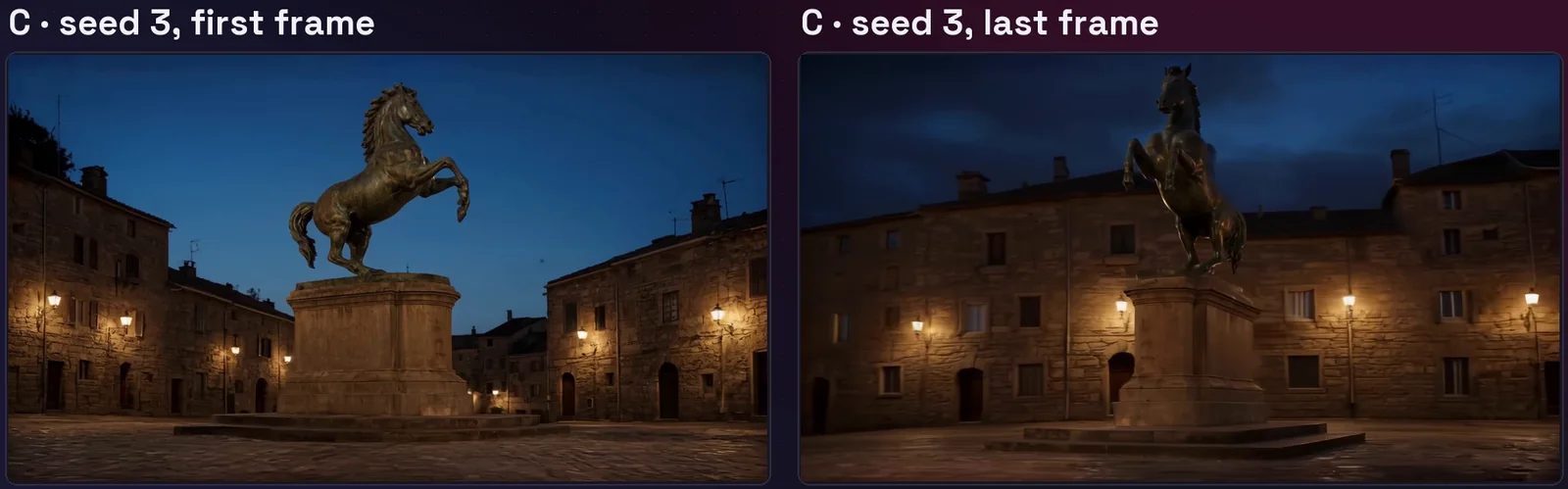
In the video, A is MiniMax H3, B Kandinsky 6 Pro, C LTX 2.5.
How fast are LTX 2.5, MiniMax H3 and Kandinsky 6 in ComfyUI?
On one RTX 5090, LTX 2.5 took a median 24.6 seconds per 5-second clip, MiniMax H3 39.5 and Kandinsky 6 Pro 201.6. Each ran at its own size, finish not counted, so these times are not like for like: LTX and H3 rendered more than twice Kandinsky's pixels.
| Model | Native size | Clips | Median | Fastest to slowest |
|---|---|---|---|---|
| LTX 2.5 | 1280×704 | 30 | 24.6 | 22.8 to 44.1 |
| MiniMax H3 | 1344×768 | 30 | 39.5 | 38.7 to 57.6 |
| Kandinsky 6 Lite | 864×480 | 9 | 57.1 | 55.0 to 86.8 |
| Kandinsky 6 Pro | 864×480 | 30 | 201.6 | 191.6 to 241.8 |
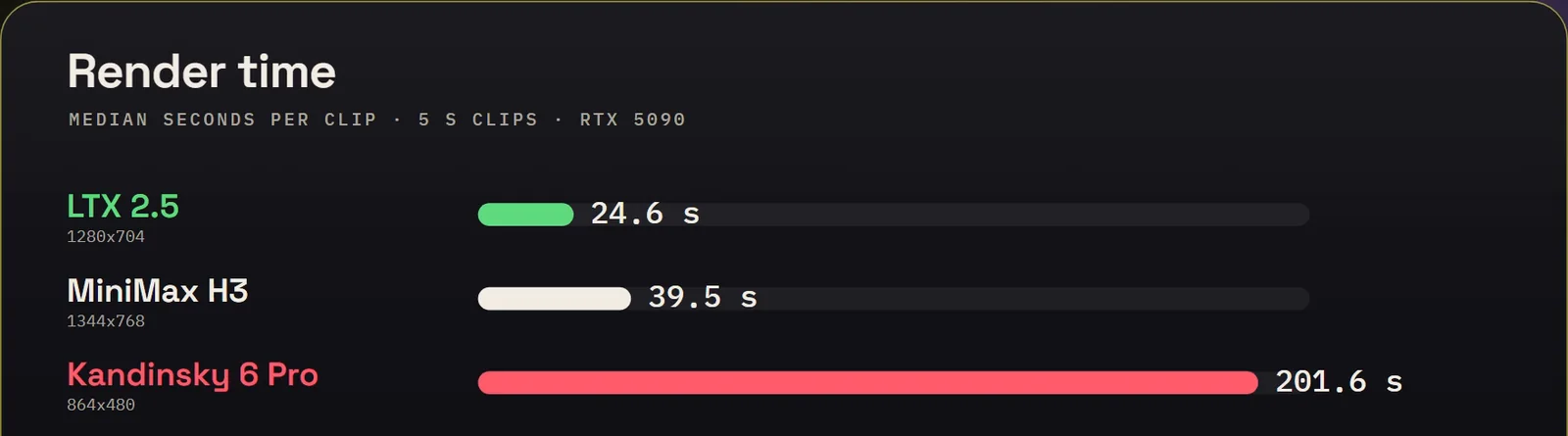
Kandinsky Pro took about 8 times as long as LTX for less than half the pixels. First jobs include loading the model, so I quote medians.
How much VRAM does each model use?
On my 32 GB RTX 5090, the whole card peaked at 28.5 GB with LTX 2.5, 30.4 GB with MiniMax H3 in PDMD mode and 31.4 GB with Kandinsky 6. That isn't the least they can run on, because these loaders fill what's free: Kandinsky Lite's 6.4 GB file peaked at the same 31.4 GB as Pro.
Which model gets the spoken words right?
All three: on rounds 1 and 2, LTX 2.5, MiniMax H3 and Kandinsky 6 Pro each got 51 of 51 words right across 6 clips, by Whisper large-v3, OpenAI's speech recognition model. But LTX 2.5 repeated the whole round 2 exchange on all 3 seeds.
H3 and Kandinsky said it once on every seed.
Which model keeps the face closest to the first frame?
It depends on the round. With one person on round 1, Kandinsky 6 Pro scored 0.88 against the first frame's face, MiniMax H3 and Kandinsky 6 Lite 0.82, and LTX 2.5 0.78. With two people on round 2, scoring the largest face only, H3 led at 0.85, with Pro 0.71 and LTX 2.5 0.56 (medians of 3 seeds). The score comes from ArcFace, a face-recognition model in InsightFace, and higher means closer.
So on round 1, 0.88 means Pro's face stayed nearer the first frame than LTX 2.5's did at 0.78. For scale, in my FastH3 Omni test a fisherman's own footage scored 0.85 against other footage of him. That test used a different reference, so it's only a rough guide. The score measures likeness, not how good the frame looks.
Is Kandinsky 6 Lite good enough instead of Pro?
Not in this test: Kandinsky 6 Lite won 0 of the 3 rounds it ran (rounds 1, 3 and 7). It is about three and a half times faster than Pro, at a median 57.1 seconds a clip.
Lite got 26 of 27 words on round 1, where one take's "twenty" was heard as "Teti". Its sound is quieter than Pro's: a median −32.0 dB against −22.8 on round 1 and −41.8 against −24.9 on round 3, though close on round 7. I didn't test it on a smaller card.
Which is the best free AI video model: LTX 2.5, MiniMax H3 or Kandinsky 6?
LTX 2.5 is the one I'd use for everyday work, even though Kandinsky 6 Pro won the most rounds, 5 of 10, on my eye and one RTX 5090. Three minutes per 5-second clip means you can't try ten ideas and keep the best one, so I'd save Pro for the shot that has to be right.
- One person talking: LTX 2.5. It won the talking round in my picks, and it's fast.
- Two people talking: MiniMax H3. It said the lines once, like Kandinsky, and it is much quicker.
- A camera move: LTX 2.5, the only one that did the orbit on all 3 seeds.
- A person in fast action: Kandinsky 6 Pro kept the shot together best.
- A sign that must stay readable: Kandinsky 6 Pro, if you can wait.

My workflows are free on GitHub: Stubelius Ultimate LTX 2.5 (2.1.0, the Ultimate LTX 2.5 modes) and Stubelius Ultimate H3 (0.15.1, long MiniMax H3 videos in chunks). Here H3 ran only in PDMD mode; the FastH3 Omni mode and the Pika H3 Flex mode have their own tests. Want a Kandinsky workflow from me? Comment KANDINSKY on the video.
What do the three licences say?
Kandinsky 6 is MIT. LTX 2.5 is free under $10M annual revenue, with a paid licence from there up. MiniMax H3 needs written authorisation above $20M a year, and its licence excludes the EU, UK, South Korea and US unless MiniMax approves you. Read them yourself; I'm not a lawyer and this isn't legal advice.
- Kandinsky 6: the MIT License in Kandinsky Lab's repo. The Pro distilled card and the community build's card are both tagged MIT.
- LTX 2.5: the LTX-2.x Community License Agreement, linked from the model card. Entities with annual revenues of at least $10,000,000 need a paid licence, except for use solely for a non-commercial purpose.
- MiniMax H3: the MiniMax H3 Community License, linked from the model card. You need prior written authorisation if your commercial products and services make more than 20 million US dollars a year. Its Excluded Territories are the EU, UK, Republic of Korea and US; MiniMax has a request form for them.
How do I run Kandinsky 6 in ComfyUI?
Install Kandinsky Lab's kandinsky6 custom nodes on ComfyUI 0.38.0 or newer, get the model files, and open its image-to-video template. My small set, Lite included, was about 26 GB plus the text encoder.
- In Manager, install
kandinsky6andkandinsky6-sr(publisherkandinskylab, also on the Registry), then restart. The bundled workflows need both. - Use the workflow's Download models button for the official Pro distilled files, not Lite, or place them by hand (model folders). The W4A8 file goes in
models/diffusion_models; its page says it runs on the official nodes through ComfyUI's own quantisation. - The nodes look for
models/audio_vaein ComfyUI's own folder, so if your models live on another drive, link it there. - For the distilled files, set 10 steps and CFG 1. Put spoken lines between
<S>and<E>in the video caption, and the sound in the audio caption.
New to ComfyUI? Part 1 of ComfyUI From Zero is free.
What are the limits of this test?
The results rest on one card, one run per seed, one person's eye and one community build of Kandinsky 6 Pro, so they are my test, not a general ranking.
- 99 clips on one RTX 5090, one run per seed; Lite on 3 rounds only.
- One person's eye; rounds 1 and 2 weren't fully blind. I make no firm claim on legs, hands or faces in rounds 3, 5 and 8.
- Sizes differ by model, so render times are not like for like. Pro is a community W4A8 marked experimental; I didn't run the official 60 GB.
- MiniMax H3 ran only in its 4-step PDMD mode, and LTX 2.5 only as the official distilled int8.
- Peak VRAM isn't a minimum. I don't rank lip sync: correlations were mostly under 0.5. The face scores quoted are from rounds 1 and 2 only.
- Not tested: other cards, text to video, or clips longer than 5 seconds.
Sources and files
- LTX 2.5 vs MiniMax H3 vs Kandinsky 6, I Tested 99 Videos, the video: rules at 0:52, the rounds at 2:27, the scoreboard at 7:30, render times at 8:00, Lite at 8:37, which to use at 9:07 and licences at 10:06.
- Kandinsky Lab: the Pro distilled and Lite distilled cards and the repo. Community build: realrebelai/Kandinsky-6.0-Pro-5s_GGUFs.
- LTX 2.5 and MiniMax H3 model cards.
- On this site: the LTX 2.5 Director, MiniMax H3 in 4 steps, FastH3 Omni vs PDMD, Pika H3 Flex vs PDMD and FastH3 Omni and DLSS 5 vs RTX VSR.
Common questions
How much VRAM does Kandinsky 6 need?
16 GB can run it, by Kandinsky Lab's README: on its own setup, a 16 GB RTX 5060 Ti took 717.6 s for Pro distilled and 173.7 s for Lite distilled, text to video at base size. On my 32 GB card it peaked at 31.4 GB, which isn't a minimum; I didn't test a smaller card.
Is Kandinsky 6 free to use?
Yes, it is free to download under the MIT License, and its model card is tagged MIT. Read it yourself before commercial use; this isn't legal advice.
Can Kandinsky 6 make clips longer than 5 seconds?
No, not the checkpoints I tested: Kandinsky Lab's README says Pro and Lite make 5-second clips, which is why every clip in my test was 5 seconds.
Is the official 60 GB Kandinsky 6 Pro better than the 17 GB W4A8?
Possibly, but I didn't test it. My test used realrebelai's experimental community W4A8 build, a quantised 17 GB file, and the official one could look better.
Why did Kandinsky 6 run at only 864×480 in this test?
864×480 is its base size: Kandinsky Lab's README reaches Full HD through a plug-in super-resolution model. I left that off and gave every model the same DLSS 5 and Color Lock finish to 1080p.