STUUBZZZ
MiniMax H3 ComfyUI workflow: Speed, Hybrid and Quality modes timed on an RTX 5090
 Watch the video · I Built the Ultimate MiniMax H3 Workflow in ComfyUI Free, 4K, 60 FPS
Stubelius Ultimate H3 is my free MiniMax H3 workflow for ComfyUI with three presets: on an RTX 5090, one 8-second 16:9 clip finished at 1080p took 1:29 in Speed (8 steps) and 2:33 in Hybrid (10 steps). Quality (20 steps) took 5:55 at its native 768p, or about 50 minutes with the 2× latent polish to 1080p.
- Speed preset in Stubelius Ultimate H3: 8 steps, res_multistep / simple, 0.4 megapixels, turbo LoRA at 1.0. An 8 s MiniMax H3 clip took 1:07 to render plus 0:22 to finish at 1080p on an RTX 5090 (32 GB), peaking at 25.5 GB of VRAM.
- Hybrid preset in Stubelius Ultimate H3: 10 steps, euler / beta, 0.5 megapixels, turbo LoRA at 0.75. An 8 s MiniMax H3 clip took 2:09 to render plus 0:24 to finish at 1080p on an RTX 5090 (32 GB), peaking at 28.2 GB of VRAM.
- Quality preset in Stubelius Ultimate H3: 20 steps, euler / beta, 0.98 megapixels, no turbo LoRA. An 8 s MiniMax H3 clip took 5:48 to render on an RTX 5090 (32 GB), peaking at 30.8 GB of VRAM. The optional 2× latent polish to 1080p added 43:55 in one run.
- Seed hunting in Stubelius Ultimate H3 renders 1 to 4 full takes with sound. WINNER 0 on the Finish node holds after the seeds, and setting WINNER to 1, 2, 3 or 4 re-runs only the finish, from cache.
- The pack is MIT licensed and public at github.com/stuubszzz/Stubelius-Ultimate-H3. There is no release zip: install it with ComfyUI Manager (Install via Git URL) or
git clone.
MiniMax H3 is MiniMax's video model with sound: from a text prompt, a first or last frame, or reference media, it generates the picture and the audio in the same pass. Its checkpoints are an open release on Hugging Face under the MiniMax H3 Community License (model card), and ComfyUI runs it with its stock nodes.
What are the Speed, Hybrid and Quality settings?
Speed, Hybrid and Quality are the three mode presets on the Setup node. Picking one fills in the steps, sampler, scheduler, megapixels and speed LoRA strength. The widgets hold the real values, so you can still change any of them by hand.
| Mode | Steps | Sampler / scheduler | Megapixels | Native render at 16:9 | Speed LoRA strength |
|---|---|---|---|---|---|
| Speed | 8 | res_multistep / simple | 0.4 | 864 × 480 | 1.0 |
| Hybrid | 10 | euler / beta | 0.5 | 960 × 544 | 0.75 |
| Quality | 20 | euler / beta | 0.98 | 1344 × 768 | 0 (off) |
The speed LoRA is the 8-step turbo LoRA from the Comfy-Org MiniMax H3 files. FastVideo's FastH3 preview adapter is another speed LoRA for H3, but it does nothing in ComfyUI until you convert it with the FastH3 LoRA converter. The native sizes follow from the megapixel value, rounded to multiples of 32.
How long does an 8-second MiniMax H3 clip take on an RTX 5090?
An 8-second clip took 1:29 in Speed and 2:33 in Hybrid, both finished at 1080p, and 5:55 in Quality at its native 768p. Taking Quality to 1080p with the 2× latent polish made it 49:42. I ran the same prompt and seed in all three modes, split the way a seed hunt runs: the seed render with WINNER at 0, then the finish as a second queue with the seed coming from cache.
| Mode and output | Seed render | Peak VRAM, seed | Finish | Peak VRAM, finish | Total |
|---|---|---|---|---|---|
| Speed, 1080p | 1:07 | 25.5 GB | 0:22 (RTX VSR) | 3.5 GB | 1:29 |
| Hybrid, 1080p | 2:09 | 28.2 GB | 0:24 (RTX VSR) | 3.6 GB | 2:33 |
| Quality, native 768p | 5:48 | 30.8 GB | 0:07 (no upscale) | 2.6 GB | 5:55 |
| Quality, 1080p | 5:48 | 30.8 GB | 43:55 (2× latent polish) | 31.4 GB | 49:42 |
Tested 2026-09-25 to 2026-09-26 on an RTX 5090 (32 GB), 96 GB RAM, Windows 11, ComfyUI 0.37.0, workflow v0.8. One seed per setting and one run each, apart from the Speed seed render, which ran cold and then warm.
Times are ComfyUI's own execution time, queue wait excluded, with totals added up before rounding. Peak VRAM is the card's memory in use as reported by nvidia-smi, polled every 5 seconds. The Speed seed render in the table is the warm run. The first one, with the models loading from disk, took 2:21 and peaked at 27.8 GB.
One difference from the file list further down: the timed runs loaded a community variant of the text encoder in the same int8 format (26.4 GB, against 27.1 GB for the official file). The checkpoints, VAEs and turbo LoRA were the files listed there.
The Quality polish is the expensive step. It doubles the chosen take in latent space, from 1344 × 768 to 2688 × 1536, and re-samples it at that size (here 12 steps at strength 0.3 with the learned 2× upscaler) before the result is scaled down to 1080p. It peaked at 31.4 GB on a 32 GB card. One longer data point: a 10-second Quality clip taken to 4K with the polish, DLSS5 + Color Lock and the low-VRAM options on took 7:07 for the seed and 62:10 for the finish, peaking at 31.3 and 31.4 GB.
What each node does
You work top to bottom: Setup, Models, Output, Director, Finish.
| Node | Job |
|---|---|
| Stubelius H3 Setup | How the video is made: the mode preset, the number of seeds (1 to 4), and the settings the mode filled in. |
| Stubelius H3 Models | Reference (ref2va) and First/Last Frame (fl2va) checkpoints as safetensors or GGUF, text encoder, video and audio VAE, speed LoRA, two global LoRAs, attention and low-VRAM options, live preview. A checkpoint loads only when the Director needs it. |
| Stubelius H3 Output | What comes out: final resolution, frame rate, upscaler and the Quality polish settings. It feeds only Finish. |
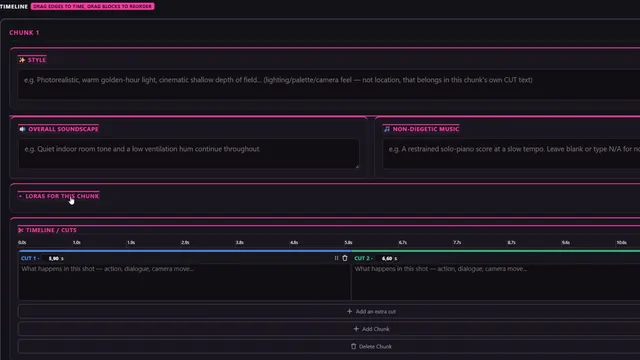
| Stubelius H3 Director V2 | What the video is: timeline or prompt, Reference (Omni) or First/Last Frame mode, reference media, aspect ratio, duration, seed, and a LoRA box per chunk. |
| Stubelius H3 Finish | WINNER 1 to 4, or 0 to hold. Runs the polish, RIFE and the upscale on the chosen take. |
| Stubelius Live Preview | Shows the Director, and the Quality polish, while it samples. |
| Stubelius RIFE to FPS, Stubelius Color Lock | Frame rate conversion that keeps hard cuts clean, and a step that restores the original colours after DLSS 5. |
| Stubelius Theme | A colour theme for this workflow only. |
A single H3 call is capped at 15 seconds here. A longer duration is split into chunks, and each chunk can carry its own LoRAs while the turbo LoRA stays global. A 12-second Hybrid clip made of two 6-second chunks with different LoRAs rendered its seed in 2:52 and finished at 1080p in 0:14.
In this workflow I tested a style LoRA that I trained in AI Toolkit. If you train your own, the AI Toolkit post explains how the trainer deals with H3's guidance distillation.
How does seed hunting with full videos work?
Every candidate seed, 1 to 4 of them, renders as a complete video with sound, and only the one you pick is finished. My older Director workflow scouts seeds as low-resolution latents instead.
- Set seeds to 2, 3 or 4 on Setup and WINNER to 0 on Finish, then queue. WINNER 0 means hold: the seeds render and preview, and nothing is finished.
- Watch the seed previews and pick one.
- Set WINNER to that number and queue again. The seeds come from ComfyUI's cache and only the finish runs.
Four 8-second Hybrid takes of a different prompt (a dancer) took 7:48 on the RTX 5090 and peaked at 28.7 GB.
Because Output feeds only Finish, you can change the resolution, frame rate or upscaler after the hunt without rendering the seeds again. Leave Setup, Models and the Director alone in between, or they do render again. Running an unrelated workflow in between can also push the seeds out of ComfyUI's cache.
Output sizes per mode
| Mode | Sizes offered | How it gets there |
|---|---|---|
| Speed | native (about 480p), 720p, 1080p, 2K (1440p) | Upscale from the render. 4K is not offered. |
| Hybrid | native (about 540p), 720p, 1080p, 2K, 4K (2160p) | Upscale from the render. |
| Quality | native (about 768p), 1080p, 2K, 4K | A 2× latent polish from 1080p up. 1080p and 2K are scaled down from the polished frames, 4K goes through the upscaler. |
The short side lands exactly on the number, in portrait too. The upscaler is RTX VSR, or DLSS 5 followed by Color Lock, which puts the clip's original colours back (both timed, with the colour measurements). The workflow renders at 24 fps, and any higher frame rate, up to 120, is interpolated by RIFE with length and audio sync kept.
| Output | Upscaler | Frame rate | Finish time | Peak VRAM |
|---|---|---|---|---|
| 720p | RTX VSR | 24 fps | 0:24 | 3.0 GB |
| 1080p | RTX VSR | 24 fps | 0:53 | 3.0 GB |
| 1080p | RTX VSR | 60 fps (RIFE) | 0:56 | 5.8 GB |
| 2K (1440p) | RTX VSR | 24 fps | 1:06 | 2.8 GB |
| 2K (1440p) | DLSS5 + Color Lock | 24 fps | 4:27 | 16.7 GB |
| 4K (2160p) | RTX VSR | 24 fps | 1:26 | 3.0 GB |
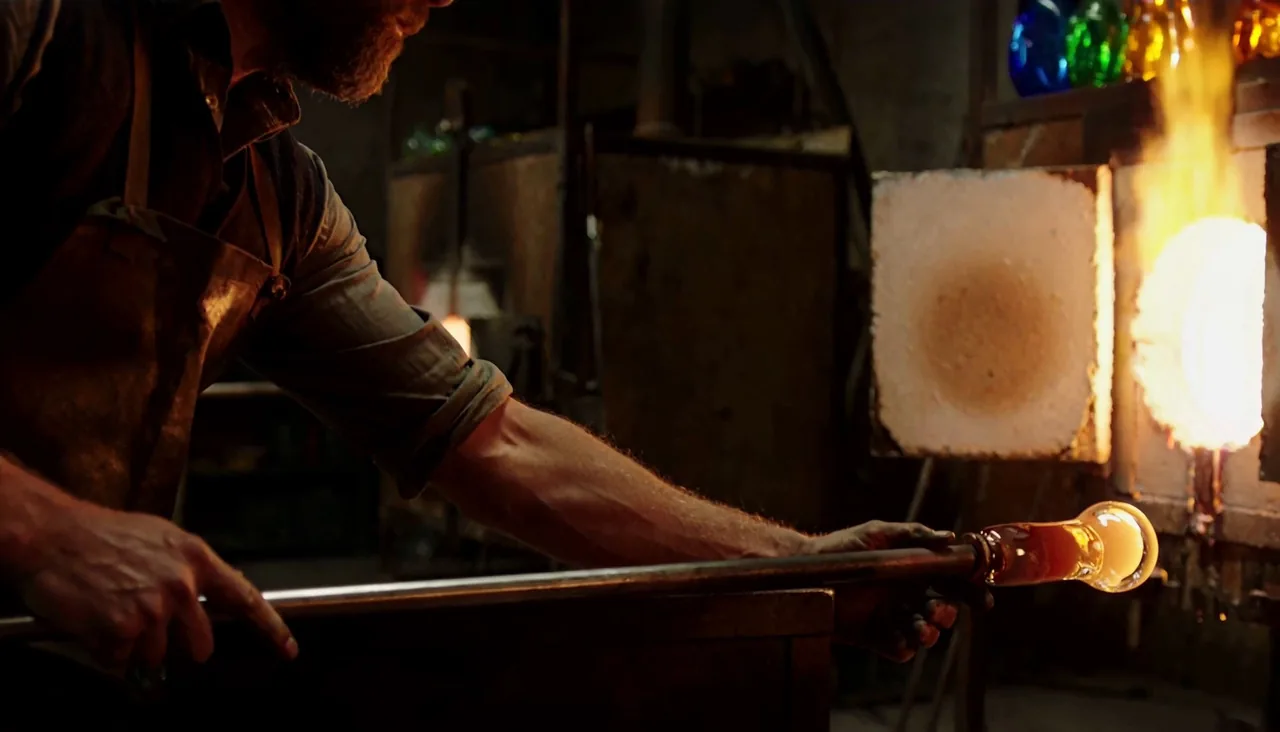
Same settings, different clip: the glassblower's Hybrid 1080p finish took 0:24 and the dancer's took 0:53. These are single runs, so read them as ballpark figures.
Install in 3 steps
- Install the pack. In ComfyUI Manager choose Install via Git URL, paste
https://github.com/stuubszzz/Stubelius-Ultimate-H3and restart. If your Manager security level blocks Git URLs, use the commands below. - Open the workflow under Workflow, Browse Templates, Stubelius-Ultimate-H3, then run Manager, Install Missing Custom Nodes for the other packs it uses.
- Download the models listed below, check that the Models node shows your files, and press Queue. The example, a 12.5-second glassblower shot, ships with WINNER at 0, so the first queue stops after the seed. Set WINNER to 1 and queue again for the final video.
cd ComfyUI/custom_nodes
git clone https://github.com/stuubszzz/Stubelius-Ultimate-H3
On Windows portable, install its one requirement from the ComfyUI_windows_portable folder:
python_embeded\python.exe -m pip install -r ComfyUI\custom_nodes\Stubelius-Ultimate-H3\requirements.txtTo update, use Manager, Update All, or git pull in the pack folder, then restart. The repo has no tagged release, so the main branch is the current version.
Required node packs
The Director and Refine engines inside the pack are Muse Minimax Director V1.2 by Muse Collective, carried with changes under its MIT license. The workflow also uses these packs:
| Pack | By | Needed for |
|---|---|---|
| ComfyUI-VideoHelperSuite | Kosinkadink | Video outputs (needed) |
| Nvidia RTX nodes | Comfy-Org | RTX VSR upscaling (needed) |
| ComfyUI-KJNodes | kijai | Live preview and the low-VRAM options (needed) |
| ComfyUI-Frame-Interpolation | Fannovel16 | RIFE for any frame rate above 24 fps (needed) |
| ComfyUI-H3-Motion-Context-MultiRef | seitanism | Recommended: smoother continuity when a video runs past one chunk |
| ComfyUI-MiniMaxH3_LatentUpscaler and ComfyUI-H3-Latent-Upscaler-Mamad8 | Tr1dae, mamad8c | The Quality polish method "learned model (2x)". Without them, pick bislerp or bicubic. |
| ComfyUI-DLSS5-Enhancer | Blueforcer | The DLSS 5 upscaler |
| ComfyUI-GGUF | city96 | GGUF models |
| ComfyUI-Spectrum-MiniMax-H3 | xmarre | The Spectrum option |
| Comfyui-PlagueKind-Nodes | PlagueKind | The H3 cache option |
Where do the MiniMax H3 model files go in ComfyUI?
The two checkpoints go in models/diffusion_models, the text encoder in models/text_encoders, the video and audio VAEs in models/vae and the turbo LoRA in models/loras.
All six are in the Comfy-Org/MiniMax-H3 repository, about 77 GB in total. Direct links are in the pack's INSTALL.txt.
| Folder | File | Size |
|---|---|---|
models/diffusion_models | minimax_h3_ref2va_pruned_int8_convrot.safetensors | 21 GB |
models/diffusion_models | minimax_h3_fl2va_pruned_int8_convrot.safetensors | 21 GB |
models/text_encoders | qwen3vl_32b_minimax_h3_int8_convrot.safetensors | 27 GB |
models/vae | minimax_h3_video_vae_fp16.safetensors | 5.2 GB |
models/vae | minimax_h3_audio_vae_fp32.safetensors | 0.6 GB |
models/loras | minimax_h3_fl2v_turbo_8step_v1.0_comfyui_bf16.safetensors | 2 GB |
RTX 50-series cards can swap the text encoder for qwen3vl_32b_minimax_h3_nvfp4_awq.safetensors (16 GB). The optional live preview uses Kijai's tiny H3 VAE, taeh3.safetensors (10 MB), in models/vae_approx. RIFE downloads rife47.pth by itself the first time you pick a frame rate above 24 fps.
Hardware notes
- Every number here comes from one RTX 5090 (32 GB) with 96 GB of RAM. The VRAM peaks are what the workflow used on that card, not minimum requirements.
- For cards with less VRAM, the Models node has low VRAM attention and chunk feed-forward switches, and it loads GGUF checkpoints and text encoders through ComfyUI-GGUF. My one run with both switches on, the 10-second Quality clip above, still peaked at 31.3 GB on the 32 GB card, so I have no measurement of how far they lower the requirement.
- RTX VSR needs an NVIDIA RTX card. The DLSS 5 pack's README lists RTX 30, 40 and 50 cards and says it is Windows only.
- A finished 4K frame holds about 100 MB of RAM, so keep 4K clips short, especially at 48 or 60 fps.
- The note inside the workflow says the turbo modes can mumble dialogue. For talking shots, use Quality.
- If VRAM budgeting is new to you, ComfyUI From Zero covers it in Part 2, with fit tables for 8, 12, 16 and 24 GB cards.
Sources and files
- Stubelius Ultimate H3 on GitHub: nodes, example workflow and
INSTALL.txt. - Muse Minimax Director V1.2 by Muse Collective, the engine it is built on.
- MiniMax H3 model card. The model is MiniMax's, under the MiniMax H3 Community License.
- Comfy-Org/MiniMax-H3, the ComfyUI model files.
- The walkthrough video: I Built the Ultimate MiniMax H3 Workflow in ComfyUI Free, 4K, 60 FPS (26:54).
- The older workflow: MiniMax H3 Director, seed hunt and two-stage sampling.
- On prompts: the three-field MiniMax H3 prompt format the Director compiles for you.
Common questions
Is Stubelius Ultimate H3 free?
Yes. The nodes and the example workflow are MIT licensed in a public GitHub repo. The MiniMax H3 model is a separate download under the MiniMax H3 Community License, which you need to read for yourself.
Can I keep the older Stubelius Director or the Muse Director installed?
Yes. Ultimate H3 registers only its own nodes and uses its own server routes, so it installs next to Stubelius-Director and the Muse Director without clashing.
Will it run on a card with less than 32 GB of VRAM?
I do not know, because I have only measured it on an RTX 5090 (32 GB), where the 8-second seed renders peaked between 25.5 and 30.8 GB. The Models node has two low VRAM switches and loads GGUF files for smaller cards, but my one run with both switches on still peaked at 31.3 GB, so I cannot say how far they lower the requirement.