STUUBZZZ
MiniMax H3 long videos in ComfyUI: retake one chunk, keep the rest (Ultimate H3 0.13)
 Watch the video · MiniMax H3 Long Videos in ComfyUI: Retake Any Chunk, Keep the Rest
Stubelius Ultimate H3 0.13, my free MiniMax H3 workflow for ComfyUI, renders a long video chunk by chunk and keeps every chunk as a take, so you can redo one part alone. On an RTX 5090, retaking chunk 2 of a 12-second Speed video at 864×480 took 53.7 seconds, against 83.2 to 120.9 for rendering both chunks.
- Stubelius Ultimate H3 0.13, a free, MIT-licensed MiniMax H3 workflow for ComfyUI, went public on GitHub on 2026-10-18. Its Director takes a length of up to 120 s, rendered in chunks of 3 to 15 s, and keeps each chunk as a take on disk.
- In Ultimate H3 0.13 on an RTX 5090, a 12-second MiniMax H3 video in two Speed chunks at 864×480 took 120.9 s to render (83.2 s in a later run with another seed), 6.5 s to load again from its takes and 53.7 s to retake chunk 2 (2026-10-15, one run each).
- Hunt in Ultimate H3 0.13 (2026-10-18) renders 2, 3 or 4 seeds of one MiniMax H3 chunk instead of the whole video, and you pick the winner chunk by chunk.
- In Ultimate H3's First/Last Frame mode, a character made from 8 pictures (a RefMod) scored a face match of 0.74 against 0.40 with words alone: mean of three seeds, one 6-second Hybrid MiniMax H3 take each, RTX 5090, 2026-10-15.
- Ultimate H3 takes up to eight MiniMax H3 middle frames between the first and the last frame. In a 6.5-second PDMD test on an RTX 5090 (2026-10-08, for version 0.12), all eight landed on their own frames.
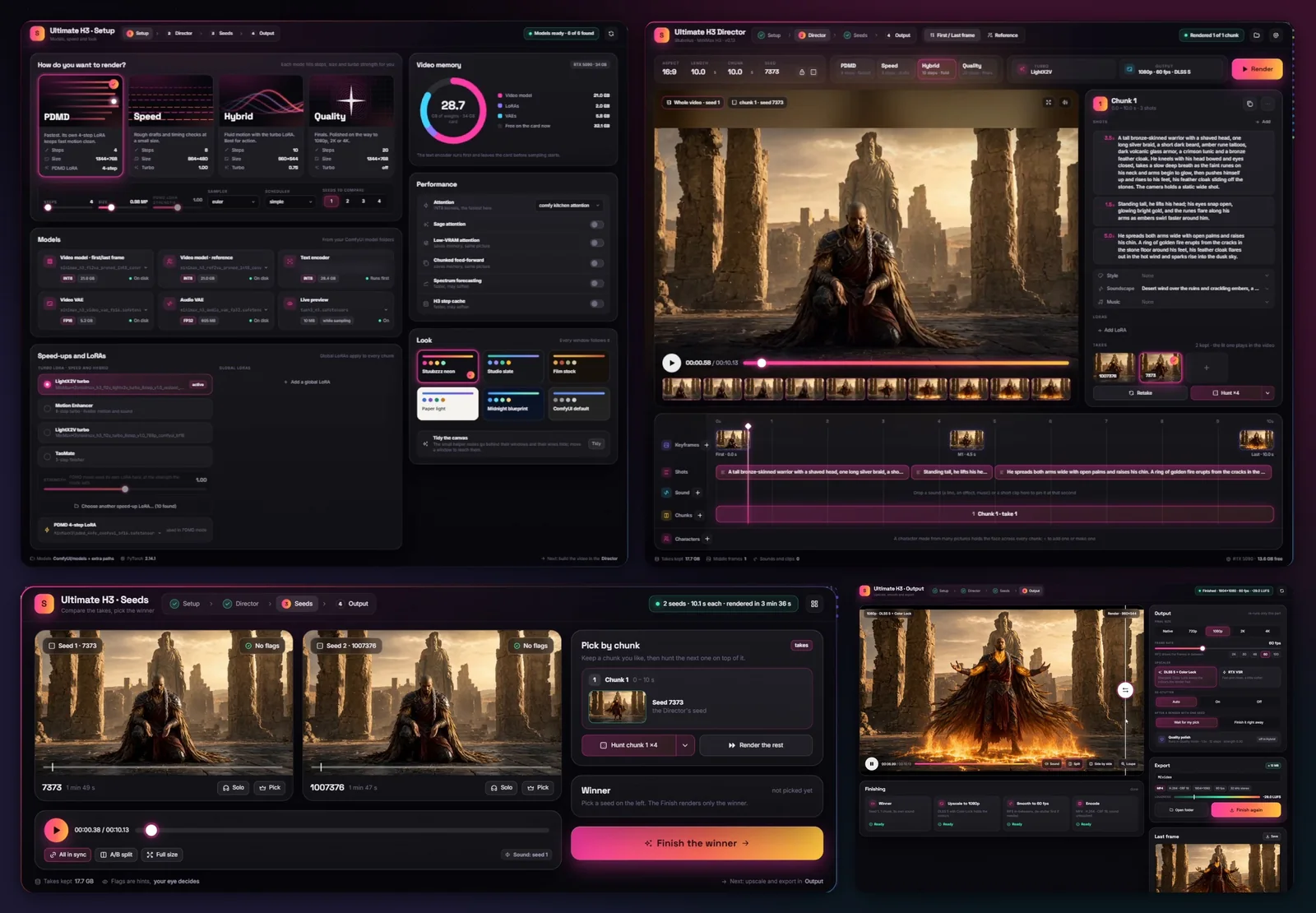
Stubelius Ultimate H3 is my MiniMax H3 workflow and custom node pack for ComfyUI. In 0.13 it is four windows: Setup decides how the video is made, the Director what it is, Seeds plays the candidate videos side by side, and Output finishes the one you pick.
How does Ultimate H3 make a long MiniMax H3 video?
It renders the video in chunks, one MiniMax H3 generation each, and every chunk after the first starts from the one before it, unless it cuts to a new shot. In the Director you set the length, up to 120 seconds, and the chunk size, 3 to 15 seconds (10 by default).
| Join | What happens | Use it when |
|---|---|---|
| Picture + sound (default) | The last 1.6 s of picture and sound run on | You want the smoothest join |
| Picture, fresh sound | The picture runs on, the sound is made new | A later chunk sounds dull or muffled |
| Last frame only | The chunk starts from the last frame | Later PDMD chunks drift darker and more detailed: in my test this halved the drift, with less smooth motion at the join |
| New shot | A real cut, nothing carried over | The story cuts. A middle frame in the chunk's first half second opens the new shot |
For the smoothest joins the pack recommends seitanism's ComfyUI-H3-Motion-Context-MultiRef. Each chunk also has its own shots, style, soundscape, music and LoRAs, while the turbo LoRA and two global LoRAs in Setup apply to every chunk.
How do you retake one chunk without rendering the whole video again?
Pick the chunk in the Director and press Retake. It gets a seed of its own and the video renders up to it, while the chunks before it load from their takes. On my RTX 5090, retaking chunk 2 of a 12-second Speed video took 53.7 seconds, against 83.2 to 120.9 for both chunks.
A take is found by what made it, from the prompt and settings to the seed and the chunk before, so a chunk that would come out the same is loaded, not sampled. A loaded take matched the render within one 8-bit step on every frame but the two blended at a join, with bit-identical sound.
| Run | What rendered | Seconds |
|---|---|---|
| First render | Both chunks | 120.9 |
| The same video again | Nothing: both chunks loaded | 6.5 |
| Retake chunk 2 | Chunk 2, with its own seed | 53.7 |
| Hunt chunk 2, two candidates | One new candidate (the other was a take) | 59.6 |
| Stop after chunk 1, then Render | Chunk 2 | 54.2 |
| Later, with another seed | Both chunks | 83.2 |
Tested 2026-10-15 on an RTX 5090 (32 GB), 96 GB RAM, Windows 11. Speed mode (8 steps, 0.4 megapixels: 864×480 at 16:9, turbo LoRA at 1.0), First/Last Frame mode with no pictures, one text-only scene, seed 7 (8 in the last row). Render only, no finish.
- Takes, under Retake, lists the chunk's kept takes: click one to pick it back.
- Stop keeps the chunks it finished. Chunks after a retaken chunk that start from it render again with the next Render.
- A different seed at a join can change the fine grain. If a retake shows that, retake again or pick the take before.
How do you hunt seeds for one chunk instead of the whole video?
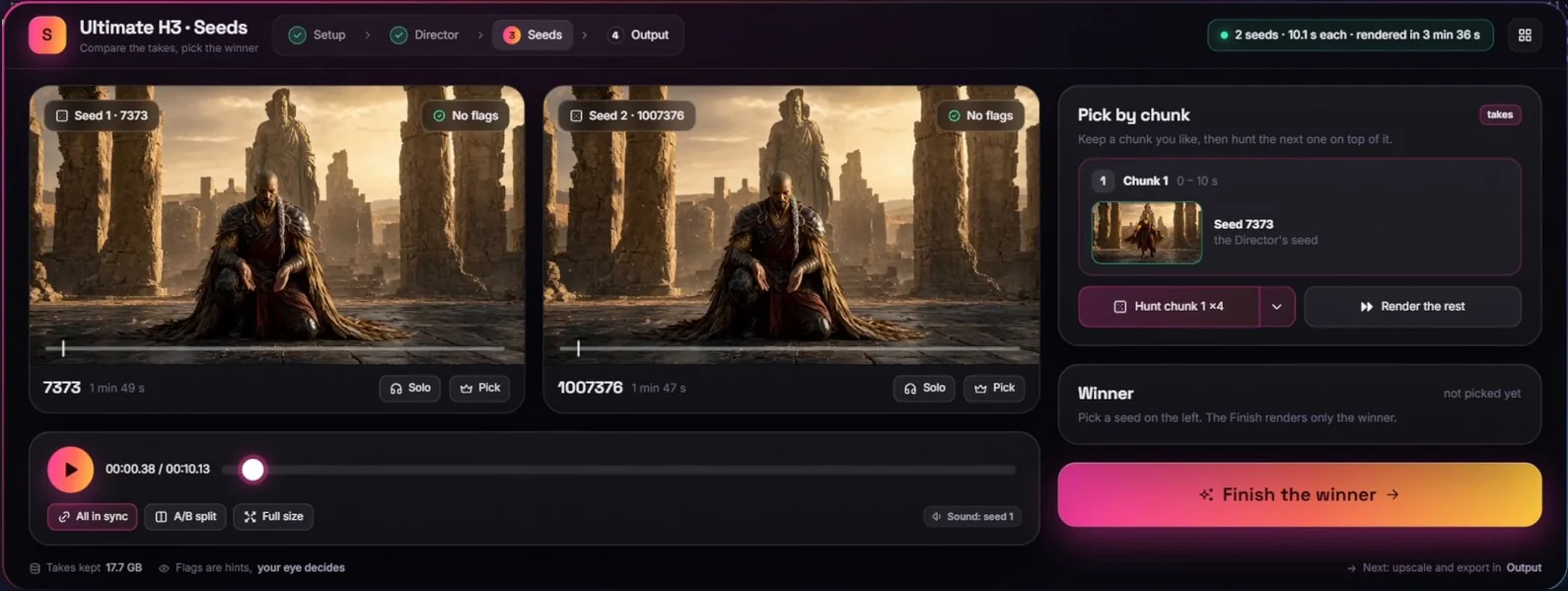
Press Hunt on that chunk, with the arrow beside it set to 2, 3 or 4. The candidates differ in that chunk alone, the chunks before it render once, and you choose one in the Seeds window with Pick by chunk. Its seed becomes the chunk's own, and you can hunt the next chunk on top of it.
I built it because I often wasn't happy with how chunk 1 ran into chunk 2, and starting the whole video again got frustrating. Seeds to compare in Setup still renders 1 to 4 full videos, and Render the rest renders the chunks after your picks.
The Seeds window plays every seed side by side and in sync. Solo one seed's sound, or you hear them mixed. Then Finish the winner. End to end, two seeds of the 12-second Speed video took 3 min 13 s, and the finish to 1080p at 30 fps with RTX VSR another 15 s.
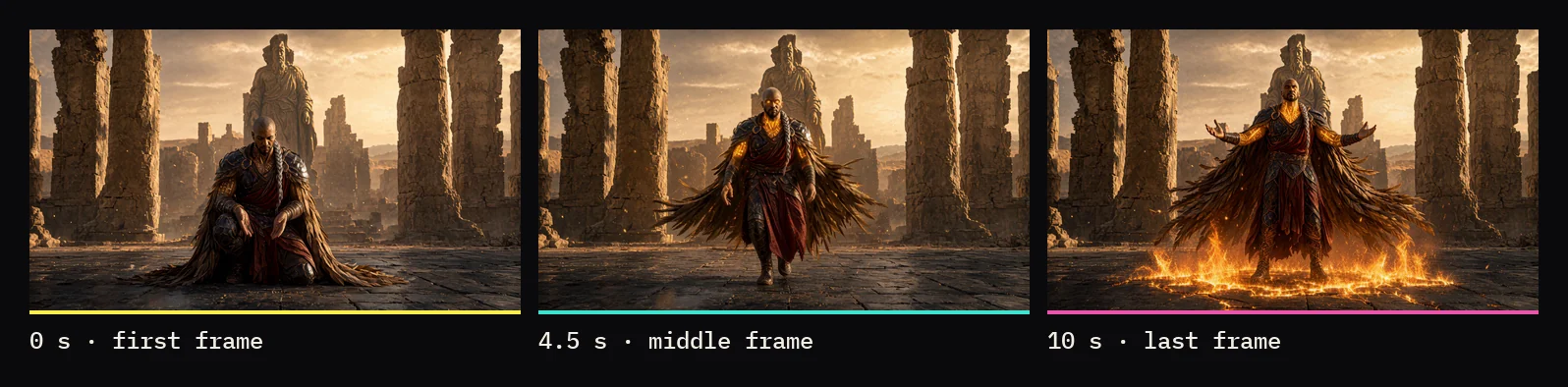
How many middle frames can MiniMax H3 hit between the first and last frame?
In Ultimate H3's First/Last Frame mode, up to eight, plus the first and the last frame, in one shot. Each is pinned on its own frame with ComfyUI's Add Guide for MiniMax H3. In my tests for 0.12 (2026-10-08), eight of eight landed on their exact frames.
Middle frames sit on the Keyframes lane, at least half a second apart. The text encoder sees only the first and the last frame, so write the way to each middle frame in the shot. On a 0.12 test build that took more (2026-10-08), 1 to 38 middle frames in one 6.5-second chunk all landed on their own frames, with no jumps or holds. Don't pin fast action in the first half second of a chunk that continues the video: it can snap into place for a frame.
Tested 2026-10-08 on an RTX 5090 (32 GB), for 0.12: PDMD mode at 1344×768, one 6.5-second chunk, pictures cut from a render of the same scene and pinned in a render with another seed.
In the video's showcase shot, one 10-second PDMD render through a first frame, a middle frame at 4.5 seconds and a last frame, the middle frame landed on its exact frame.
The Sound lane pins up to 8 sounds or short clips at their seconds. A sound doesn't move the picture: for a reaction on it, pin a middle frame just after, as in the 0.11 door-slam test.
How do you keep a character's face the same across chunks?
Make a character from 8 to 16 pictures on the Characters lane and keep it on for the whole video. In First/Last Frame mode, a character from 8 pictures scored a face match of 0.74 against 0.40 for words alone, as high as the character's own footage, in a 6-second Hybrid test on three seeds.
Use the face from different angles and light, and describe the character in words too: H3's text side never sees the pictures. The files are the RefMods of Luisacaotica's ComfyUI-MiniMaxH3Mod, so they load in both packs.
| Mode and what H3 got | Face match |
|---|---|
| First/Last Frame, words only | 0.40 |
| First/Last Frame, a character (8 pictures, 1 MP) | 0.74 |
| Reference (Omni), one design picture | 0.51 |
| Reference (Omni), a design picture and a character (1 MP) | 0.72 |
Tested 2026-10-15 on an RTX 5090 (32 GB). Hybrid mode, one 6-second chunk per take, seeds 101, 202 and 303. Face match is face recognition against other footage of the character.
It held over a join too: in 12 seconds in two chunks, every seed's second chunk scored 0.77 to 0.82 with the character and 0.33 to 0.62 without. Eight pictures at 0.5 megapixels each (the default) added about 4 seconds to a 6-second Hybrid chunk; at 1 megapixel, 13 to 16. In Reference (Omni) mode, use a cast picture and a character together.
Which mode should you pick in the Setup window?
PDMD for most shots: 4 steps at about 768p, close to the 20-step quality, with caveats in motion and fine detail. Speed and Hybrid suit quick drafts with the turbo LoRA, and Quality, 20 steps with a polish, suits shots that must hold up. Setup also holds the seed count, the models, the speed-up LoRAs and the low-VRAM switches.
| Mode | Render | Steps | Sampler / scheduler | Output up to |
|---|---|---|---|---|
| Speed | About 480p, turbo LoRA 1.0 | 8 | res_multistep / simple | 2K |
| Hybrid | About 540p, turbo LoRA 0.75 | 10 | euler / beta | 4K |
| Quality | About 768p, no speed-up LoRA | 20 | euler / beta | 4K, with a 1.5× polish from 1080p |
| PDMD | About 768p, PDMD LoRA 1.0 | 4 | euler / simple | 4K, no polish |
PDMD is measured in the PDMD test; its LoRA comes from pdmd2026/pdmd_4NFE_lora, as published.
What does the Output window do?
It finishes only the winner: final size, a frame-rate slider from 24 to 120 fps (RIFE draws the frames in between), RTX VSR or DLSS 5 with Color Lock, de-stutter and the Quality polish. Changing anything there re-runs only the finish, never the seeds.
In the video I finish a 10-second Hybrid shot to 1080p at 60 fps with DLSS5 + Color Lock, which keeps the original colours (DLSS 5 against RTX VSR). A split view puts the winner against the finished video, with a loupe for detail, and a Last frame card saves the final frame to start the next video from.
De-stutter, which I made with anime and 2.5D in mind, fixes takes that judder, where the picture holds a frame in a steady rhythm: RIFE draws the held frames again, keeping the length and the sound. In my 0.11 test (2026-10-07), on a 15-second Speed take it found all 95 held frames, and the motion's roughness fell from 0.83 to 0.23. Leave it on auto, which acts only on takes that judder.
How do you update to Ultimate H3 0.13?
Pull the latest main from GitHub or update through Manager, restart ComfyUI, and open the new example workflow to get the four windows. There is no release zip: 0.13 is on the repo's main branch, and your older Ultimate H3 workflows still open.
- In
ComfyUI/custom_nodes/Stubelius-Ultimate-H3, rungit checkout mainandgit pull, or Manager → Update All. - Restart ComfyUI and reload the page.
- Open the example workflow under Workflow → Browse Templates → Stubelius-Ultimate-H3 to get the four windows.
For a new install, clone the repo into custom_nodes or use Manager → Install via Git URL. It needs ComfyUI 0.34 or newer. New to ComfyUI? The free Part 1 of ComfyUI From Zero covers the install.
Test setup and limits
- One RTX 5090 (32 GB), 96 GB RAM, Windows 11.
- The takes timings are one run each of one 12-second Speed video, not PDMD or Quality.
- The face matches are one character in one scene, three seeds per row.
- The middle-frame numbers come from 0.12 tests (2026-10-08), the de-stutter numbers from one Speed take in 0.11 (2026-10-07), and the showcase shot is one render.
- The 2026-10-15 tests ran on 0.13 test builds, with a community variant of the text encoder in the same int8 format.
- I didn't benchmark the video's render or test cards under 32 GB.
Sources and files
- MiniMax H3 Long Videos in ComfyUI: Retake Any Chunk, Keep the Rest (21:59): the modes from 1:46, hunt one chunk from 7:51, middle frames from 9:34, characters from 10:19, takes and retakes from 12:43 and the Output from 15:29.
- stuubszzz/Stubelius-Ultimate-H3: the pack, example workflow and README (MIT), built on Muse Minimax Director V1.2 by Muse Collective.
- Luisacaotica's ComfyUI-MiniMaxH3Mod (the RefMods format), Fannovel16's ComfyUI-Frame-Interpolation (RIFE) and Blueforcer's ComfyUI-DLSS5-Enhancer.
- The MiniMax H3 model card. The model is MiniMax's, under the MiniMax H3 Community License.
- On this site: the first Ultimate H3 guide, written for 0.8, and middle frames, clips and pinned sounds.
Common questions
Is Ultimate H3 0.13 free?
Yes. The nodes and the example workflow are MIT licensed and public on GitHub. The MiniMax H3 model is a separate download under the MiniMax H3 Community License: read it before commercial use.
Will Ultimate H3 run with less than 32 GB of VRAM?
I don't know: I measured it only on an RTX 5090 (32 GB), where a 6.5-second PDMD chunk peaked at 28 to 31 GB of VRAM in my 0.12 tests (2026-10-08). For less VRAM, the pack points to the low-VRAM switches under Performance in Setup, or GGUF models.
Do my older Ultimate H3 workflows still open in 0.13?
Yes, with a Show as window button on their Setup, Seed Previews and Finish nodes. Open the new example workflow to get all four windows.
How much disk space do the takes use?
Roughly 60 to 120 MB for a 10-second chunk, in output/StubeliusH3/takes, up to 20 GB, least recently used out first. STUBELIUS_TAKES_GB changes the cap.
Do RefMods made in ComfyUI-MiniMaxH3Mod work in Ultimate H3?
Yes, and the other way round: Ultimate H3's characters are that pack's RefMods files. It uses that pack's refmods folder when it is installed, otherwise models/refmods.