STUUBZZZ
FastH3 Omni vs PDMD on MiniMax H3 in ComfyUI: 48 clips and the VSA setting I first missed
 Watch the video · I Tested FastH3 Omni vs PDMD on MiniMax H3 With 48 Clips
FastH3 Omni by FastVideo and Nuva Lab is MiniMax H3's reference model distilled to 8 steps. In my 48-clip ComfyUI test on an RTX 5090, with its sparse attention (VSA) on, it beat PDMD's 4 steps at 15 seconds (157 s vs 173 s, one shot) but lost at 5 seconds (51 s vs 39 s).
- On MiniMax H3 in ComfyUI, use FastH3 Omni for reference-mode videos, long chunks and fast motion, and PDMD for short clips, first and last frame, and when the face has to stay as close as possible (48 clips, RTX 5090, 2026-10-26).
- FastH3 Omni vs the PDMD 4-step LoRA on MiniMax H3 (RTX 5090, Reference mode, 1344×768, 2026-10-26, 8 shots × 3 seeds), seconds per clip: 51 vs 39 at 5 seconds, 108 vs 103 at 10, 157 vs 173 at 15, so the speed result flips with clip length. The 10- and 15-second figures are one shot each; a wider Pika H3 Flex test agrees at 15 seconds (PDMD 167 to 172 s, Omni 149 to 157 s, fastest per clip).
- Without VSA, its video sparse attention, FastH3 Omni took 69 s per 5-second MiniMax H3 clip on an RTX 5090, 1.8 times PDMD's 39 s (16 warm renders each). ComfyUI's FastH3 Omni template says the setting must stay on.
- In 48 MiniMax H3 clips on an RTX 5090, FastH3 Omni and PDMD each spoke 30 of 30 lines word for word and followed a voice clip equally (0.95 and 0.94, 3 takes each). Over 21 takes per model, PDMD kept a face slightly closer (0.74 vs 0.71), and Ultimate H3's held-frame test found a stutter in 2 FastH3 Omni takes and 8 PDMD takes.
- Stubelius Ultimate H3 0.15 added a free FastH3 Omni mode. In 24-second MiniMax H3 videos of two chunks (3 seeds, RTX 5090), the second chunk's voice matched the clip at 0.88, against 0.75 in PDMD mode.
What is FastH3 Omni, and how is it different from FastH3?
FastH3 Omni is a MiniMax H3 reference-to-video checkpoint from FastVideo (Hao AI Lab) and Nuva Lab, distilled to 8 steps. You give it pictures, video clips and voice clips, and it makes a new shot with sound. It is not the FastH3 adapter I tested in September, which is a LoRA.
| Release | What it is | Steps | Made for |
|---|---|---|---|
| FastH3 Preview v1 | A LoRA | 4 as published, 6 converted for ComfyUI | Text-to-audio-video by its model card; I ran it on reference-to-video (the FastH3 vs Turbo LoRA test) |
| FastH3 V2 | A checkpoint, about 22 GB | 8 | Text-to-video, first/last-frame image-to-video |
| FastH3 Omni | A diffusion model of its own, 22.2 GB as int8 | 8 | Reference-to-video |
MiniMax H3 is MiniMax's video model with sound. ComfyUI is a free, open-source program that runs image and video models on your own computer, or on a rented GPU. Its template, video_fasth3_ominiref_r2v, calls this model FastH3 OmniRef.
What is PDMD, and why test against it?
PDMD is a 4-step distillation LoRA for MiniMax H3 by Zimo Wang and co-authors, and it already runs reference videos in my workflow. Most tests put FastH3 Omni against the full model at 20 steps or more, where it is much faster, so I set it against the 4-step mode instead.
By its README, the PDMD LoRA was trained on H3's other branch, for text and first and last frames, not reference. On paper, Omni should win.
What does VSA do, and what happens without it?
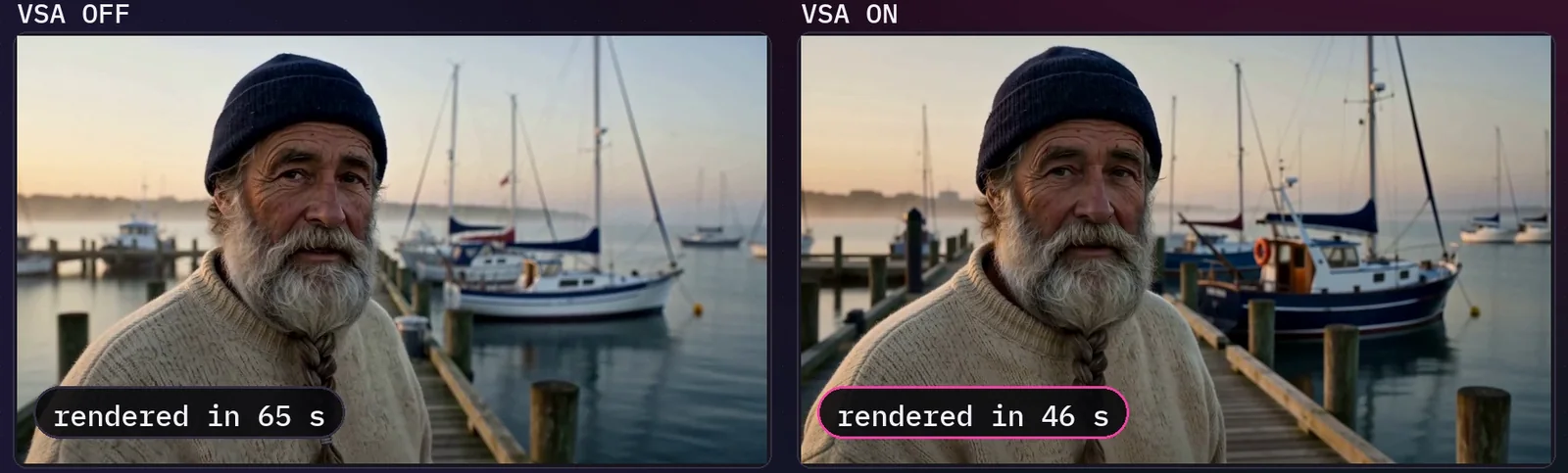
VSA, video sparse attention, is the attention setting FastH3 Omni is trained with: the model looks closely at only about a tenth of the video at a time. My first test left that node out, so Omni took 1.8 times PDMD's time, doing all the work it was trained to skip.
It didn't look better to my eye either, and I had decided it wasn't worth adding. Then I read the notes in ComfyUI's video_fasth3_ominiref_r2v template again: its Model Sparse Attention node "must stay on method vsa with keep_percent 10".
So I rendered every Omni clip again with VSA on. The saving grew with length: 26% at 5 seconds, 43% at 10. If you build your own workflow for FastH3 Omni, keep that node in.
How did I run the test?
I rendered 8 shots on 3 seeds with both models, 48 clips, with the same prompts, pictures, seeds and size. FastH3 Omni ran 8 steps with VSA; PDMD ran 4 steps as the reference model plus the LoRA at 1.0. Both used euler and simple in one stock ComfyUI graph.
The scores come from tools, and I also watched every clip at full size.
- Face match: ArcFace against other footage of the character (the fisherman's own footage scores 0.85).
- Lines: Whisper large-v3, word for word.
- Voice: WavLM similarity to the clip.
- Stutter: a take stutters if Ultimate H3's held-frame test would fire: held frames on at least 8% of the moving steps, and at least 3.
| Shot | Length | Face, PDMD | Face, Omni | Stutter, PDMD | Stutter, Omni |
|---|---|---|---|---|---|
| Close-up with a line | 5 s | 0.83 | 0.80 | 1 | 0 |
| Storm, heavy motion | 5 s | 0.76 | 0.75 | 2 | 0 |
| Character in a room, two pictures | 5 s | 0.54 | 0.49 | 0 | 0 |
| One picture and a voice clip | 5 s | 0.81 | 0.79 | 2 | 0 |
| Two characters and a cut | 10 s | 0.77 | 0.76 | 2 | 1 |
| RefMod only, no picture | 5 s | 0.84 | 0.82 | 0 | 0 |
| One long shot | 15 s | 0.63 | 0.59 | 1 | 1 |
| All seven, 21 takes each | – | 0.74 | 0.71 | 8 | 2 |
| 2D cartoon, not in the totals | 5 s | – | – | 2 | 2 |
Tested 2026-10-26 on an RTX 5090 (32 GB), 96 GB RAM, Windows 11, with ComfyUI 0.42.0 (the version the same install logged for the 24-second runs that evening). Reference mode, 1344×768, Comfy Kitchen attention, shifts 12 / 3. Render only: no upscale and no de-stutter. More on how I test.
How fast is FastH3 Omni compared with PDMD on MiniMax H3?
FastH3 Omni with VSA was slower than PDMD on short clips and faster on the longest: about 1.3 times PDMD's time at 5 seconds, about even at 10, and about 9% less time at 15. The 10- and 15-second rows are small samples, one shot each. Fifteen seconds is the longest chunk H3 makes in one go.
| Clip length | Renders | PDMD | Omni, no VSA | Omni, VSA | Omni with VSA vs PDMD |
|---|---|---|---|---|---|
| 5 s (6 shots) | 16 each | 39 | 69 | 51 | 1.3× the time |
| 10 s (1 shot) | 3 each | 103 | 188 | 108 | 1.05× the time |
| 15 s (1 shot) | 2 PDMD, 3 Omni | 173 | not run | 157 | 9% less time |
Warm means a render that loaded a model is left out. Seeds vary: at 15 seconds PDMD took 165 and 182 seconds, Omni 153 to 162. A later Pika H3 Flex test agrees over a wider range: on four 15-second clips, the fastest take per clip was PDMD 167 to 172 s and Omni 149 to 157 s.
Don't read this as "Omni is faster on any long video". At 24 seconds in two 12-second chunks, through the workflow's own modes, PDMD mode averaged 296 seconds and FastH3 Omni mode 315 (3 seeds). I measured the flip but can't explain it.
Which keeps a face closer, Omni or PDMD?
PDMD, by a little: face match 0.74 against 0.71 for FastH3 Omni, on 21 takes each. PDMD scored higher on all seven fisherman shots in the table above, by 0.01 to 0.05.
- A second character from one picture: a tie, 0.50 for PDMD and 0.51 for Omni, scored against her picture. Without VSA, Omni scored 0.38.
- A RefMod alone, no picture: both kept him, at 0.84 and 0.82.
Do Omni and PDMD get the dialogue right and match a voice clip?
Yes to both: FastH3 Omni and PDMD each spoke all 30 scripted lines word for word across the 48 clips, and on the voice-clip shot they matched the clip at 0.95 and 0.94 (3 seeds each). Anything at 0.86 or above counts as the same speaker.
On that shot, Omni's speech came out about 10 dB quieter than PDMD's, −29.7 dB against −19.2 dB (RMS loudness over the spoken words). On the other seven shots the two were within about 3 dB. The Pika H3 Flex test looks closer at sound.
Does PDMD stutter more than Omni?
Yes: the held-frame test fired on 8 of PDMD's 21 takes and on 2 of FastH3 Omni's, on the same prompts and seeds. A held frame is the picture stopping for a frame while the scene moves.
The storm shows it best. On two of three seeds, PDMD held about every fourth frame through the whole clip (32 of 119 moving steps and 29 of 120). Omni held 0, 7 and 0. Omni's two stuttering takes are in its two longest shots.
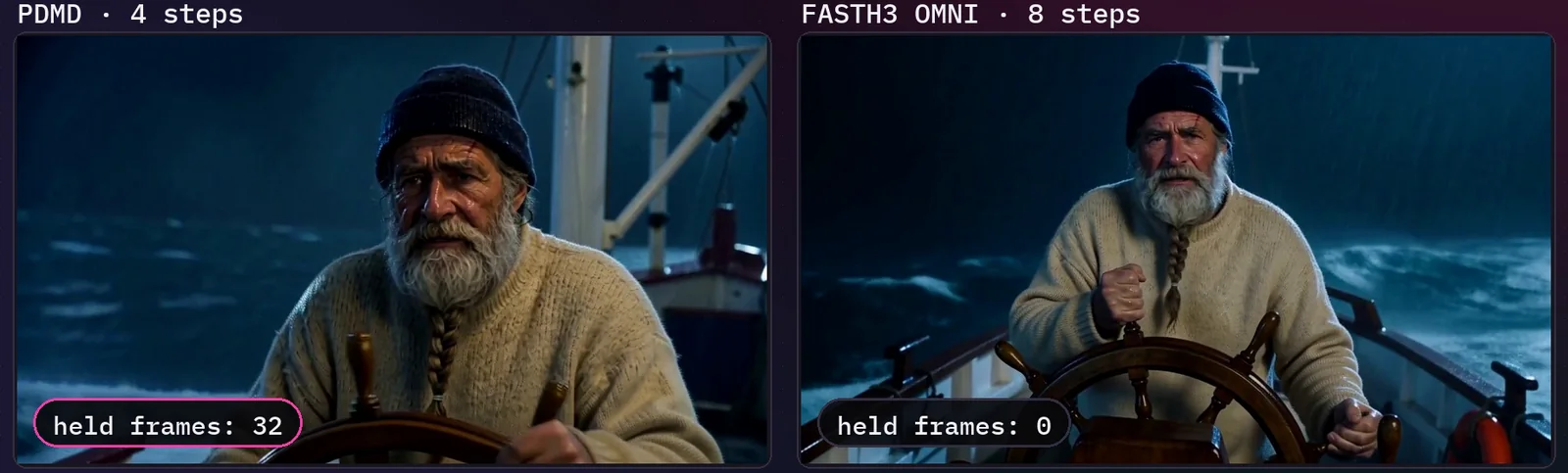
The de-stutter in my workflow redraws held frames, so PDMD's takes can be repaired; Omni just needs it a lot less. PDMD moved more: median optical flow, a measure of how much the picture moves, was 2.54 against 1.99 pixels per frame, about 28% more over the 21 takes.
Does Omni keep the same voice in long videos?
Yes, in my test: every chunk renders on FastH3 Omni, so a long video stays in Reference mode. In 24-second videos of two chunks (3 seeds), the second chunk's voice matched the clip at 0.88 in FastH3 Omni mode and 0.75 in PDMD mode, whose later chunks run on the First/Last Frame model.
That model takes no voice clip. Both modes started level, at 0.95 and 0.94 in chunk 1. The same videos held 0, 0 and 2 frames in FastH3 Omni mode against 73, 100 and 73 in PDMD mode, before any de-stutter.
How do I set up the Omni mode in ComfyUI?
Update Stubelius Ultimate H3 to 0.15 or later (GitHub main is at 0.15.1), use ComfyUI 0.42 or newer, put the 22.2 GB model in models/diffusion_models, and pick FastH3 Omni in the Setup window. It works in Reference mode only.
- Update the pack with Manager → Update All, or
git pullincustom_nodes/Stubelius-Ultimate-H3, then restart. There are no releases or tags: install from main. - Download
fasth3_omniref_8step_pruned_int8_convrot.safetensorsfrom FastVideo/FastH3-Omni-Comfy intomodels/diffusion_models(model folders). - In the Setup window, click the FastH3 Omni card and pick the file in its model slot. The card fills in 8 steps,
eulerwithsimple, 0.98 megapixels (1344×768) and shifts of 12 / 3. - In the Director, use Reference mode. For a voice clip, put the sample in Ref Audio and set it to
Voice reference: new lines, same voice. - On the Output window, pick native (about 768p), 1080p, 2K or 4K. There is no polish in this mode.
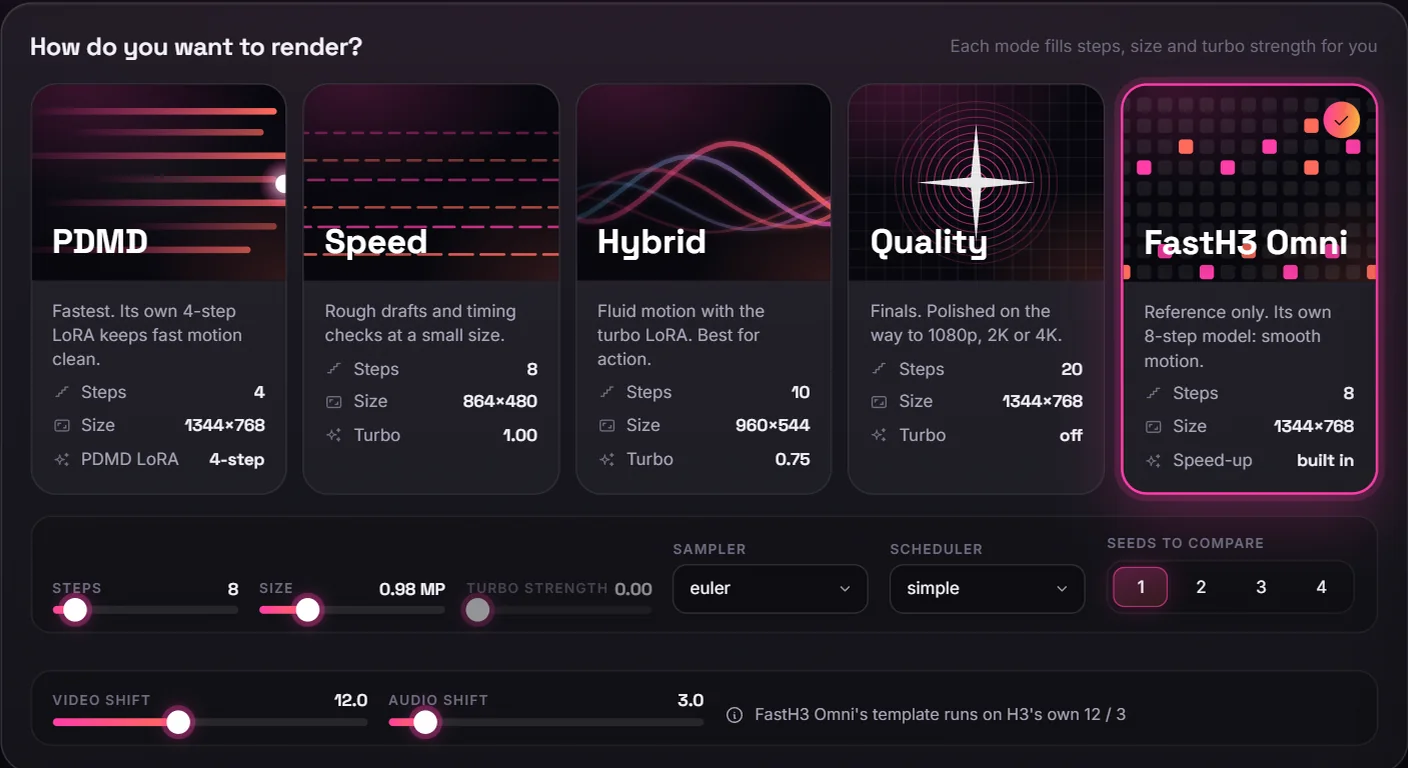
VSA is built in, so there is nothing to switch on. Sage attention, low-VRAM attention and chunked feed-forward replace the attention VSA sits in, so this mode leaves them out. New to steps and seeds? Part 1 of ComfyUI From Zero is free.
Should you use FastH3 Omni or PDMD on MiniMax H3?
Use FastH3 Omni for reference-mode videos, long chunks and fast motion, and PDMD for short clips, first and last frame, and when the face has to stay as close as possible. It is an option, not a replacement.
- FastH3 Omni: 15-second chunks (157 s against 173 s on one shot; the wider Pika H3 Flex test agrees), fewer stuttering takes, and a voice clip that reaches every chunk.
- PDMD: 5-second clips (39 s against 51 s), First/Last Frame mode, a slightly closer face and more motion.
What are the limits of this test?
This test covers one RTX 5090 on one day, with small samples at 10 and 15 seconds, so read the numbers as one setup's results, not a general rule.
- 48 clips: 8 shots × 3 seeds × 2 models, on one RTX 5090 on 2026-10-26. With the 21 clips of the run without VSA, 69 renders. I did not render the 15-second shot without VSA.
- The 10- and 15-second speed rows are one shot each, and PDMD's 15-second row is two renders, because the first loaded a model.
- The tool scores are warning lights, not a verdict on the picture. The voice-clip, RefMod and second-character scores rest on one shot and 3 seeds each. Face, stutter and motion totals leave out the cartoon.
- Not tested: other cards, VRAM use, the bf16 export of FastH3 Omni, its text-to-video, the 20-step model, Hybrid mode, or videos past 24 seconds.
Sources and files
- I Tested FastH3 Omni vs PDMD on MiniMax H3 With 48 Clips: the test at 2:40, the VSA mistake at 3:32, results at 4:41, which one when at 7:18 and the mode at 7:44.
- FastH3 Omni by FastVideo (Hao AI Lab) and Nuva Lab: the ComfyUI files and Nuva Lab's release post.
- PDMD by Zimo Wang et al.: the paper, the code (Apache-2.0) and the 4-step LoRA.
- MiniMax H3 model card by MiniMax.
- The FastH3 Omni mode in Stubelius Ultimate H3. The RefMod shot used ComfyUI-MiniMaxH3Mod by Luisacaotica. Pictures: Qwen-Image 2.1. Voice clip: VoxCPM2.
- On this site: Pika H3 Flex vs PDMD and FastH3 Omni, PDMD vs SoL Refiner, the FastH3 adapter vs the turbo LoRA, RefMods vs reference images and long videos and chunks.
Common questions
How much VRAM does FastH3 Omni need?
I have no minimum to give: I did not measure VRAM here, and the int8 model file alone is 22.2 GB. For context, in my LTX 2.5 vs MiniMax H3 vs Kandinsky 6 test, MiniMax H3 in PDMD mode peaked at 30.4 GB across the whole of a 32 GB card, which isn't a minimum.
Is FastH3 Omni free to use?
Yes for the workflow: the mode is part of Stubelius Ultimate H3, free and MIT-licensed on GitHub. The model is a separate download under the MiniMax H3 Community License and isn't bundled; read it yourself before any commercial use; this isn't legal advice.
Does FastH3 Omni work with first and last frames?
No. FastH3 Omni has no first or last frame, so in Stubelius Ultimate H3 the Director tells you to switch to Reference mode, or pick another mode such as PDMD for First/Last Frame.
Can I add a turbo LoRA to FastH3 Omni?
No. FastH3 Omni is already distilled to 8 steps, so Ultimate H3's mode runs it with no speed-up LoRA on top.
Can FastH3 Omni do text-to-video?
It can, but ComfyUI's template note says it isn't its strength and points to the FastVideo FastH3 text-to-video and image-to-video templates. I did not test it.