STUUBZZZ
Stubelius Ultimate LTX 2.5 ComfyUI workflow: multi-shot timeline, seed hunt, Licon MSR
 Watch the video · I Built the Ultimate LTX 2.5 Workflow in ComfyUI (Free, 4K, 60 FPS)
Stubelius Ultimate LTX 2.5 is my free ComfyUI node pack and workflow for LTX 2.5: a multi-shot Director timeline, 1 to 4 full seeds rendered with sound, and a finish that takes only the winner up to 4K. On my RTX 5090 one 8-second 1280×704 seed renders in 46 to 58 seconds, and four of them in 3 minutes 19 seconds.
- Stubelius Ultimate LTX 2.5 is a free, GPL-3.0 node pack and workflow for LTX 2.5 in ComfyUI, published at github.com/stuubszzz/Stubelius-Ultimate-LTX2.5.
- The Stubelius Ultimate LTX 2.5 defaults for the official LTX 2.5 distilled checkpoint are euler_ancestral with the linear_quadratic scheduler, 8 steps, cfg 1 and a full-size first pass (scale 1.0).
- On an RTX 5090 (32 GB), one 8-second 1280×704 LTX 2.5 seed at 25 fps rendered in 46 to 58 seconds across 9 runs, and a 4-seed hunt took 3 minutes 19 seconds (one run).
- Licon MSR reference images work on LTX 2.5 in Stubelius Ultimate LTX 2.5 with the LTX-2.5-Licon-MSR-V1 LoRA. The LTX 2.3 MSR LoRAs do not work on 2.5.
- Stubelius Ultimate LTX 2.5 installs next to the LTX 2.3 Director pack, because its Director nodes are registered under their own names (LTXDirectorCS25 and so on).
LTX 2.5 is Lightricks' video model. It renders a clip and its sound together, and its checkpoints are on Hugging Face in the gated Lightricks/LTX-2.5 repo.
A seed hunt is rendering the same clip on several seeds, picking the best take by watching and listening, and finishing only that one. In this workflow that is 1 to 4 seeds, each rendered as a complete video with its audio, and a Finish stage that works on the winner alone.
The seven stages
The workflow reads in the order you set it up. Everything is chosen before you queue. After a seed hunt, the only control left to touch is WINNER.
| Stage | Node | What you decide there |
|---|---|---|
| 1 | Setup | Number of seeds (1 to 4), the seed, steps, cfg, first-pass scale |
| 2 | Seed Samplers | A sampler and a scheduler for each seed. Unused slots are greyed out |
| 3 | Models | Checkpoint (safetensors or GGUF), distill LoRA, two extra LoRAs, IC-LoRA, MSR LoRA, text encoder, VAEs, latent upscaler, attention, memory options, decode tile size, live preview |
| 4 | Output | Refine strength, steps and sampler, the refine's MSR strengths, audio, final resolution, final frame rate, upscaler |
| 5 | Director | The timeline: prompts, images, audio and motion tracks, size, frame rate, duration |
| 6 | Seeds | Nothing. It renders the seeds with sound, one preview each |
| 7 | Finish | WINNER 1 to 4, or 0 to hold after the seeds |
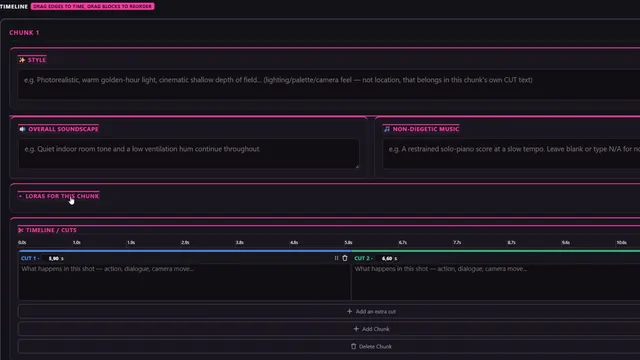
The Director is the timeline node from WhatDreamsCost's LTX Director, which this pack is forked from by way of CGlide's WhatDreamsCost-CSGlide. A multi-shot video is a row of segments, each with its own prompt. Segments can be text, image, audio or video. You also get image anchors and end frames (right click a segment, "pin to last frame"), multiple keyframes, chunk render for long videos with audio, and packed timelines that save their assets with them.
The workflow previews the last frame of the final video too, so you can feed it to the next shot as its first frame.
Which sampler settings does it start with?
It starts with euler_ancestral and the linear_quadratic scheduler, 8 steps and cfg 1, which matches the first stage of ComfyUI's official LTX 2.5 text-to-video template. The template types its eight-step sigma list in by hand (1.0, 0.99375, 0.9875, 0.98125, 0.975, 0.909375, 0.725, 0.421875, 0), and the linear_quadratic scheduler at 8 steps gives the same nine values. At cfg 1 ComfyUI skips the negative prompt, so each step is one model call instead of two.
The shipped workflow points at the official LTX 2.5 distilled checkpoint. If you load a non-distilled checkpoint instead, the Models node has a slot for the distilled LoRA. For why this pair is the default and how to try another sampler on the same seed, see the LTX 2.5 sampler settings post.
How do you run a seed hunt with sound?
- On Setup, set seeds to 3 (anything from 1 to 4) and keep the seed's control on fixed. Each further seed adds 1000003 to the one before it.
- On Seed Samplers, give each seed its sampler and scheduler. Keep the default pair on one seed and try
euleron another for variety. - On Finish, set WINNER to 0. That means hold after the seeds.
- Queue. Every seed renders as a complete video with its audio and gets its own preview.
- Watch, listen, set WINNER to the take you want and queue again. Only the finish runs. The seeds come from cache.
Between the two queues, leave Setup, Seed Samplers, Models and the Director alone, or the seeds render again. The Output node feeds only Finish, so resolution, frame rate and upscaler can change as often as you like.
Full-size first pass or 0.5 plus refine?
Full size, first-pass scale 1.0, is the default. Half size (0.5) plus refine saves time while you hunt and, by my eye on one clip, costs fine detail on the take you keep. At 1.0 the seeds render at the Director's size and the winner is finished as rendered: no latent upscale, no refine. Below 1.0 the seeds are quicker and softer, and Finish takes the winner back up with the latent ×2 upscaler and a refine (defaults: strength 0.35, 4 steps, euler). A refine cannot draw detail that a half-size render never had.
On one clip and one seed (8 s at 1280×704), the full-size seed took 58.4 s and its finish 2.7 s. A later re-render of the same seed with the models already loaded took 46.1 s. At scale 0.5 the seed took 13.4 s and the upscale plus refine 32.8 s. The details are in the full-size first pass post.
Licon MSR references in both passes
The reference features are switched on in this build. Licon MSR runs on an engine written for LTX 2.5 that follows liconstudio/ComfyUI-LTX2.5-MSR: each character or ingredient image becomes a slot-embedded reference. You need Licon's LTX 2.5 MSR LoRA, LTX-2.5-Licon-MSR-V1.safetensors. The LTX 2.3 MSR LoRAs lack the slot-embedding weights the engine needs.
- Choose Licon MSR as the Director's reference option and add your images to the character slots. Give each slot a short label of 3 to 5 words. The image carries the identity.
- In the prompt, call a slot with its tag,
@ref1to@ref5. Only the slots you mention are used. With no tags, all filled slots are. - Pick the MSR LoRA on the Models node. The strength there applies to the seeds, together with the Director's reference strength.
- Set the Director's frame rate to 50 and leave the final frame rate at 0. Every MSR render in the tables below ran that way. At other rates the Director shows an "MSR 50 recommended" hint. Its tooltip, carried over from the LTX 2.3 build, says Licon MSR is trained at 50 fps and that other frame rates can cause double or jittery motion.
- With a first-pass scale below 1.0, set the second pass on the Output node: refine MSR LoRA strength and refine MSR reference. About 0.4 for the reference keeps the detail without the references repainting the opening. 0 means the Director's value.
Ghost Mask mode and the 2.3-style reference sheets were made for LTX 2.3's behaviour. On 2.5, Licon MSR is the mode I use.
Audio lock, output sizes and frame rates
- Audio. The Output node either keeps the seed's audio (the default) or regenerates it in the refine. Kept means the refine leaves the sound exactly as you heard it in the preview.
- Render size. The Director has presets for 1920×1088, 1088×1920, 1280×704, 1024×1024 and 768×512, or a custom size.
- Final resolution. Native, 720p, 1080p, 2K (1440p) or 4K (2160p). The number is the short side, in portrait too, so a 1280×704 render comes out at 3928×2160 on the 4K setting.
- Upscaler. RTX VSR, or DLSS 5 followed by Color Lock (both timed here). Color Lock keeps the fine detail DLSS 5 added and takes colour and tone from the original frames.
- Frame rate. The Director offers 24, 25, 30, 48, 50 and 60 fps or a custom value. Final fps 0 leaves that untouched. A higher final fps is drawn by RIFE, with length and sync kept and hard cuts left as clean cuts.
The finished frames are held uncompressed, about 100 MB of RAM per frame at 4K, so keep 4K clips short, especially at 48 to 60 fps.
How long does a render take on an RTX 5090?
One 8-second 1280×704 seed rendered in 46 to 58 seconds over 9 runs, and four seeds took 3:19. Finishing the winner took 3 seconds as rendered and 11 to 24 seconds with RTX VSR. These are the B-roll renders for the video, run like a real seed hunt: a seed job with WINNER 0, then a separate finish job. Unless a row says otherwise: the official LTX 2.5 distilled int8 checkpoint, 8 steps, cfg 1, first-pass scale 1.0, Sage attention, decode tile 768, no extra LoRAs, text-to-video, 8 s at 1280×704 and 25 fps.
| Seed job | Runs | Time (min:s) |
|---|---|---|
| 1 seed | 9 | 0:46 to 0:58 |
| 2 seeds | 6 | 1:41 to 1:54 |
| 4 seeds | 1 | 3:19 |
| 1 seed, portrait 704×1280 | 1 | 0:56 |
| 2 seeds, portrait 704×1280 | 1 | 1:28 |
| 1 seed at first-pass scale 0.5 | 1 | 0:13 |
| 2 seeds, 5 s at 50 fps, decode tile 512, no references | 1 | 2:01 |
| 2 seeds, 5 s at 50 fps, decode tile 512, Licon MSR with 3 reference images | 2 | 2:52 and 2:54 |
| Finish job | Runs | Time (min:s) |
|---|---|---|
| As rendered, no upscale | 3 | 0:03 |
| As rendered, RIFE to 60 fps | 1 | 0:11 |
| Latent ×2 and refine of a 0.5 seed, no upscale | 1 | 0:33 |
| 1080p, RTX VSR | 1 | 0:17 |
| 2K, RTX VSR | 1 | 0:11 |
| 4K, RTX VSR | 1 | 0:24 |
| 2K, DLSS5 + Color Lock | 2 | 0:54 and 1:09 |
| 2K, DLSS5 + Color Lock, RIFE to 30 fps | 6 | 1:02 to 1:25 |
| 2K, DLSS5 + Color Lock, the 5 s MSR clip at 50 fps | 1 | 2:38 |
The 1080p RTX VSR job ran before the 2K one and came out slower. I ran each once, so read the VSR rows as "10 to 25 seconds", not as a ranking.
The jobs ran back to back, most of them with the models already in memory. I did not time a cold start separately. They ran on the pack as it stood that evening. The public main branch was committed the next day, and I have not re-timed it.
During the 8-second full-size seed renders, nvidia-smi showed 30 to 31 GB in use on the card, polled every 5 seconds, with both memory options off. That is a reading from one 32 GB card, not a minimum requirement. I have not measured how little it can run on.
Tested 2026-09-29 on an RTX 5090 (32 GB), 96 GB RAM, Windows 11, ComfyUI 0.37.0. Times are ComfyUI's own execution time per job, queue wait excluded. One run per setting unless the Runs column says more.
Install in 3 steps
- Clone the pack into your custom nodes folder and restart ComfyUI. There is nothing to pip install.
- Open the workflow from Workflow → Browse Templates → Stubelius-Ultimate-LTX2.5, or drag
example_workflows/Stubelius_Ultimate_LTX.jsoninto ComfyUI. Then run Manager → Install Missing Custom Nodes. - Download the model files below, check the Models node, and queue. The HOW TO USE note inside the workflow explains every node.
cd ComfyUI/custom_nodes
git clone https://github.com/stuubszzz/Stubelius-Ultimate-LTX2.5.git
To update, run git pull in that folder or use Manager → Update All, then restart. There is no release download: the repo's main branch is the current version.
Which files does LTX 2.5 need, and where do they go?
Five official files from Lightricks/LTX-2.5 on Hugging Face go in four model folders: the distilled transformer in models/diffusion_models, the Gemma 4 text encoder in models/text_encoders, the video and audio VAEs in models/vae and the x2 latent upscaler in models/latent_upscale_models. The repo is gated, so log in and accept the terms before downloading.
| Folder | File |
|---|---|
models/diffusion_models | ltx-2.5-22b-distilled-transformer-comfy-int8-convrot.safetensors |
models/text_encoders | gemma4-12b-with-proj-ltx-2.5-comfy-int8-convrot.safetensors |
models/vae | ltx-2.5-video-vae-bf16.safetensorsltx-2.5-audio-vae-bf16.safetensors |
models/latent_upscale_models | ltx-2.5-latent-spatial-upscaler-x2-bf16-1.0.safetensors |
models/loras (optional) | LTX-2.5-Licon-MSR-V1.safetensors, for Licon MSR references. It is Licon's file, not part of the Lightricks repo |
models/vae (optional) | A tiny LTX VAE such as taeltx2_3.safetensors, for the live preview panel |
LTX 2.5 needs the Gemma 4 text encoder and will not load a 2.3 one. RIFE downloads its checkpoint the first time you ask for a final frame rate above the Director's.
| Pack | Needed for |
|---|---|
| ComfyUI-VideoHelperSuite | Video outputs |
| ComfyUI-KJNodes | Live preview, Sage attention, the low-VRAM options |
| Nvidia RTX nodes | RTX VSR upscaling (NVIDIA RTX GPU) |
| ComfyUI-Frame-Interpolation | A final frame rate above the Director's (RIFE) |
| ComfyUI-DLSS5-Enhancer | The DLSS 5 upscaler (RTX 30, 40 or 50 series, Windows only) |
| ComfyUI-GGUF | GGUF models |
I developed and tested it on an RTX 5090 (32 GB) only. With less VRAM, turn on the Models node's memory options (memory-efficient attention, chunked feed-forward). The Models node also loads GGUF checkpoints. The video decode sizes itself to the free VRAM and steps its tile size down by itself when a clip does not fit (why that matters on Windows). For what fits on 8, 12, 16 and 24 GB cards in general, Part 2 of ComfyUI From Zero has fit tables.
On Windows, NVIDIA's driver lets an allocation past the card's VRAM spill into system RAM, where it crawls. For a clean out-of-memory error instead, set CUDA - Sysmem Fallback Policy to Prefer No Sysmem Fallback for ComfyUI's python.exe in NVIDIA Control Panel → Manage 3D Settings → Program Settings.
What changed since the first build
This post first described an earlier build. Five things in it are no longer true:
- The repo has a new name. It is now
Stubelius-Ultimate-LTX2.5, and the old address redirects there. A folder under the old name incustom_nodesis the same pack. Ifgit pullfails on an install made before October 2026, delete the folder and clone again. - References are on. The first build hid every reference feature on 2.5. Licon MSR now works with the LTX 2.5 MSR LoRA. Ghost Mask and the reference sheets remain 2.3-era.
- It installs next to the 2.3 pack. The 2.3 pack registers
LTXDirectorCS. This one registersLTXDirectorCS25,LTXDirectorGuideCS25and so on, shown as "… CS (2.5)" in the node menu. The old "do not run alongside" warning no longer applies. It also sits next to WhatDreamsCost's original pack and Stubelius Ultimate H3. - A new Theme node sets the look of this workflow only: Studio slate, Stuubzzz neon, Film stock, Paper light, Midnight blueprint or ComfyUI default.
- The dashboard is seven stages. Setup, Seed Samplers, Models, Output, Director, Seeds, Finish replace the two older dashboard nodes. Seed Hunt and Refine (Pass 2) are still registered, so workflows built with them keep loading.
Sources and files
- stuubszzz/Stubelius-Ultimate-LTX2.5: the pack, the workflow and the readme (GPL-3.0)
- WhatDreamsCost/WhatDreamsCost-ComfyUI: the original LTX Director this is forked from
- CGlide/WhatDreamsCost-CSGlide: the build to use if you are on LTX 2.3
- Lightricks/LTX-2.5 model card, and Lightricks on GitHub
- ComfyUI's official LTX 2.5 text-to-video template: the first-stage sampler and sigma list the defaults match
- liconstudio/ComfyUI-LTX2.5-MSR: Licon's multi-reference nodes for LTX 2.5
- The walkthrough video on YouTube (19 minutes)
- On this site: full-size first pass against 0.5 plus refine, LTX 2.5 sampler settings, and the MiniMax H3 counterpart, Stubelius Ultimate H3
Common questions
Can I install Stubelius Ultimate LTX 2.5 next to the LTX 2.3 Director pack?
Yes. Its Director nodes are registered under their own names (LTXDirectorCS25, LTXDirectorGuideCS25 and so on), where the LTX 2.3 pack uses LTXDirectorCS. The readme lists it as safe to keep next to WhatDreamsCost's original pack, the LTX 2.3 pack and Stubelius Ultimate H3. A folder of this pack under its previous name is the same pack, so keep only one of the two.
Do I need the Licon MSR LoRA to use the workflow?
No. The MSR LoRA slot is used only when the Director's reference option is Licon MSR, and ignored otherwise. For reference images on LTX 2.5 use LTX-2.5-Licon-MSR-V1. The LTX 2.3 MSR LoRAs do not work on 2.5.
Why did my seeds render again when I changed WINNER?
Something upstream of the seeds changed. Keep the seed's control on fixed, and do not touch Setup, Seed Samplers, Models or the Director between the hunt and the finish. The Output node and WINNER are safe to change, because they feed only Finish.
Will it run on less than 32 GB of VRAM?
I can only report an RTX 5090 (32 GB), where an 8-second 1280×704 seed took 46 to 58 seconds. The pack has memory-efficient attention, chunked feed-forward, GGUF checkpoint support and a decode that sizes itself to the free VRAM, but I have no timings for other cards.