STUUBZZZ
FLUX 3 Klein vs Qwen-Image 2.1 in ComfyUI: 428 renders on an RTX 5090, round by round
 Watch the video · Flux 3 Klein Vs Qwen Image 2.1 | I Tested 400 images
In my 428-render test on an RTX 5090, FLUX 3 Klein (distilled, int8) and Qwen-Image 2.1 came out close: with prompts as typed, two seeds each, Qwen won 7 of 23 image types, Klein 4, and 12 were ties. With each model's own prompt enhancer, both were excellent. Klein was better at short text and layouts, Qwen at editing.
- In a 428-render test on an RTX 5090 (ComfyUI 0.41.0, October 2026), prompts as typed, two seeds each, Qwen-Image 2.1 won 7 of 23 text-to-image types, FLUX 3 Klein Distilled int8 won 4 (short text, layouts) and 12 were ties.
- On 13 edits in the same RTX 5090 test (October 2026), two seeds each, Qwen-Image 2.1 won 4 (one narrowly), FLUX 3 Klein 3 (two narrowly) and 6 were ties. Qwen won the photo-to-anime edit, the neon relight and a character sheet.
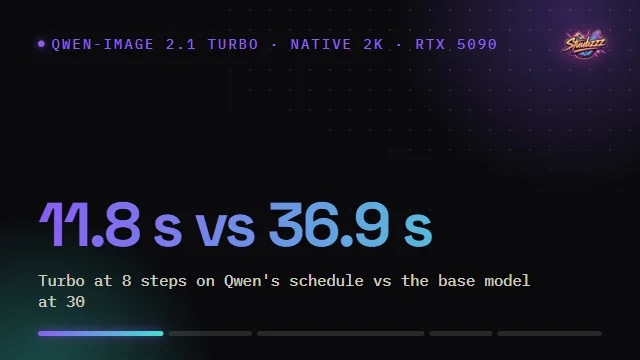
- At 4 MP (native 2K) on an RTX 5090 with int8 weights, FLUX 3 Klein Distilled took 9.7 s per image at 16 steps and 6.1 s at 8 steps; Qwen-Image 2.1 Turbo took 8.4 s and Base 23.9 s (median of three, October 2026).
- In my RTX 5090 test (October 2026, 8 short briefs, two seeds each), raw short prompts broke posters and infographics on FLUX 3 Klein and Qwen-Image 2.1 Turbo. With Black Forest Labs' upsampler and Qwen's enhancer, both were excellent and about even; Klein gained the most.
What is FLUX 3 Klein, and which version did I test?
FLUX 3 Klein is the small open-weights image model of Black Forest Labs' FLUX 3 family, announced on 2026-10-15: a 5.6-billion-parameter diffusion model for text-to-image, editing and multi-reference images, with Qwen3-VL-4B as its text encoder. I tested the distilled int8 checkpoint, 5.8 GB, at 16 steps and CFG 1.
Distilled means part of the sampling is baked into the weights; the reference code from Black Forest Labs (BFL) runs it with euler and refuses guidance other than 1.0. Klein also has a prompt upsampler, a separate 9B model that turns a short idea into a full scene description. BFL's README: "do not use the model without it".
Qwen-Image 2.1 is bigger, 7 billion parameters with an 8-billion-parameter text encoder. I ran Turbo at 8 steps on Qwen's saved schedule and Base at 30 steps. By my reading of BFL's own chart, Klein leads Qwen-Image 2.1 by about 11 Elo points in text-to-image: close to a coin flip.
How did I test FLUX 3 Klein against Qwen-Image 2.1?
Same prompts, same seeds, one RTX 5090, official settings for Klein and Turbo, both seeds scored. First 23 image types and 13 edits exactly as typed, then short briefs with and without each model's own enhancer.
- Text-to-image at 4 MP (native 2K), Klein vs Qwen Turbo vs Qwen Base: 138 renders. The 16 types from my Qwen-Image 2.1 Turbo test plus 7 adherence tests.
- Edits at about 1.5 MP, the photo's own size: 78 renders.
- 8 short briefs and 4 short edit requests, raw and enhanced, Klein vs Qwen Turbo.
Tested 2026-10-16 and 2026-10-17 on an RTX 5090 (32 GB), 96 GB RAM, Windows 11, ComfyUI 0.41.0. Int8 weights and Comfy Kitchen int8 attention on both. 428 test renders in all.
How fast is FLUX 3 Klein in ComfyUI?
At 4 MP (native 2K) on an RTX 5090, FLUX 3 Klein took 9.7 seconds per image at its default 16 steps, about 15% slower than Qwen-Image 2.1 Turbo at 8.4 s. At 8 steps Klein took 6.1 s, about 27% faster than Turbo, with almost the same picture.
| Model | 1 MP | 2 MP | 4 MP | First image, with loading (1 MP) |
|---|---|---|---|---|
| FLUX 3 Klein Distilled, 16 steps | 2.6 | 4.5 | 9.7 | 9.0 |
| FLUX 3 Klein Distilled, 8 steps | 1.9 | 3.0 | 6.1 | – |
| Qwen-Image 2.1 Turbo, 8 steps | 2.4 | 4.2 | 8.4 | 9.3 |
| Qwen-Image 2.1 Base, 30 steps | 5.3 | 10.7 | 23.9 | 8.0 |
On three prompts and one seed, 8 steps gave the same picture as 16 with slightly softer skin. At 4 steps Klein drew a different, weaker picture. Comfy Kitchen attention was about 30% faster than PyTorch attention at 4 MP.
Which is better for photos, FLUX 3 Klein or Qwen-Image 2.1?
Mostly neither: fashion, perfume, landscape, kitchen and wildlife were all ties as typed, two seeds each. Klein follows details more literally, like the turquoise water and wide angle I asked for in Ha Long Bay; Qwen looks a bit more like a magazine.
Klein slipped on objects with structure. Its guitar's neck and headstock didn't make sense, and its pho was a vegetable soup with no noodles. Qwen got both right and won both.
Which renders text better, FLUX 3 Klein or Qwen-Image 2.1?
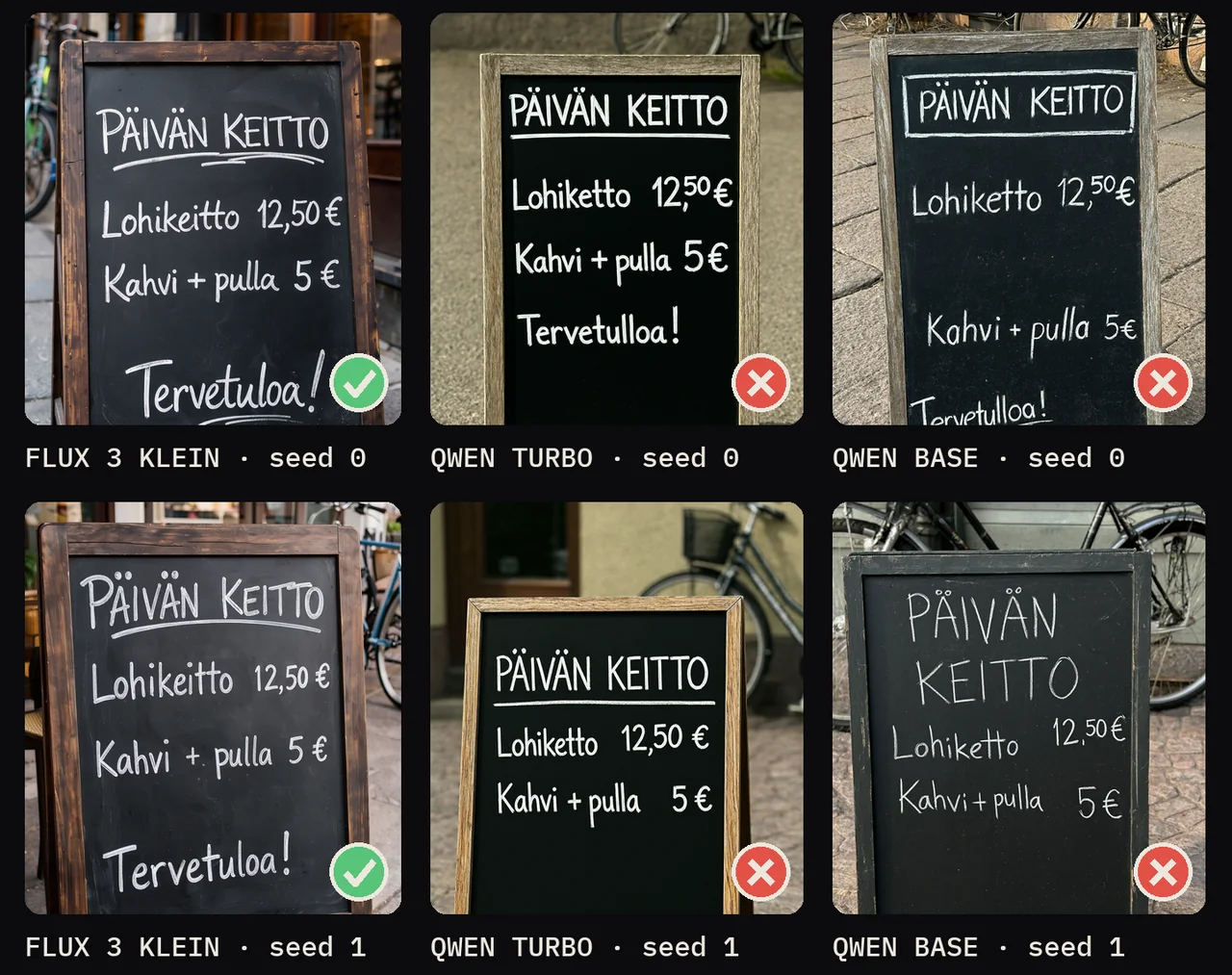
Klein for short text, Qwen for long text. Klein won the logo, weather app and Finnish menu board, two seeds each. Qwen Turbo wrote a full magazine paragraph word for word on both seeds, while Klein garbled the paragraph on one seed and the headline on the other.
The NORTH PEAK COFFEE logo was right on all six Klein renders, counting my smoke tests; Qwen Turbo dropped COFFEE on one seed and Qwen Base garbled it on one. On the chalkboard, Klein spelled Lohikeitto 12,50 € and Tervetuloa! right on both seeds, while all four Qwen renders wrote "Lohiketto" and "Tervetulloa".
Which follows instructions better?
Even on placement, Qwen on counting, Klein on layouts. Five people in named colours and four shapes came out right on every render from both models. Asked for exactly seven apples, Klein drew six on both seeds; Qwen got it right on one seed of each model.
Klein's recipe card came out clean on both seeds (one dropped a "1."); Qwen Turbo managed one of two, and Qwen Base squeezed the recipe into a narrow band. Klein's weather app showed HELSINKI and −4 °C large; Qwen's text was small.
Which has the better styles and seed variety?
Qwen for styles, Klein for variety. Qwen's Pixar-style robot and three-panel comic looked more like the real thing; the impressionist café and the anime scene were ties (two seeds each). Across six seeds of two prompts, Klein changed pose, outfit and framing, while Qwen Turbo repeated the same frame.
Which is the better image editor?
Qwen-Image 2.1, by a little: as typed, two seeds each, it won 4 of 13 edits to Klein's 3, with 6 ties. Both got the outfit, background, sign-text and expression edits right and kept faces.
| Edit | Winner | What I saw |
|---|---|---|
| Photo to anime | Qwen | Klein barely changed the photo |
| Neon relight | Qwen | Klein added neon behind him, but his face stayed in daylight |
| Character sheet from one photo | Qwen | Klein cropped at the waist and got the labels wrong |
| Remove a plant | Qwen, slightly | Klein left a blotchy wall texture |
| Age to 75 | Klein | Klein looked about 75, Qwen about 60 |
| Add an armchair and a painting | Klein, slightly | Qwen moved the plant on one seed |
| Sketch to photo | Klein, slightly | Qwen's looked like a 3D render |
Klein kept the photo's exact size; Qwen cropped slightly. Keep Klein's reference near the photo's own size (the workflow's 1.5 MP default): at 4 MP an edit took 22 s instead of 5.8 and the face drifted slightly.
Do short prompts need the prompt upsampler?
On FLUX 3 Klein, yes. On 8 short briefs, two seeds each, raw briefs broke both models, Klein worse: a Hanoi jazz-festival poster brief gave Klein scrambled letters and Qwen Turbo a portrait with no poster. With each model's own enhancer both were excellent and about even, and Klein gained far more.
With the upsampler, Klein made rich scenes and a jazz poster with every line right, for 3.2 s more per image. Qwen's enhancer gave clean, photographic versions with equally right text, for 2.2 s more.
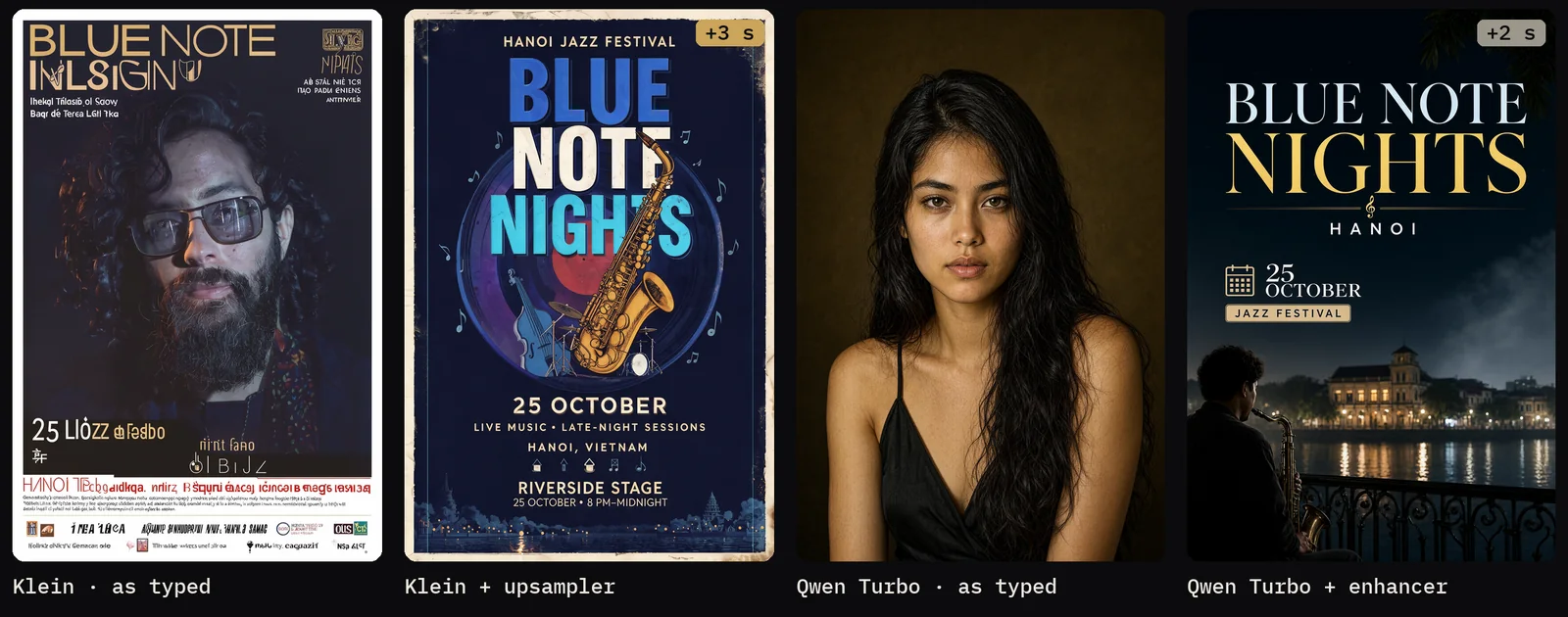
A warning for Qwen users: on the infographic, Qwen's enhancer wrote broken JSON, so Qwen rendered an empty prompt (a random portrait) on both seeds. The fix is a fallback to your own prompt. And for both models, an enhanced prompt gives near-identical pictures on every seed, so for variety, change the words.
What can only one of the two models do?
FLUX 3 Klein has layout boxes; Qwen-Image 2.1 has transparent PNGs, ControlNet and inpainting. With boxes, Klein placed a mug, a cactus and a stack of books exactly as drawn, in two arrangements of the same sentence, on both seeds. Without boxes it picked its own layout.

Cite each box in the prompt as <obj_1>, <obj_2>; boxes guide placement and scale, not a hard mask. Drawing them needs Nodes 2.0, and the upsampler drops the tags.
Is native 4K worth it, or should you upscale with DLSS 5 or RTX VSR?
Native 4K is the quality pick, DLSS 5 the practical one. On my RTX 5090, FLUX 3 Klein rendered native 4K (16 MP) in 76 to 89 seconds per image (three prompts, one seed), with no repeated faces or broken layouts and the most real detail. 2K plus DLSS 5 with Color Lock added about 10 seconds and looked the most natural.
RTX Video Super Resolution added 3 to 5 seconds, crisper but grainier. DLSS 5 and Color Lock are explained in DLSS 5 vs RTX VSR.
Which should you use, FLUX 3 Klein or Qwen-Image 2.1?
Pick by the job. Typed as is, Qwen-Image 2.1 won a few more rounds; with the enhancers, it was even, and most photos were a draw. My own setup is FLUX 3 Klein with its upsampler for new images, and Qwen-Image 2.1 for edits and transparent PNGs.
- FLUX 3 Klein: logos, short and non-English text, app screens and infographics, more variety between seeds, layout boxes, native 4K and 8-step drafts.
- Qwen-Image 2.1: restyling, relighting and character sheets, counting, objects like the guitar, paragraph text, Pixar and comic styles, transparent PNGs, ControlNet and inpainting.
Each model has its own licence: FLUX 3 Klein the FLUX Kommunity License, Qwen-Image 2.1 the Qwen Research License. Read both before any commercial use.
How do I set up the free FLUX 3 Klein All-in-One workflow?
Download it from my Patreon, where it is free for everyone, free tier included. Every optional group starts switched off, so the workflow runs with just the model, the text encoder and the VAE.
- Update ComfyUI to 0.41 or newer and install rgthree-comfy through Manager.
- Accept the licence on BFL's gated flux-3-image-klein-comfy repo. Download
flux3_image_klein_sd_int8_convrot.safetensors(5.8 GB) intomodels/diffusion_models,qwen3vl_4b_int8_convrot.safetensors(4.9 GB) intomodels/text_encodersandflux2-vae.safetensorsintomodels/vae(model folders). - Optional: the upsampler,
qwen3.5_9b_flux3_prompt_upsampler_int8_convrot.safetensors(9.7 GB), intomodels/text_encoders. - Load the workflow, set Steps, Canvas and Seed, and switch on what you need in the OPTIONS panel: Ref 1 to 4, the upsampler, layout boxes, Upscale to 4K.
- For the 4K group only: the custom nodes ComfyUI-DLSS5-Enhancer, Stubelius Color Lock (in the Stubelius Ultimate H3 and LTX 2.5 packs) and NVIDIA's RTX nodes.
For edits, switch Canvas off so the output keeps your photo's size. What steps, seed, CFG and the sampler do is in the free Part 1 of ComfyUI From Zero.
Test setup and limits
- 428 test renders on one RTX 5090, plus about 20 uncounted workflow checks; two seeds per head-to-head prompt.
- Winners are my call by eye, from sheets showing both seeds. "Slight" wins count as ties in the text-to-image tally and as wins in the edit tally, as in my notes.
- Klein's settings tests used one seed on two or three prompts. Timings outside the clean speed pass ran on a shared GPU and may include model reloads.
- Klein ran with the bf16 text encoder; the public workflow defaults to the int8 one, which I did not compare.
- Not tested: Klein Base, LoRAs, other cards, VRAM use, and Qwen-Image 2.1 at native 4K.
Sources and files
- Flux 3 Klein Vs Qwen Image 2.1 | I Tested 400 images, the video this post belongs to: speed at 2:09, text at 2:55, the enhancers at 4:56, 4K at 5:57 and the workflow at 6:24.
- Black Forest Labs: the announcement, the model card, the prompt upsampler and the reference code.
- Qwen: the Qwen-Image 2.1 and Turbo cards, and the ComfyUI files at Comfy-Org/Qwen-Image-2.1.
- ComfyUI-DLSS5-Enhancer by Blueforcer, the DLSS 5 nodes.
- On this site: the Qwen-Image 2.1 Turbo test, DLSS 5 vs RTX VSR and the ComfyUI From Zero course.
Common questions
How much VRAM does FLUX 3 Klein need?
I only tested on an RTX 5090 with 32 GB. The int8 files are 5.8 GB (model), 4.9 GB (text encoder) and 9.7 GB (optional upsampler). BFL's blog says the INT8 build runs on RTX cards with as little as 8 GB of VRAM; I have not tested that.
Why did FLUX 3 Klein look broken on launch day?
Many launch-day pictures came from the first ComfyUI templates, which had an error; BFL staff said so on Hugging Face. Fixed templates came the next day with ComfyUI 0.41.2, which changed no model code. My test ran on 0.41.0 with BFL's settings: 16 steps, euler, no CFG.
Can I use the FLUX 3 Klein Base checkpoint in the All-in-One workflow?
The workflow is built for the distilled checkpoint. Base is meant for LoRA training and needs 50 steps at CFG 3.5; I did not test it.
Does FLUX 3 Klein make transparent PNGs?
No. In my RTX 5090 test it painted a fake checkerboard behind a sticker, while Qwen-Image 2.1 made a real alpha channel.
Can I use FLUX 3 Klein or Qwen-Image 2.1 images commercially?
FLUX 3 Klein is under Black Forest Labs' FLUX Kommunity License and Qwen-Image 2.1 under the Qwen Research License. Read both before any commercial use; this isn't legal advice.