STUUBZZZ
MiniMax H3 prompt format: three fields, speaker tags and a word budget
MiniMax H3 expects a structured prompt, not free prose: a picture-alignment line when you supply a first or last frame, then three named fields, integrated_multimodal_description, overall_soundscape and non_diegetic_music. Speech goes in <d>[English] ...</d> tags behind a speaker ID such as (S1), and in ComfyUI the clip length snaps up to a 17k+5 frame grid at 24 fps, so 10 seconds (240 frames) renders as 243 frames (10.125 s).
- A MiniMax H3 prompt has three named fields in a fixed order:
integrated_multimodal_description,overall_soundscape(1 to 4 sentences) andnon_diegetic_music(1 to 3 sentences). Prompts with a first or last frame add one alignment line above them. - Dialogue for MiniMax H3 is a speaker with a stable ID followed by the exact words in a tag:
(S1) says: <d>[English] Words here.</d>. The voice description stays outside the tag. - ComfyUI's stock MiniMax H3 nodes snap clip length up to 17k+5 frames at 24 fps: 5 seconds (120 frames) becomes 124 frames (5.17 s), 10 seconds becomes 243 frames (10.125 s), 15 seconds becomes 362 frames (15.08 s). The node tooltip gives about 124 to 362 frames as the trained range.
- The system that rewrites plain requests into this format on MiniMax's hosted pipeline (H3-Context-IR) is not in the open-source release, so on a local install you write the format yourself or let a node such as the Stubelius Ultimate H3 Director compile it.
- In one render of this page's example prompt (one seed, 10 seconds requested, 243 frames out), the
<d>line was spoken word for word from the first frames, and a cut asked for at00:06.500landed at 7.17 s.
integrated_multimodal_description, overall_soundscape and non_diegetic_music. Spoken words go in <d> tags inside the description.What is the MiniMax H3 prompt format?
A MiniMax H3 prompt is one line about the reference pictures if you supply any, one blank line, then three labelled fields in this order:
integrated_multimodal_description: [Shot 1] ...

overall_soundscape: ...

non_diegetic_music: ...| Field | What goes in it | Limit |
|---|---|---|
integrated_multimodal_description | Everything on the timeline: style, framing, action, cuts, camera moves, who speaks, the spoken words, sounds tied to a moment. | None stated. |
overall_soundscape | Ambience, physical action sounds and non-verbal human sounds across the whole clip. Never the dialogue. | 1 to 4 sentences. N/A only for a fully silent clip. |
non_diegetic_music | Score only the audience hears: instruments, tempo, rhythm, dynamics. No mood words. | 1 to 3 sentences. N/A when there is no score. |
Music the characters can hear, a radio or someone singing, is an event in the description, not score.
The open MiniMax H3 checkpoints are the generation stage only. On MiniMax's hosted pipeline a separate system, H3-Context-IR, first rewrites the request into a structured prompt. The model card says that system is not part of the open release and recommends following its prompting guidance to build your own. Locally, that means you write the structure, or a node writes it for you.
The alignment line
| Mode | Pictures you supply | First line |
|---|---|---|
| T2VA | None | No alignment line. Start with the three fields. |
| I2VA | First frame | One fixed sentence: <Picture 1>, from [Shot 1], is fully referenced at 0.00 seconds. |
| FL2VA | First and last frame | One sentence mapping Picture 1 (Shot 1) to the 0.00-second mark and Picture 2 (the final shot) to the end time. |
| L2VA | Last frame | One sentence mapping <Picture 1> (the final shot) to the end time. |
The end time is the clip's effective duration with exactly two decimals, 8.00 and not 8. The wording is fixed, so copy it from section 2.1 of MiniMax's base prompt guide. When a picture is the first frame, open [Shot 1] with what is in it (style, subject, composition) before anything moves, and keep identity, clothing, key objects and layout consistent after that.
Full-reference mode, with subjects, reference videos and reference audio, uses six sections: subject_definitions, summary, retention_analysis, detailed_description, then the same two audio fields. It has its own guide.
Shots, timestamps and camera motion
Open [Shot 1] with the overall style and the first composition: live-action, 2D-animated, 3D CG, claymation and so on. Later shots are numbered in order and each starts with its cut time as MM:SS.mmm, strictly increasing and inside the clip: [Shot 2] At 00:06.500, the camera cuts to .... The guide is blunt about the first one: "Do not add a timestamp to the first shot."
A cut should show something new. If only the distance or the angle changes, use a camera move.
Camera motion is a sentence inside the shot, built from motion type, amplitude and speed. The types are zoom, push in, pull out, pan, truck, tilt, pedestal, arc shot, tracking shot, static shot, shake, POV and roll. Amplitude is with small amplitude or with large amplitude, speed is at slow speed or at fast speed, and both are usually left out when medium. Write The camera pans left with large amplitude at slow speed across the workbench. and not a row of labels after the action.
How do you write dialogue for MiniMax H3?
Name the speaker with a stable ID such as (S1), then put the exact words in a <d> tag that starts with the language, and keep the voice description outside the tag.
- Every voice gets a stable ID in order of first speaking:
(S1),(S2). Two people speaking together are(S1,S2). IDs carry across shots, and a character who never makes a vocal sound gets none. - On first appearance, describe the speaker with details such as who they are, age, gender, on or off screen, and the voice (pitch, timbre, pace, accent).
- Identity, action and delivery stay outside the tag. Inside
<d>go only the language tag and the exact words, punctuation included, untranslated. - A voiceover uses the exact phrase
says in an off-screen voiceover, followed at once by a statement that the on-screen character's lips stay closed. - A line that crosses a cut carries
<scenetrans>at both joins plus a note that the audio continues. A line cut off by the end of the clip carries<cutoff>. - Text visible in the picture, a sign or a label, goes in double quotes, verbatim.
The mechanic with a low, unhurried voice (S1) says: <d>[English] Your chain was fine.</d>How long should a MiniMax H3 prompt be?
The base guide sets no length for the description. The only explicit range is in the full-reference guide: normally 350 to 500 words for detailed_description, and a dialogue-heavy clip should fit its spoken timeline first. The base guide's four worked examples use 81 to 98 words of description. The rewritten prompts on the model card, which show what the hosted rewriter hands to the model, are far longer: 249 words of description for the 10 second text-to-video example and 533 for the 8 second image-to-video one.
For the spoken words I budget 2.5 to 3 words per second of clip, and less when the line starts late. That is my working rule, not a measurement. For comparison, the 5 second reference-mode example on the model card carries 11 spoken words.
If you would rather have an LLM write the format, MiniMax publishes an h3-prompt-writing skill in its GitHub repo.
The frame-count grid
ComfyUI's stock MiniMax H3 nodes run at 24 fps, take the length in frames and snap it up to the next value of the form 17k+5. The node tooltip gives about 124 to 362 frames as the trained range and calls anything longer untested. The Director node in Stubelius Ultimate H3 asks for seconds, multiplies by 24 and applies the same snap, which is how the table below is computed.
| Requested length | Frames rendered | Real length at 24 fps | Dialogue budget (2.5 to 3 words/s) |
|---|---|---|---|
| 5 s | 124 | 5.17 s | 12 to 15 words |
| 6 s | 158 | 6.58 s | 15 to 18 words |
| 8 s | 192 | 8.00 s | 20 to 24 words |
| 10 s | 243 | 10.125 s | 25 to 30 words |
| 12 s | 294 | 12.25 s | 30 to 36 words |
| 15 s | 362 | 15.08 s | 37 to 45 words |
Shot timestamps have to sit inside the real length. Only the 8 second row lands on the grid exactly: a 6 second request renders 6.58 s, more than half a second extra to fill.
Frame counts computed 2026-09-30 from the align_frame_count rule in ComfyUI's stock MiniMax H3 nodes (master branch on that date). Word counts are whitespace counts of MiniMax's published examples. The dialogue column is arithmetic on my rule of thumb. No number in this table comes from a render.
A complete example
Text-to-video, so no alignment line. One speaker, one cut, 11 spoken words for a 10 second request. I wrote it for this page as a format example, then rendered it once, as written. The frames are below the prompt.
integrated_multimodal_description: [Shot 1] Live-action, cinematic, medium shot of a bicycle mechanic in her fifties at a cluttered workbench in a small repair shop, with morning light coming through a dusty front window. She is already speaking to a customer out of frame as the shot opens, one hand resting on the rear wheel of an upturned blue bicycle. The mechanic with a low, unhurried voice and a dry, even delivery (S1) says: <d>[English] Your chain was fine. It was the pedal making that noise.</d> The camera tilts down with small amplitude at slow speed from her face to her hands as she closes her mouth and spins the wheel. [Shot 2] At 00:06.500, the camera cuts to a close-up of the spinning rear wheel, its spokes blurring, until two of her fingers press on the tyre and stop it. The camera holds a static shot as the wheel comes to rest.

overall_soundscape: A freewheel ticks steadily while the wheel spins, then a short rubber squeak stops it. Small tools clink on the wooden bench and light traffic passes outside the shop window.

non_diegetic_music: A single marimba repeats a slow two-note pattern at low volume, joined halfway through by a brushed snare on every second beat.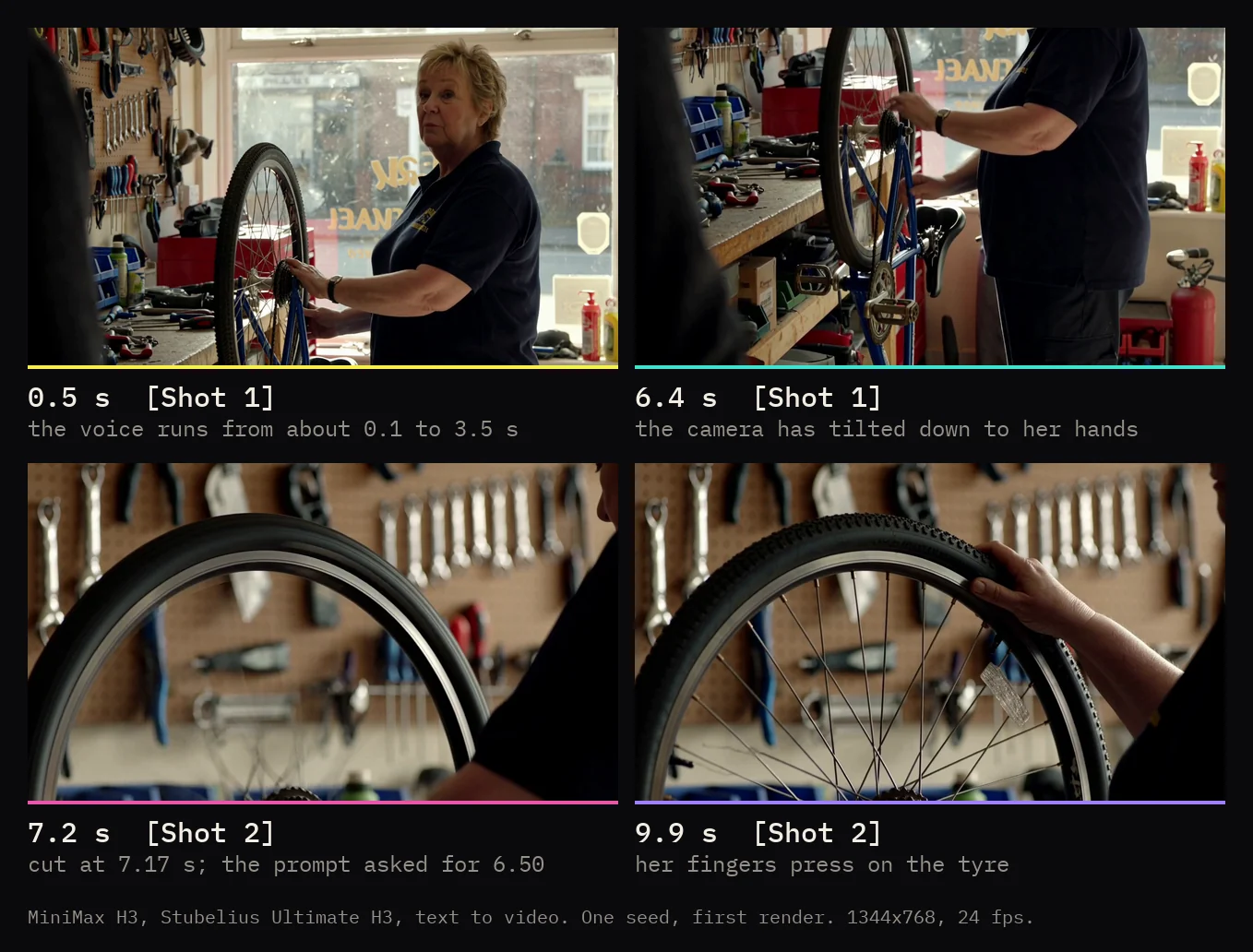
Two parts held. The dialogue came out word for word and started with no dead air, which is what an early <d> line and a speaker who is already talking as the shot opens are for. Whisper transcribed "Your chain was fine. It was the pedal making that noise.", and the voice runs from about 0.1 s to 3.5 s. The camera made the tilt down to her hands, and Shot 2 is the close-up of the wheel with her fingers on the tyre.
One part drifted. The cut came at 7.17 s, on the 173rd of 243 frames, about two-thirds of a second after the 00:06.500 in the prompt. Treat shot timestamps as a target, not a frame-exact edit, and leave room around them. This is one render on one seed, so read that as one sample, not as the model's tolerance.
Rendered 2026-10-01 on an RTX 5090 (32 GB), 96 GB RAM, Windows 11, ComfyUI 0.37.0. Stubelius Ultimate H3, MiniMax H3 fl2va int8, stock Qwen3-VL text encoder, Turbo 8-step LoRA at 0.75, 10 steps, euler with the beta scheduler, seed 20261001, 1344×768 at 24 fps. The prompt went in exactly as printed above. Cut found by frame difference, dialogue transcribed with Whisper large-v3-turbo.
Why is there silence at the start, a ghost voice, or no camera move?
The likely cause is in the prompt: a dialogue line placed late in [Shot 1] (silence at the start), a spoken line repeated in overall_soundscape (ghost voice), or camera motion stacked as labels at the end of a sentence (no camera move).
| Symptom | Likely cause in the prompt | Fix |
|---|---|---|
| Dead air before the first line | The <d> line sits late in [Shot 1], after a long scene set-up. | Confirm it with the command below. Then put the <d> line early in [Shot 1] and say the speaker is already talking as the shot opens. Or render longer and trim the head. |
| Ghost dialogue, the line echoed as background | The spoken line is repeated in overall_soundscape. | Keep dialogue in the description only. |
| Camera move ignored | Motion stacked as labels at the end of a sentence. | Rewrite it as an action inside the shot: type, amplitude, speed. |
| Speech runs past the end | More words than the clip can hold. | Shorten the line. If the cut-off is intended, mark it with <cutoff>. |
| Character drifts from the reference picture | [Shot 1] does not restate the picture. | Say that appearance, clothing, position and layout from <Picture 1> are preserved. |
Measure before you rewrite. This lists every stretch of 0.3 s or more where the soundtrack stays below -30 dB:
ffmpeg -hide_banner -i out.mp4 -af silencedetect=noise=-30dB:d=0.3 -f null -A first silence_start at about 0 is real dead air. A first silence_start well into the clip means there was sound from the first frame and the later gaps are pauses. The filter hears the whole mix, so under a score or loud ambience it cannot tell you when the voice starts.
What the Ultimate H3 Director node compiles for you
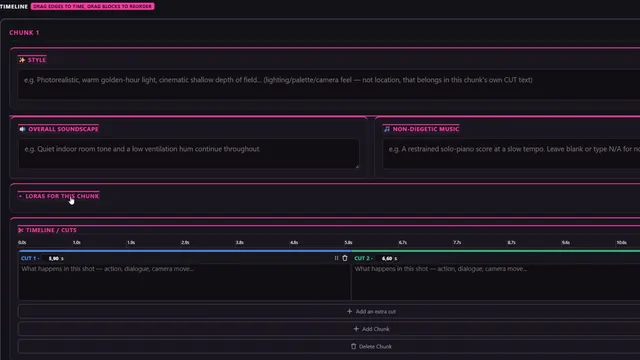
The Director node in Stubelius Ultimate H3 writes this format from a timeline. It is built on Muse Minimax Director V1.2 by Muse Collective, and the compile logic is in the public repo. In First/Last Frame mode it produces the three-field prompt, one per chunk (the chunk length setting goes up to 15 seconds):
- Each CUT with text becomes a
[Shot N]. The first has no timestamp, the rest getAt MM:SS.mmmfrom their position in the chunk. - Anything in straight double quotes is wrapped as
<d>[Language] ...</d>, using the timeline's dialogue language (English by default). Repeated punctuation is collapsed and a missing full stop is added. - Speaker IDs are yours to type in this mode, because the speaker picker on a CUT is a Reference-mode control. Write
The mechanic (S1) says: "Your chain was fine."in the CUT and the quoted words are wrapped for you. - An alignment sentence for the frames you loaded goes in as the first line of the description, in the Director's own wording, which is close to the guide's and not identical. An empty soundscape or music box becomes
N/A. The guide reservesN/Ain the soundscape for silent clips, so fill that box in.
In Reference (Omni) mode it writes the six-section version, and the speaker picker adds the (S1) style IDs next to the subject tags. The result comes out on the compiled_prompt output, so you can read what was compiled. Every quoted span is treated as speech, so a sign with quoted text needs a prompt you write yourself: wire it into prompt_override and it replaces the timeline, for every chunk, whenever it contains text.
Part 2 of ComfyUI From Zero covers structured prompting, with MiniMax H3 on screen.
Sources and files
- MiniMax H3 model card on Hugging Face: the pipeline description and the rewritten example prompts.
- Video Prompt Writing Guide for T2VA, I2VA, FL2VA and L2VA, and the full-reference guide.
- MiniMax's prompt-writing skills on GitHub.
- ComfyUI's stock MiniMax H3 nodes (the 17k+5 frame rule) and the ComfyUI MiniMax H3 tutorial.
- Stubelius Ultimate H3 on GitHub, and Muse Minimax Director V1.2, which it is built on.
- On this site: the Stubelius Ultimate H3 workflow, the earlier MiniMax H3 Director post and the course.
Common questions
Does MiniMax H3 work with a plain text prompt?
Nothing stops you typing prose into the prompt box, but the open checkpoints are only the generation stage. MiniMax's hosted pipeline rewrites the request into the structured format first, and the model card recommends building the same step into a local pipeline, so I write the three fields every time.
How many frames is a 10 second MiniMax H3 clip in ComfyUI?
243 frames, which is 10.125 seconds at 24 fps. The stock nodes snap the frame count up to the next 17k+5 value, so 240 becomes 243. A 5 second request is 124 frames and a 15 second request is 362.
Do I write the prompt in English if the dialogue is in another language?
Yes. MiniMax's guides ask for the fields in English and keep the original language only for the spoken words inside the dialogue tag and for text visible in the picture. The tag names the language in square brackets and the words are not translated.