STUUBZZZ
MiniMax H3 in 4 steps: PDMD LoRA vs NVIDIA's SoL Refiner, timed on an RTX 5090
 Watch the video · MiniMax H3 in 4 Steps: I Tested PDMD vs NVIDIA's SoL Refiner
Yes, on my three test clips. With PDMD's 4-step LoRA, MiniMax H3 finished a 6.6-second clip to 2520×1440 in 101 seconds on average on an RTX 5090, against 753 seconds for my 20-step Quality path, and by eye at 1:1 its own take looked solid. The same 20-step take finished with NVIDIA's SoL Refiner took about 790 seconds, and SoL changed faces and designs, so only PDMD went into my free workflow.
- On one RTX 5090 (32 GB) on 2026-10-04, PDMD's 4-step LoRA plus DLSS 5 finished a 6.6-second MiniMax H3 clip to 2520×1440 in 101 s, against 753 s for 20 steps, a 1.5× polish and DLSS 5, and by eye at 1:1 its own take looked solid. Mean of three clips, one run each.
- On an RTX 5090 (2026-10-04), a 20-step MiniMax H3 take finished with NVIDIA's SoL Refiner took about 790 s per 6.6-second clip (mean of two warm runs). SoL needed a 66 GB download and committed about 91 GB of memory, and changed what was rendered in all three test clips: eye colour, a nose, a train's windows, an anime character's jewellery and beauty mark.
- Since version 0.10 (2026-10-04), the free Stubelius Ultimate H3 workflow for MiniMax H3 has a PDMD mode: 4 steps,
eulerwithsimple, 0.98 megapixels and the PDMD LoRA at 1.0, loaded as published.
What are PDMD and the SoL Refiner?
PDMD, short for projected distribution matching distillation, comes from a 2026 paper by Zimo Wang and co-authors and is released under Apache-2.0. For MiniMax H3 it is a LoRA, 1.4 GB at rank 128, that teaches the model to make a video in 4 steps instead of 20, run with Euler and no CFG. It is a distillation LoRA, and there was no ComfyUI version, so I converted it for the test.
SoL Refiner is a one-step refiner for H3 video from NVIDIA research (NVlabs). It encodes a finished clip with LTX 2.5's VAE, doubles the latent, puts the noise back to 91%, runs one pass of its transformer, an LTX 2.5 fine-tune, and decodes with NVIDIA's own tiled diffusion decoder, up to 4K. The sound passes through untouched. Olli Sorjonen ported it to ComfyUI as Olm SoL Refiner.
The baseline is the Quality path of my workflow, Stubelius Ultimate H3: a 20-step take at about 768p (1344×768), a polish that renders it again 1.5 times bigger, then DLSS 5 with Color Lock up to 2K. It looks great, and it takes about 12.5 minutes per clip.
How did I test them?
With three 6.6-second clips (158 frames at 24 fps) that break in different ways: an old fisherman talking to the camera with lip sync, because faces show every mistake; a train on a viaduct, two shots with a moving camera, for detail and motion; and a 2D anime villainess with a Japanese line, because a character design has to stay on model. The renders of a clip shared one prompt and one seed, and each clip was finished seven ways to 2520×1440, the paths in the speed table. SoL's own 2688×1536 output was scaled to that size.
I judged the picture at 1:1, on playback. Sharpness scores don't help, because a sharpening filter wins all of them. Two numbers served as warning lights only: drift, the PSNR in dB between a finished clip and the render it came from (higher is closer), and flicker, the frame-to-frame change against the render (above 1.0 means added shimmer).
How fast is MiniMax H3 at 4 steps?
101 seconds per 6.6-second clip finished to 2520×1440, about 7.5 times faster than my 753-second Quality path. Only the turbo modes, at about half the pixels or fewer, were quicker.
| Path | Render | Seconds per clip |
|---|---|---|
| Speed + DLSS 5 | 0.4 MP, 8 steps, turbo LoRA | 65 |
| Hybrid + DLSS 5 | 0.5 MP, 10 steps, turbo LoRA | 90 |
| PDMD + DLSS 5 | 0.98 MP, 4 steps | 101 |
| Quality + DLSS 5, no polish | 0.98 MP, 20 steps | 261 |
| PDMD + SoL Refiner | 0.98 MP, 4 steps | 648 |
| Quality + polish + DLSS 5 | 0.98 MP, 20 steps | 753 |
| Quality + SoL Refiner | 0.98 MP, 20 steps | 791 |
Tested 2026-10-04 on an RTX 5090 (32 GB), 96 GB RAM, Windows 11. Three 6.6-second clips, one run per path. SoL Refiner ran in a separate ComfyUI install on the same machine; its times are warm runs.
Most of PDMD's gain is the polish it skips. The rest is the render itself: 67 seconds for 4 steps at 0.98 megapixels, against 222 for the 20-step take. DLSS 5 with Color Lock adds 33 seconds to either (how DLSS 5 and Color Lock work).
SoL Refiner spends its time in the decoder. In one warm 579-second run, the transformer pass took about 60 seconds and the decoder about 510, working through the full 2688×1536 in tiles with attention on every pixel.
The interesting pair is PDMD and Hybrid. Hybrid renders 0.5 megapixels, about 540p, in 10 steps with the turbo LoRA at 0.75, and took 90 seconds. PDMD renders 0.98 megapixels in 4 steps and took 101: about twice the pixels for 11 seconds more. A third speed LoRA, FastH3, is timed in FastH3 vs the turbo LoRA.

What does SoL Refiner do to a face?
On my fisherman clip it changed the face. At 1:1, his eyes went from blue-grey to brown, his nose changed shape, his skin turned waxy and younger, and his beard looks freshly combed. On the PDMD render, SoL did the same and added pale blotches on his forehead and cheeks.
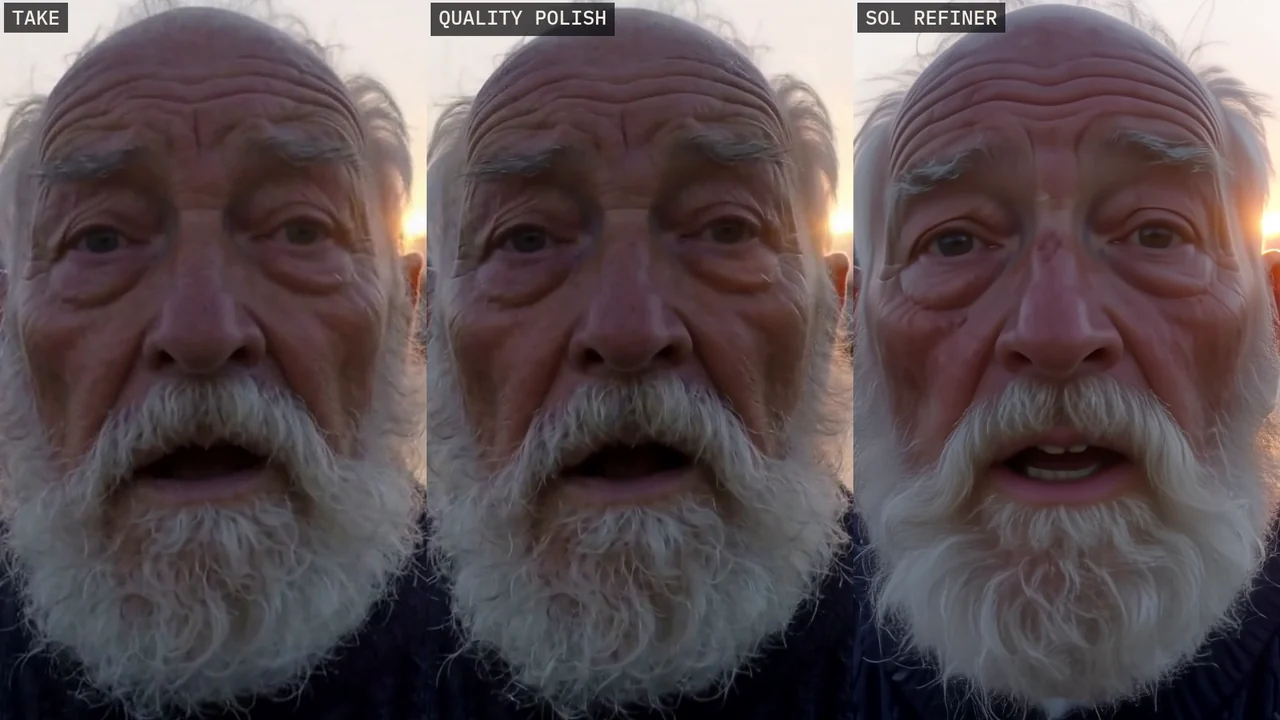
| Version | Face window | Whole frame |
|---|---|---|
| Quality take + DLSS 5 | 41.9 | 44.1 |
| PDMD + DLSS 5, against its own render | 41.4 | 43.5 |
| Quality + polish + DLSS 5 | 30.4 | 32.6 |
| Quality + SoL Refiner | 23.5 | 24.1 |
| PDMD + SoL Refiner | 23.6 | 23.4 |
DLSS 5 stays close to what was rendered, on either render. The polish scores lower because it redraws fine detail on purpose. At SoL's 23.5 dB it isn't refining any more. By eye, it is a different face.
What did SoL Refiner change on the train?
It didn't refine the picture, it redrew it: bigger windows, a different nose on the train, and the red pantograph on the roof turned black. The grass and the mountains became smooth paint, and the path at the bottom bends. It also added the most flicker, 1.09 against the render, which is 9% more frame-to-frame change than the take had. DLSS 5 measured 0.97 and the polish 1.04.
Does a 4-step render keep an anime character on model?
Mostly. PDMD kept the villainess's crimson drill curls, gold eyes and beauty mark, but her reference image has the mark under the other eye. SoL Refiner turned her pearl circlet into a metal band and her leaf tiara into curls, took off her beauty mark and painted on a blush. In a series where she has to look the same in every episode, that is a deal breaker.
SoL is a finisher, so it should keep what was rendered. PDMD renders its own take of the prompt and seed, so details such as her jewellery differ from the 20-step take.

The workflow's notes warn that turbo modes can mumble, so I checked her line. PDMD said all of it, laugh included, and was the loudest and clearest of the four modes at −18.2 LUFS. Hybrid also kept the laugh (−23.4 LUFS), Quality said the line (−24.0) and Speed dropped one word (−24.9).
What does SoL Refiner cost to run?
It is a 66 GB download, and it needs newer Diffusers and Triton than the rest of my ComfyUI, so it ran in a separate install. While it ran it committed about 91 GB of memory (RAM plus page file) on a 96 GB machine, and Windows grew the page file from 31 to 41 GB. SoL itself took about 9.6 minutes a clip. The ComfyUI port's licence doesn't allow redistribution, so it couldn't go into a free workflow anyway.
To be fair to it, SoL Refiner is a research release built to sharpen small drafts, and keeping faces was never its promise.
How do you use PDMD mode in Stubelius Ultimate H3?
- Update the pack with
git pullincustom_nodes/Stubelius-Ultimate-H3or Update All in ComfyUI Manager, then restart. PDMD mode is in version 0.10 and later. - Download
lora_model_0.safetensorsfrom pdmd2026/pdmd_4NFE_lora, exactly as published, intomodels/loras(model folders). - On the Setup node, set
modetoPDMD. It fills in 4 steps, theeulersampler, thesimplescheduler, 0.98 megapixels and LoRA strength 1.0, and you can change any of them afterwards. Euler with simple had no gross failure at 6 to 14 steps in my sampler test. - On the Models node, pick the file in
pdmd_lora. - On the Output node, pick native (about 768p), 1080p, 2K or 4K. Sizes above native go through RTX VSR or
DLSS5 + Color Lock. There is no polish in this mode.
ComfyUI can't read the published file as it is. It keeps the attention's query, key and value as three layers (to_q, to_k, to_v) with Diffusers names, while ComfyUI's H3 has them fused into one (qkv_proj). The workflow rebuilds it while it loads. I checked that against my hand-converted file: the same 624 tensors, and the same render, bit for bit.
When is PDMD, Quality or SoL Refiner worth it?
- PDMD for most shots, at about 100 seconds a clip.
- Quality with the polish for the shots that really have to hold up, when you have the time: about 12.5 minutes a clip.
- Speed and Hybrid for quick drafts, at 65 to 90 seconds.
- SoL Refiner stays out of my workflow. It changed faces, designs or objects on all three clips, it is heavy to run, and I can't ship it.
Part 2 of ComfyUI From Zero covers the steps and CFG a speed LoRA needs.
Test setup and limits
- Three 6.6-second clips, one prompt and one seed per clip, one run per path, one RTX 5090. Every time here is the mean of the three clips, except Quality + SoL Refiner.
- SoL's times are warm runs. The first SoL job of a session also loads the 66 GB and compiles its decoder, which added 222 seconds to the fisherman's run, so Quality + SoL Refiner is the mean of the other two clips.
- The timed PDMD runs used my hand-converted LoRA. On the fisherman clip, the workflow's PDMD mode gave the same render, bit for bit.
- Drift (from the fisherman) and flicker (from the train) are warning lights, not quality scores. PDMD's drift measures what DLSS 5 did to PDMD's own take, not how close PDMD comes to the 20-step take. Whether its characters held is my call, by eye at 1:1.
- Speed and Hybrid have times and a dialogue check here, but no picture verdict.
- No numbers here for other cards or for clips longer than 6.6 seconds.
Sources and files
- MiniMax H3 in 4 Steps: I Tested PDMD vs NVIDIA's SoL Refiner, the video this post belongs to: speed at 3:09, the fisherman at 4:22, the villainess at 5:37 and PDMD mode at 7:05.
- PDMD: Projected Distribution Matching Distillation for Video Diffusion Models by Zimo Wang et al. (2026), the code (Apache-2.0) and the 4-step LoRA.
- SoL Refiner by NVIDIA research (NVlabs), and Olli Sorjonen's ComfyUI port, ComfyUI-Olm-SoL-Refiner.
- MiniMax H3 model card. The model is MiniMax's, under the MiniMax H3 Community License.
- ComfyUI-DLSS5-Enhancer by Blueforcer, the DLSS 5 nodes.
- stuubszzz/Stubelius-Ultimate-H3: my free workflow, with PDMD mode from version 0.10.
- On this site: Stubelius Ultimate H3 and its modes, FastH3 vs the turbo LoRA, LoRA and checkpoint pairings, DLSS 5 vs RTX VSR and sampler settings.
Common questions
Can MiniMax H3 make a usable video in 4 steps?
With the PDMD LoRA it did on my three 6.6-second test clips on an RTX 5090: a talking close-up, a moving train and a 2D anime close-up. Finished to 2520×1440 with DLSS 5, a clip took 101 seconds on average, and by eye at 1:1 it looked solid, though the anime character's beauty mark moved to her other eye. For shots that must hold up, I still use the Quality path with its polish, about 12.5 minutes a clip.
Is NVIDIA's SoL Refiner worth it for MiniMax H3?
Not for the footage I tested. On three clips it changed eye colour, a nose, a train's windows and an anime character's jewellery and beauty mark, and the 20-step take plus SoL took about 790 seconds per clip, more than my whole 753-second Quality path. It also needed a 66 GB download, a separate ComfyUI install and about 91 GB of committed memory. It is a research release built to sharpen small drafts, and keeping faces was never its promise.
Do I need to convert the PDMD LoRA for ComfyUI?
Not in Stubelius Ultimate H3 from version 0.10. Put lora_model_0.safetensors into models/loras as published and pick it in pdmd_lora: the workflow fuses its separate query, key and value layers into ComfyUI's qkv_proj while it loads. Outside the workflow, ComfyUI can't read the published file as it is.