STUUBZZZ
Free AI influencer in ComfyUI: MOSS Image photos, one face, MiniMax H3 talking clips
 Watch the video · I Made a Higgsfield AI Influencer for Free on My Own PC (ComfyUI)
I made a consistent AI influencer for free in ComfyUI on one RTX 5090: MOSS Image for her photos, a character from eight pictures, a designed voice, and MiniMax H3 for 10-second talking clips. Her five clips in the video took about 2.5 minutes each: voice match 0.98 (WavLM), face match 0.65 to 0.86 (ArcFace; same person about 0.7).
- On an RTX 5090 (test of 2026-11-03), MOSS Image SFT by OpenMOSS took about 16 s per 1024×1280 photo at its makers' settings (50 steps, CFG 3); Qwen-Image 2.1 took about 9 s on the same six prompts and two seeds. I picked MOSS Image for its Apache 2.0 licence.
- One MOSS Image text description gave a different-looking woman almost every time: 11 photos matched the chosen face photo at 0.15 to 0.40 (ArcFace), where the same person usually scores around 0.7.
- MOSS Image's edit LoRA kept the face in 7 of 10 edits of one photo (one seed, about 9 s each, RTX 5090, 2026-11-03); the full-body, big-laugh and studio edits lost it.
- MiniMax H3 in Stubelius Ultimate H3 (Reference mode, Pika H3 Flex, 6 steps) made 10-second talking clips in about 2.5 minutes each on an RTX 5090, with voice match 0.98 to 0.99 across 21 takes.
- In 12 MiniMax H3 mirror-clip takes (RTX 5090, 2026-11-03), the clip jumped into places from the character's pictures (the cafe five times, a neon street once) until the character was rebuilt from three plain-wall pictures: then 0 of 2 takes left the hallway.
What did I build instead of Higgsfield's AI Influencer?
I built the four things a hosted AI influencer tool sells: photos of one made-up woman, the same face every time, her own voice, and videos where she talks. All of it ran locally in ComfyUI with free models, in under an hour of GPU time.
A free local AI influencer is a made-up character whose photos, face, voice and talking clips all come from open models on your own PC. Mine is Mira, an AI-made adult woman in her mid-twenties, nobody's likeness. AI Influencer by Higgsfield is the hosted version, paid in credits on Higgsfield's site; I did not render in it.
ComfyUI is a free, open-source program that runs image and video models on your own computer. The stack: MOSS Image by OpenMOSS for stills and its edit LoRA for new looks; VoxCPM2 by OpenBMB, a speech model that can design a voice from words; and MiniMax H3 by MiniMax, MiniMax's video model with sound, through my free Stubelius Ultimate H3 workflow.
Tested 2026-11-03 on an RTX 5090 (32 GB), 96 GB RAM, Windows 11, Stubelius Ultimate H3 0.15.1. Face: ArcFace, a face-recognition score, median over every third frame against her chosen photo (same person around 0.7). Voice: WavLM, a speaker-match score, against her clip (same speaker about 0.86 and up). Words: Whisper large-v3, a speech-to-text model.
Which makes better AI influencer photos, MOSS Image or Qwen-Image 2.1?
Both followed every prompt; I kept MOSS Image for its licence, not speed. At 1024×1280, MOSS Image took about 16 s a photo at its makers' 50 steps and Qwen-Image 2.1 about 9 s, median of 12 photos each (six shots, two seeds).
MOSS Image is a 5-billion-parameter image model from OpenMOSS with a Qwen3.5-9B text encoder and the small FLUX.2 VAE, released under Apache 2.0. It is in ComfyUI core (templates need 0.42 or newer). I ran it as its makers do: euler / sgm_uniform, CFG 3, shift 5 built in, skip-layer guidance on layer 22; Qwen-Image 2.1 at 40 steps, CFG 1. Don't add ModelSamplingSD3 to MOSS: it wrecks the built-in shift.
By my eye: MOSS gave a warm phone-photo look and kept the beauty mark in every shot; Qwen looked softer and more natural, and listened better when asked to look away from the camera. The licence decided it: MOSS Image is Apache 2.0. Qwen-Image 2.1 is under the Qwen Research License; read it before commercial use. More on Qwen in my FLUX 3 Klein vs Qwen-Image 2.1 test.
Why does one description give a different face each time?
Words don't pin down a face. One careful description (wavy chestnut hair, hazel eyes, freckles, a beauty mark above her lip, gold hoops) went into all six shots; against the cafe selfie, the other 11 MOSS photos matched at only 0.15 to 0.40.
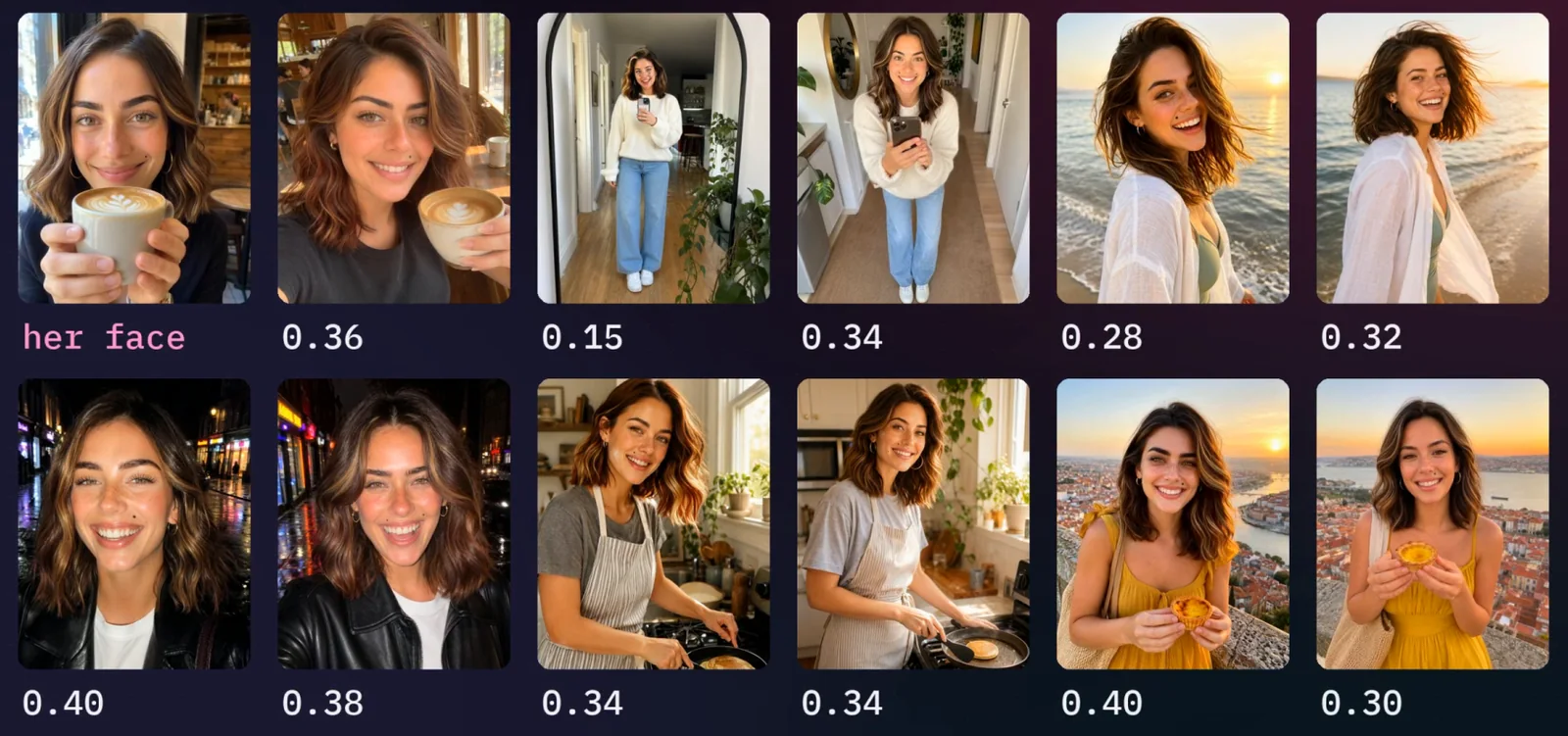
So her face had to come from a picture: the cafe selfie.
How do I keep an AI influencer's face consistent with MOSS Image's edit LoRA?
Give the MOSS Image edit LoRA by chinoll one photo and say what to change. In my test, 7 of 10 edits of the cafe selfie kept her face at a match of 0.44 or more, at about 9 seconds an edit.
Each instruction changed one thing and ended: "Keep the character, her face, hair, freckles and beauty mark, and the composition unchanged." Settings as Comfy's MOSS Image Edit template: 30 steps, CFG 4, euler / normal, 1 MP, LoRA at 1.0.
| Edit | Face match | Kept? |
|---|---|---|
| Cream knit sweater (came out full body) | 0.31 | No |
| Beach at golden hour | 0.68 | Yes |
| Warm evening lamp light | 0.62 | Yes |
| Night street with neon signs | 0.70 | Yes |
| Big open laugh | 0.22 | No |
| Winter: red scarf, snow outside | 0.44 | Yes |
| White linen shirt, grey studio wall | 0.32 | No |
| Three-quarter view | 0.56 | Yes |
| Orange juice instead of the latte | 0.88 | Yes |
| Loose low ponytail | 0.59 | Yes |
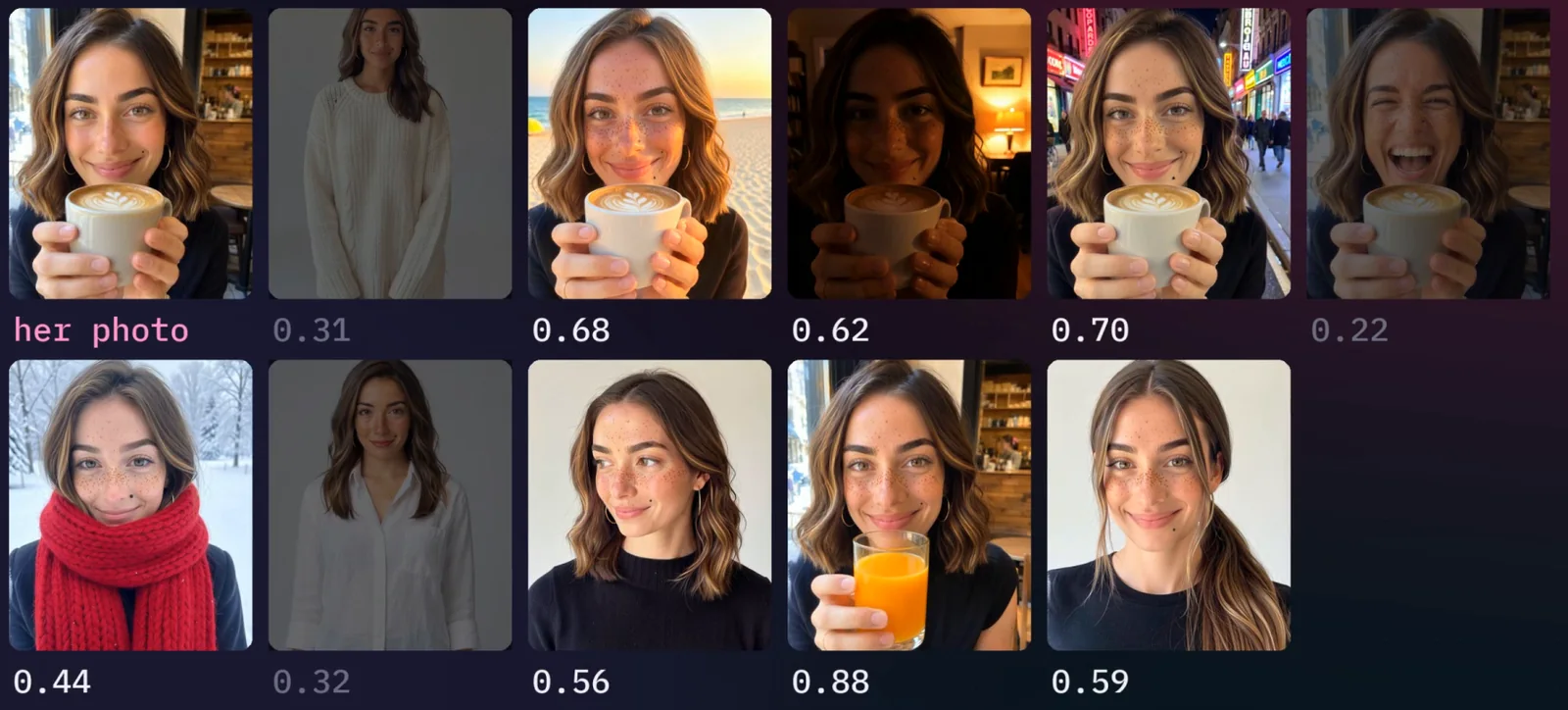
The edits piled on freckles, so check yours. The LoRA's project code is GPLv3, and the weights' licence isn't stated.
Then the original and the seven kept edits became one character with Make a Character in Ultimate H3's Director: eight pictures, 1.6 seconds, a 0.7 MB RefMod (the Director's character file). I cropped each to its top 62% first, or the cup becomes part of her and she holds it in every video. How a RefMod holds a face is in my RefMods vs reference images test.
How do I give an AI influencer a voice without cloning anyone?
Design one from words. VoxCPM2's voice design makes a new voice from a description, so nobody's voice is copied. I described "a young woman in her mid-twenties, bright, warm and friendly", made four versions of one line, and kept the one Whisper heard word for word at a relaxed 178 words a minute.
The only cloned voice in the video is the narration: my own, cloned with Fish Audio Drama 3. For cloning your own voice, see six free local voice clones against a real voice.
How well does MiniMax H3 make an AI influencer talk?
Well enough to post. In Stubelius Ultimate H3's Reference mode with Pika H3 Flex, MiniMax H3 said every line word for word after one rewording, matched her voice clip at 0.98 to 0.99, and matched her face at 0.65 to 0.86 in the video's clips. Each 10-second clip took about 2.5 minutes.
Each clip got her photo as <Picture 1>, her character and her voice as <Audio 1>. I chose Pika H3 Flex by Pika because my sound test found it the clearest of the fast modes. Settings: 6 steps, lcm / simple, 0.98 megapixels (1344×768, or 768×1344 vertical), 24 fps.
| Clip | Words heard | Voice match | Face match | Render |
|---|---|---|---|---|
| Street walk, seed 101 | 18 of 18 | 0.985 | 0.79 | 159 s |
| Cafe, seed 101 | 19 of 19 | 0.982 | 0.86 | 150 s |
| Mirror, reworded line, seed 202 | 16 of 16 | 0.991 | 0.65 | 155 s |
| Kitchen, seed 101 | 13 of 14* | 0.983 | 0.69 | 160 s |
| Rooftop, 9:16 vertical, seed 101 | 14 of 14 | 0.986 | 0.68 | 153 s |
*Whisper wrote "Sunday" as "sundae" in both kitchen takes; the video counts it as heard. The takes shown are inferred from these scores. All 21 takes rendered in 140 to 174 s.
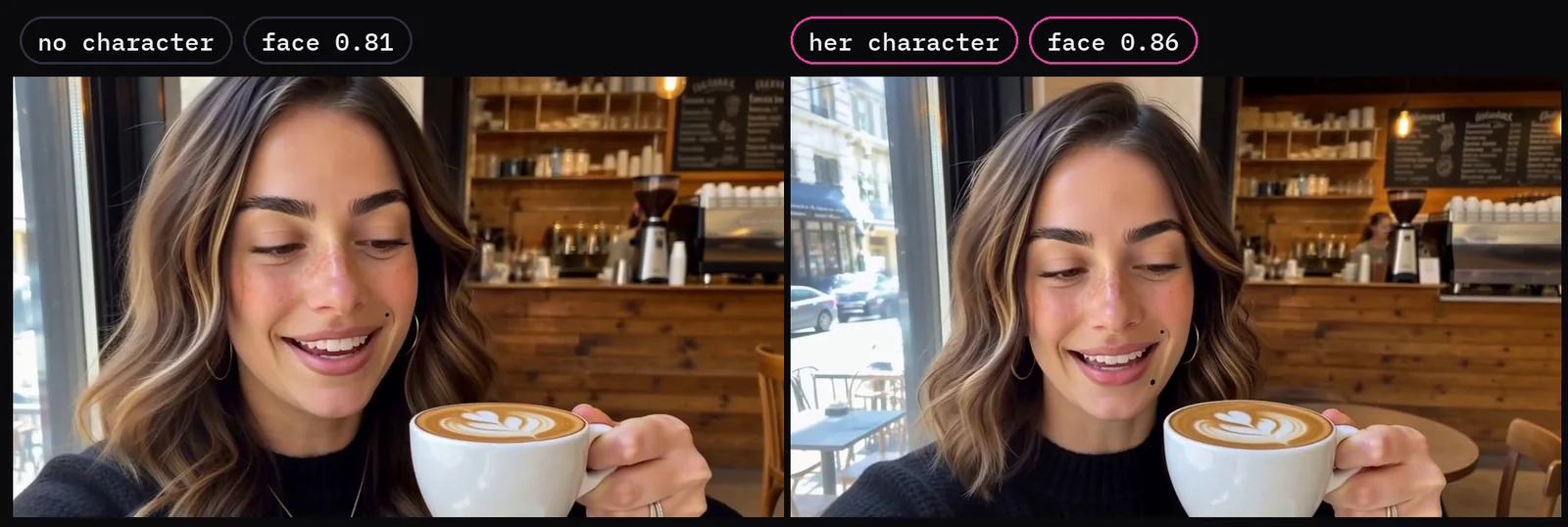
Without the character, the cafe clip matched at 0.81, not 0.86. It matters more in a long video, where every chunk has to be her.
Why did her mirror clip keep jumping back to the cafe?
The pictures her character was made from: two of the eight were in that cafe. In 12 mirror-clip takes, MiniMax H3 whipped from the hallway into a source picture's place until I rebuilt the character from three plain-wall pictures; then both takes stayed put.
| Set-up | Seeds | Takes that left the hallway |
|---|---|---|
| Her cafe photo + her character (8 pictures) | 101, 202, 303, 404, then the reworded line on 101, 202 | 3 of 6, into the cafe |
| Her photo on a plain wall + the same character | 101, 404 | 2 of 2, still the cafe |
| A character without the cafe pictures (6 pictures) | 101, 404 | 1 of 2, into the neon street |
| A character from plain walls only (3 pictures) | 101, 404 | 0 of 2, stayed in the hallway |
The rule: make your character's pictures on plain backgrounds, and put the places in the prompt. Two takes per set-up is a small sample.
How does the free local route compare with Higgsfield's AI Influencer?
Both make photos of one character and videos of her; the local route also gave her a designed voice. Higgsfield runs on its own site for credits and outputs 1080p. Locally you pay in setup and render time, about 2.5 minutes a clip.
| Free local route in ComfyUI | Higgsfield AI Influencer | |
|---|---|---|
| Where it runs | Your own PC | Higgsfield's website, and an extension in ChatGPT |
| Cost model | Free files; render time on your GPU | Credits |
| Photos | MOSS Image, about 16 s each at 1024×1280 | A portrait and full-body pair per character |
| Same face | Edit LoRA plus Make a Character; 7 of 10 edits kept it | Add one face photo, or build the character from settings |
| Voice | Designed in VoxCPM2 from a description | Not described on the page |
| Video | MiniMax H3 talking clips, 10 s at 1344×768 or 9:16, about 2.5 min each | 1080p videos in Higgsfield Genjutsu: she performs a trending motion or your own 3–30 s clip |
I didn't compare Higgsfield's faces, voices or speed.
Licences differ too. MOSS Image is Apache 2.0. MiniMax H3 is under the MiniMax H3 Community License, which lists as a prohibited use sharing output publicly "without clearly and prominently disclosing that such information and/or content is machine-generated". Read every licence before commercial use; this isn't legal advice.
How do I set up the free AI influencer workflow in ComfyUI?
Install Stubelius Ultimate H3 from GitHub main (now 0.16.2; the test ran on 0.15.1), add the MOSS Image files, then follow five steps. Details in my Ultimate H3 guide.
- From Comfy-Org/MOSS-Image, put
moss_image_sft_int8_convrot(5.41 GB),qwen3.5_9b_int8_convrot(9.75 GB),flux2-vae_small(0.25 GB) andmoss_image_edit_lora_rank_64_bf16(0.30 GB) in their model folders. - Write one detailed description; pick the photo that is her face.
- Make about ten one-change edits; keep those that still look like her, some on plain backgrounds.
- Crop out anything she shouldn't carry; press
Make a Characterin the Director. - Design her voice in VoxCPM2, then render in Reference mode with photo, character and voice clip, places in the prompt.
New to nodes? Start with the free Part 1 of ComfyUI From Zero.
What should you check before posting an AI influencer?
Three things before she goes anywhere public: label her as AI, read the licences before she earns money, and don't let her look like a real person. YouTube, TikTok and Instagram all ask for an AI label.
- Label it as AI. YouTube requires its "AI use" setting, at upload, for realistic AI content; on TikTok and Instagram, add their AI label when you post.
- Read the licences before earning. Read the MiniMax H3 Community License and MOSS Image's Apache 2.0 before commercial use; this isn't legal advice.
- No real person's likeness. Mira is made up.
What are the limits of this test?
This is one build, not a benchmark: small samples, mostly one or two seeds per test, and my own eye for the looks.
- One RTX 5090 (32 GB), one character, one day (2026-11-03).
- Photos: six shots, two seeds per model. The look comparison is my eye only.
- Edits: one seed each; the 0.44 keep line is my cut-off, not a standard.
- Clips: 21 takes, mostly two seeds per clip; "left the hallway" judged by eye. The word score ignores extra words: the seed-101 rooftop take opened with a stray half-sentence.
- Not tested: Higgsfield's product, other GPUs, VRAM use, longer clips, a second character.
Sources and files
- I Made a Higgsfield AI Influencer for Free on My Own PC (ComfyUI), the video: photos, MOSS Image vs Qwen at 1:10, the same face at 2:42, her voice at 4:03, talking videos at 4:44, plain backgrounds at 6:32, the rules at 7:39 and the free workflow at 8:07.
- MOSS Image: model card, ComfyUI files, chinoll's edit LoRA and its code.
- VoxCPM2; MiniMax H3 and its licence; Pika H3 Flex in Comfy-Org/MiniMax-H3; Stubelius Ultimate H3.
- Higgsfield's AI Influencer (no affiliation).
- On this site: the Pika H3 Flex sound test, RefMods vs reference images, character swaps with MiniMax H3 and the ComfyUI From Zero course.
Common questions
Is it really free to make an AI influencer in ComfyUI?
Yes, in software: MOSS Image, VoxCPM2, MiniMax H3 and Stubelius Ultimate H3 are free, and everything in the video took under an hour of GPU time. You do need a GPU that runs MiniMax H3: mine was a 32 GB RTX 5090, and my 8 GB test is in its own post.
How much VRAM do I need for a local AI influencer?
Unmeasured for this build: I made it on a 32 GB RTX 5090 without logging VRAM. In another test on that 32 GB card, the whole card peaked at 30.4 GB with MiniMax H3 in PDMD mode; that is a peak, not the least it can run on; it also runs on an 8 GB RTX 3060 Ti.
Can I use MOSS Image photos commercially?
MOSS Image is released under Apache 2.0 for its weights and inference code. The edit LoRA's code is GPLv3 and its weights' licence isn't stated, so read each licence before commercial use; this isn't legal advice.
Why make a character file if her photo already holds the face?
For one short clip it added little: 0.86 face match against 0.81 without, one seed. It matters in long videos, where every chunk must stay her.
Does MiniMax H3 copy the voice clip I give it?
Closely: across 21 takes, her speech matched the VoxCPM2 clip at 0.98 to 0.99 (WavLM), where the same speaker scores about 0.86 and up. I didn't try clips from other voice models.