STUUBZZZ
Free ElevenLabs alternatives on your PC: six local voice clones, 84 takes scored
 Watch the video · I Tested 6 Free ElevenLabs Alternatives on My PC, One Clearly Won
The best free ElevenLabs alternative in my test of six local engines cloning my own voice was VoxCPM2 inside VoiceStudio. On an RTX 5090 it read 10 of 12 takes word-perfect, scored 0.962 for voice match (two recordings of my real voice score 0.987), and needed 13.8 seconds per 10 seconds of speech and 6.5 GB of VRAM.
- In my 84-take test of six free voice-clone engines on an RTX 5090 (6 November 2026, my own voice, 6 lines × 2 seeds), VoxCPM2 inside VoiceStudio 0.5.7 won: 10 of 12 takes word-perfect, 1.1% word errors, 0.962 voice match.
- VoiceStudio's default model, OmniVoice, was the fastest in my RTX 5090 test (1.3 s per 10 s of speech) but only 7 of 12 takes were word-perfect, and VoiceStudio's licence record lists it as CC-BY-NC, non-commercial.
- Fish Audio's S2 Pro and Drama 3 also got 10 of 12 takes word-perfect in my November 2026 test, but took 25.3 and 41.2 s per 10 s of speech and added 19.9 and 24.6 GB of VRAM on an RTX 5090.
- VoxCPM2 as a ComfyUI node got only 6 of 12 takes word-perfect in my 6 November 2026 test: four started with a stray "it". Inside VoiceStudio, the same model never did.
What are VoiceStudio and VoxCPM2?
VoiceStudio is a free, open-source desktop app (AGPL-3.0) by debpalash that clones, designs and transcribes voices on your own PC. VoxCPM2 is an open voice-clone model from OpenBMB that copies a voice from a short recording. A local voice clone is a text-to-speech model like these that runs on your own computer.
ElevenLabs is a cloud service for text to speech and voice cloning; VoiceStudio's GitHub page calls the app "the open-source, fully-local ElevenLabs alternative". VoiceStudio's catalogue lists VoxCPM2 with 30 languages, 48 kHz output and voice design, at about 5 GB. Every voice cloned in my test is my own.
Which six free voice clones did I test?
VoiceStudio's default OmniVoice, VoxCPM2, Fish Audio's Drama 3 and S2 Pro, LongCat 3.5B and Chatterbox. Five of them I already used as custom nodes in ComfyUI or in their own environments. VoxCPM2 ran twice, as a ComfyUI node and inside VoiceStudio, which makes seven runs.
ComfyUI is a free, open-source program that runs image and video models on your own computer; with custom nodes it runs voice models too.
| Engine | Maker | Where it ran | Licence |
|---|---|---|---|
| OmniVoice (VoiceStudio's default) | k2-fsa | VoiceStudio 0.5.7 | CC-BY-NC for the weights, per its model card and VoiceStudio's licence record |
| VoxCPM2 | OpenBMB | VoiceStudio, and the ComfyUI-VoxCPM2 node | Apache 2.0 |
| Drama 3 (W6A8) | Fish Audio | ComfyUI-Drama3 node | Fish Audio Community License 1.0 (on its model card) |
| S2 Pro | Fish Audio | ComfyUI-FishAudioS2 node | Fish Audio Research License |
| LongCat-AudioDiT 3.5B | Meituan | ComfyUI-LongCat-AudioDIT-TTS node | MIT |
| Chatterbox | Resemble AI | its own Python environment | MIT |
How did I score each clone against my real voice?
Every engine cloned the same 19 seconds of my voice, said the same six lines with two seeds each, and every take was scored three ways: word errors, voice match and speed. Seven runs of 12 takes gave 84 takes in all.
- The reference: 19.2 seconds of me, three whole sentences, with its transcript.
- The lines: my blind-test sentence, a line full of numbers, one with the names ComfyUI, MiniMax H3 and LoRA, a long sentence, a question and a plain line. Seeds 330697 and 111.
- Word errors: faster-whisper with the Whisper medium model, on the CPU, writes down what it hears. A take is "perfect" when no word is wrong; the word error rate is the share of words it got wrong.
- Voice match: Microsoft's WavLM-base-plus-sv, a speaker-verification model, compares each take with two held-out recordings of me (13.7 s and 8.1 s) and averages the two. For scale, two AI-designed voices scored 0.749 and 0.609 against my recording.
- Speed: seconds the engine spent per 10 seconds of speech, warm (the median without each run's first take, which includes loading).
- VRAM: the peak while the engine ran, minus what was already in use before it started.
Tested 2026-11-06 on an RTX 5090 (32 GB), 96 GB RAM, Windows 11 (how I test). VoiceStudio 0.5.7 with its default settings; the ComfyUI engines at the settings I use for narration. 84 takes, one run each (VoxCPM2 once per app).
Which free ElevenLabs alternative won, and by how much?
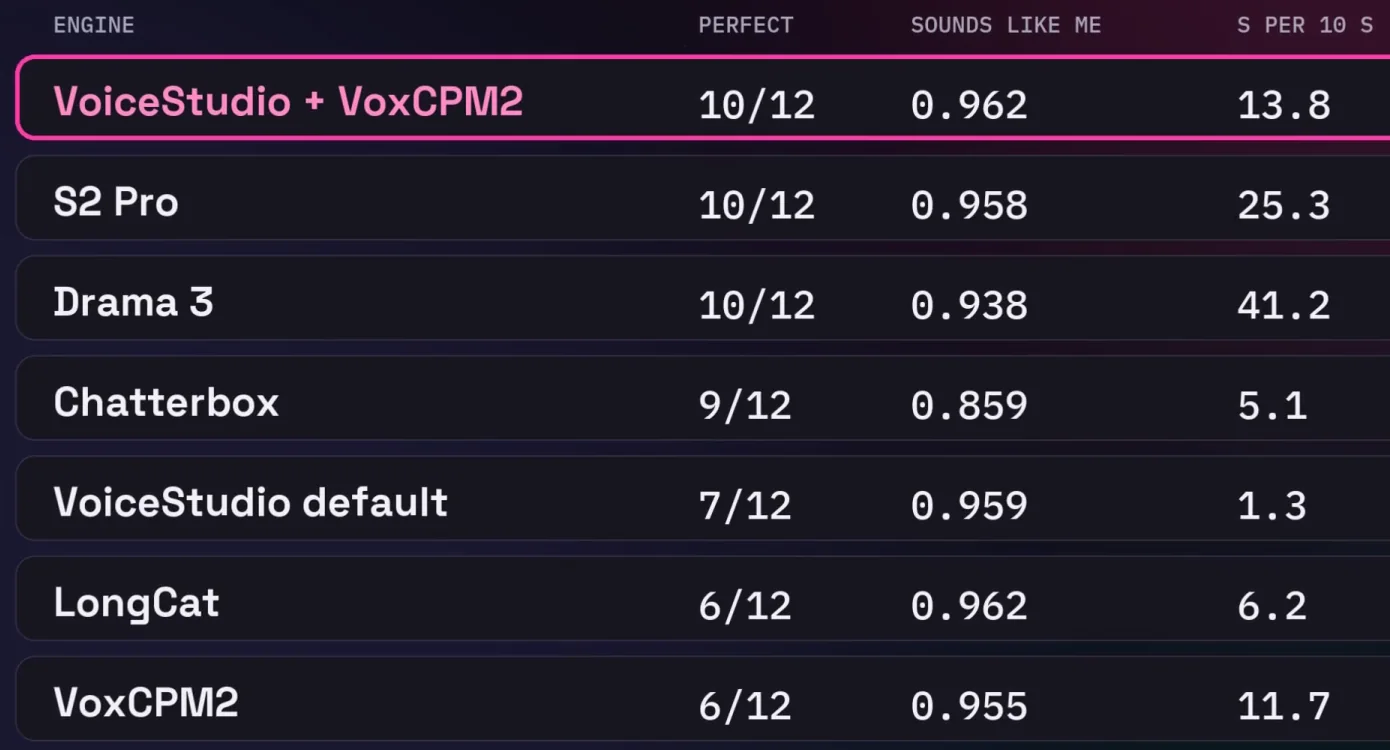
VoxCPM2 inside VoiceStudio won. It tied for the most word-perfect takes (10 of 12) and, with LongCat, for the closest voice match (0.962; my two real recordings score 0.987 against each other), and of the three engines at 10 of 12 it was the fastest and used the least VRAM. There is no combined score: the table has every number.
| Engine | Word-perfect takes | Word error rate | Voice match (mean / min) | s per 10 s of speech | VRAM added |
|---|---|---|---|---|---|
| VoxCPM2 in VoiceStudio | 10/12 | 1.1% | 0.962 / 0.944 | 13.8 | 6.5 GB |
| Fish Audio S2 Pro | 10/12 | 1.1% | 0.958 / 0.940 | 25.3 | 19.9 GB |
| Fish Audio Drama 3 | 10/12 | 1.8% | 0.938 / 0.885 | 41.2 | 24.6 GB |
| Chatterbox | 9/12 | 1.8% | 0.859 / 0.793 | 5.1 | 4.9 GB |
| OmniVoice (VoiceStudio default) | 7/12 | 4.7% | 0.959 / 0.944 | 1.3 | 2.8 GB |
| LongCat 3.5B | 6/12 | 10.9% | 0.962 / 0.937 | 6.2 | 8.9 GB |
| VoxCPM2 in ComfyUI | 6/12 | 4.3% | 0.955 / 0.902 | 11.7 | 7.5 GB |
No take broke (no pause over 1.5 seconds inside the speech, and no take far off the line's length). The blind-test take that opens the video, VoxCPM2 in VoiceStudio on seed 330697, had no word errors and a 0.975 match, about what the 19-second reference itself scores against my held-out recordings (0.976 and 0.975).
Which clones misread words, and which words?
LongCat 3.5B made the most, with a 10.9% word error rate: it garbled both of its numbers takes and both of its names takes. Only VoxCPM2 inside VoiceStudio read the names line ("ComfyUI", "MiniMax H3", "LoRA") right on both seeds.
- LongCat 3.5B: "2 minutes and 41 seconds" came out as "10 minutes and 40 seconds" on one seed, and "MiniMax H3" as "MinimaHTUR".
- OmniVoice: ComfyUI came out as words like "Konfui" and "CanvUI" in four takes.
- VoxCPM2 in ComfyUI: four takes began with a stray "it", pulled from the end of my reference.
- Chatterbox and Drama 3: "a LoRA" came out as "Allora" or "Elora" on names takes.
- VoxCPM2 in VoiceStudio: two wrong words on one blind-test take and one on one numbers take, nothing else.
How fast is each clone, and how much VRAM does it need?
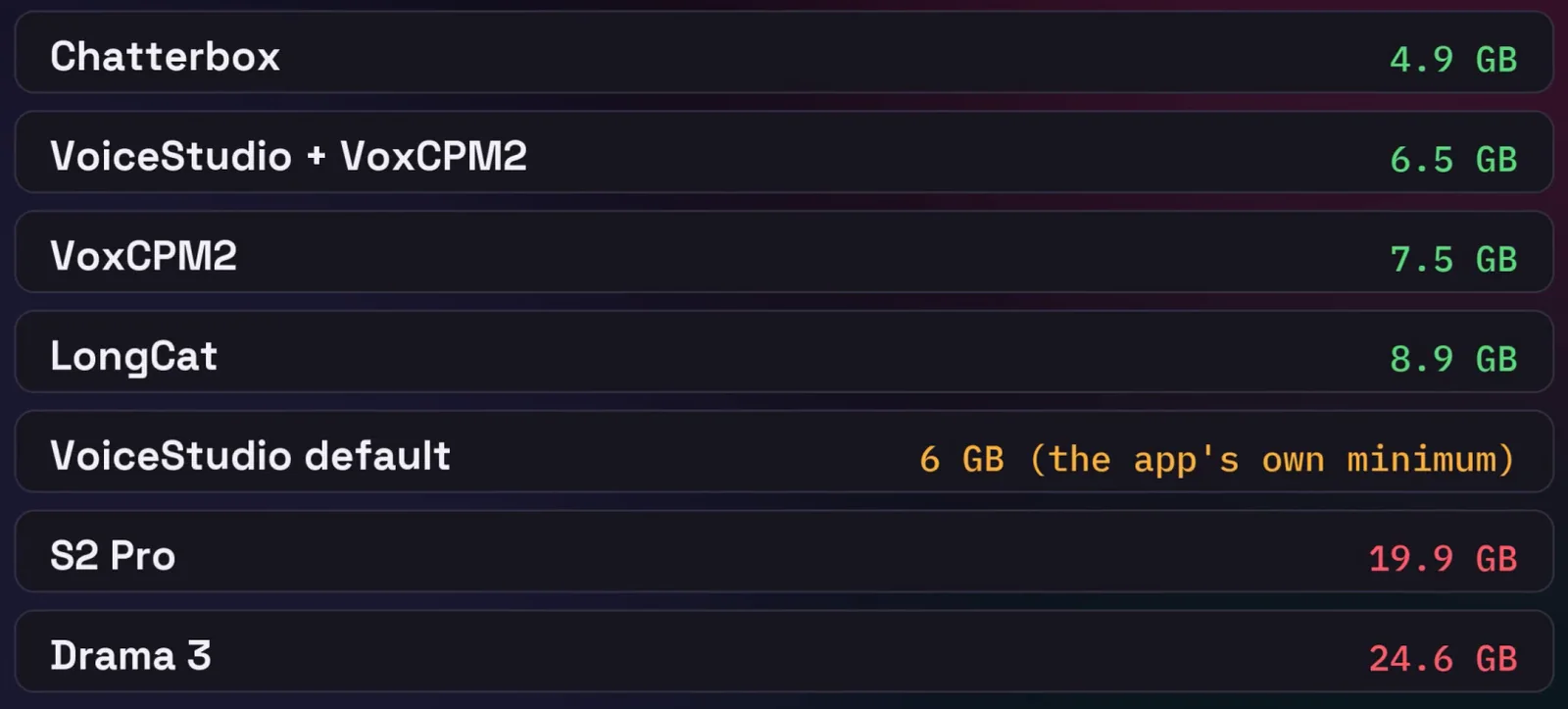
OmniVoice was by far the fastest, 1.3 seconds per 10 seconds of speech, and Drama 3 the slowest at 41.2. Chatterbox, both VoxCPM2 runs and LongCat added 4.9 to 8.9 GB of VRAM; S2 Pro and Drama 3 added 19.9 and 24.6 GB.
These are peaks above what was already loaded, not minimums. For OmniVoice I measured 2.8 GB added, but VoiceStudio states 6 GB as the app's own minimum, so plan for that. For what fits on smaller cards, see AI at every VRAM size, 8 GB to 32 GB.
Why did VoxCPM2 do better in VoiceStudio than in ComfyUI?
I don't know the cause, only the result: on the same reference, lines and seeds, VoxCPM2 as a ComfyUI node started four of 12 takes with a stray "it", and inside VoiceStudio it did that on none. The stray word was the only error in both of its question takes; its other four imperfect takes had other misheard words too.
The two runs also used different settings: the ComfyUI node at my narration settings (CFG 2.0, 10 steps, normalize_text on), VoiceStudio at its defaults (guidance 2.0, denoise on, the "broadcast" effect preset).
One thing to fix in the sound of VoxCPM2 inside VoiceStudio: in my narration it added a treble band my real voice doesn't have. In the video's narration, 14 to 18 kHz sat at −43.7 dB against the speech, where my real voice sits at −56.9; it sounded like a constant echo. A low-pass filter at 12 kHz, which cuts everything above that, brought it to −57.2 dB.
Can you use these clones on a monetised channel?
That depends on each model's licence, and they differ. VoxCPM2 is Apache 2.0. OmniVoice, VoiceStudio's default, has non-commercial weights: its own model card says the pre-trained model is CC-BY-NC (its code is Apache 2.0), VoiceStudio's licence record agrees, and the app asks you to accept it.
Fish Audio's research licence for S2 Pro says any commercial use needs a separate written licence from Fish Audio. VoiceStudio itself is AGPL-3.0, and its README says "Model weights, voices and generated output have their own licences". The full list is in the engines table above.
My channel makes money, so the video plays no OmniVoice or S2 Pro audio. Read each licence yourself; this isn't legal advice.
How do I install VoiceStudio on Windows and switch it to VoxCPM2?
Download the Windows installer only from VoiceStudio's GitHub release page or voicestudio.sh, the project's own site (its README links it as the website). Point its App environment at a drive with space, then pick VoxCPM2 in the model list.
- Get the installer (v0.5.7 in my test, 211 MB) from the GitHub release. Windows may warn you: the release notes say the installer isn't code-signed yet.
- On the first setup screen, press Change… next to App environment and pick a big drive. I missed this and about 30 GB landed on C: (18.6 GB of Python runtime, 10.8 GB of models), against the docs' figure of about 10 GB.
- On first start it checks your system, asks about analytics (off unless you say yes), downloads its default model and asks you to accept that model's licence.
- Open Settings → Models → TTS and press Select on VoxCPM2 (about 5 GB). It is Apache 2.0, with nothing extra to accept.

If you'd rather stay in ComfyUI, the workflow basics are in the free Part 1 of ComfyUI From Zero.
How do I record a reference that clones well?
Record 15 to 30 seconds of your normal voice in whole sentences, in a quiet room, with no music, and type out exactly what you said, because most of these engines read the transcript too. The recording you clone from decides most of the result.
My first reference for this test started and ended mid-sentence, and Drama 3 went silent on 2 takes out of 10. With whole sentences, it was zero.
Can Claude speak in your cloned voice?
Yes. VoiceStudio has an MCP (Model Context Protocol) server built in, which lets an AI agent use the app's tools. Adding it to Claude Code, Anthropic's AI agent that runs on your computer, is one command. I asked Claude for one sentence, and the clip came back in my cloned voice about 41 seconds later, model loading included.
The command is claude mcp add --transport http voicestudio http://localhost:3900/mcp/, with VoiceStudio running. For Claude editing a whole video, see Claude in FilmCraft and an AI agent's MiniMax H3 video, narrated with Drama 3.
Should you cancel ElevenLabs for a free local voice clone?
For narration in your own voice, in English, a free local clone was good enough for my channel: the whole video is narrated by VoxCPM2 inside VoiceStudio, cloned from the same 19 seconds. I did not test ElevenLabs' other languages or real-time voices; if you need those, test them first.
I made three takes of every sentence, about 40 minutes of generation, and kept the best. One of these engines also gave the AI influencer I built locally in ComfyUI her voice.
What are the limits of this test?
This is one voice, one reference and one run of each setup on one graphics card, scored by two models rather than a listening panel, so read the ranking as my result, not a general one.
- 84 takes: seven runs (six engines, VoxCPM2 twice) × 6 lines × 2 seeds, one run each, on one RTX 5090 (32 GB).
- One voice, mine, in English, from one 19.2-second reference. Other voices, accents and languages may rank differently.
- Voice match is a speaker-verification model's score against two held-out recordings, not a listening panel. Word errors are what Whisper medium heard, after a few name spellings are accepted.
- VRAM is the peak above what was already loaded, not a minimum; OmniVoice's 2.8 GB is below VoiceStudio's stated 6 GB minimum. Speed is warm, without loading.
- Not tested: ElevenLabs itself, CPU-only speed, other GPUs, other languages, real-time use, and the other models in VoiceStudio's catalogue.
Sources and files
- I Tested 6 Free ElevenLabs Alternatives on My PC, One Clearly Won, the video this post belongs to: the engines at 0:52, installing VoiceStudio at 1:53, the reference at 3:00, the test at 3:45, the winner at 6:35, the licences at 7:52, the MCP at 9:09 and the verdict at 9:52.
- VoiceStudio on GitHub (README, releases, licence), its privacy settings page and voicestudio.sh, the project's own site.
- The VoxCPM2 model card by OpenBMB and the OmniVoice model card by k2-fsa.
- Fish Audio on GitHub, makers of Drama 3 and S2 Pro, and the S2 Pro licence.
- faster-whisper and the Whisper medium model, the word check; WavLM-base-plus-sv, the voice match.
- On this site: AI at every VRAM size, the free AI influencer and the ComfyUI From Zero course.
Common questions
Is VoiceStudio free?
Yes. VoiceStudio is free and open source under AGPL-3.0, and it runs on your own PC. Each voice model inside it has its own licence, though, and its default model, OmniVoice, is listed as non-commercial, so read the model's licence before commercial use.
Which free voice clone is best for commercial use?
VoxCPM2, in my test: it won, and its model card gives Apache 2.0. LongCat and Chatterbox are MIT (LongCat card, Chatterbox card); OmniVoice's weights are CC-BY-NC per its model card; S2 Pro is under the Fish Audio Research License, which asks for a separate written licence for commercial use; Drama 3 is under the Fish Audio Community License 1.0 named on its model card. Read each licence before commercial use; this isn't legal advice.
Can I run a local voice clone without an NVIDIA GPU?
Yes, according to VoiceStudio's README, which says the app is fully usable on the CPU, just slower. I did not time that; all my numbers are from an RTX 5090.
Can I clone someone else's voice with these tools?
Only with their permission. VoiceStudio's README says "Clone a voice only with its owner's permission", and the licence on Drama 3's model card forbids imitating an identifiable person's voice without their prior consent. Every voice cloned in my test is my own.
Is the narration in the video a voice clone?
Yes. The whole video is narrated by my own voice cloned with VoxCPM2 inside VoiceStudio, from the same 19 seconds used in the test, low-passed at 12 kHz.
Does audio from VoiceStudio carry a watermark?
Yes, by default in my install. VoiceStudio has an invisible-watermark setting under Settings → Privacy (its privacy docs), shown on screen as on by default, so the audio can be identified as AI later. It was on for the video's narration.