STUUBZZZ
AI character swap in ComfyUI with MiniMax H3: a free Genjutsu alternative, 7 swaps tested
 Watch the video · Higgsfield Genjutsu vs ComfyUI - Create Character Swaps Locally
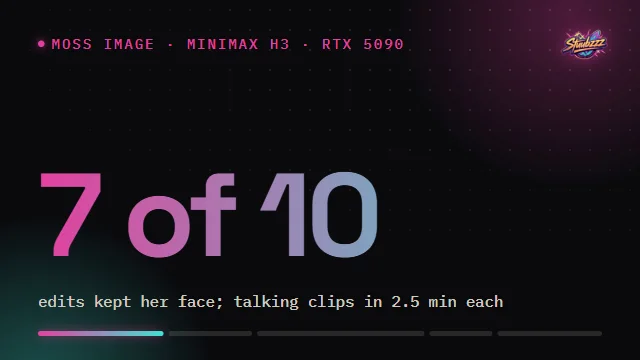
A free, local alternative to Higgsfield's Genjutsu is Akatz Labs' H3 Character Swap for MiniMax H3 in ComfyUI. On my RTX 5090 at the 768 setting, an 8-second swap took about 6 minutes and kept the clip's own sound. In seven test swaps, a hard cut broke it and one clip drifted back to the source person.
- Akatz Labs' H3 Character Swap (LoRA V1.5 on MiniMax H3, 8 steps, 768 setting) took 332 to 385 seconds per 6.6 to 8-second clip in ComfyUI on an RTX 5090 (one run per clip, 2026-11-03).
- A 15-second clip took 13.7 minutes (822 s) with the MiniMax H3 character swap on an RTX 5090, and the swapped-in character held from the first frame to the last (one run, 2026-11-03).
- The MiniMax H3 character swap kept each source clip's own soundtrack: 0.9955 to 1.000 correlation with the source on all seven of my test swaps (RTX 5090, 2026-11-03).
- At the 480 setting, the same 8-second MiniMax H3 swap took 2.7 minutes instead of 6.2, but the face no longer matched the character: ArcFace 0.30 to her picture against 0.52 at 768 (one run each, RTX 5090, 2026-11-03).
- In seven MiniMax H3 character swaps on an RTX 5090 (2026-11-03), a hard cut brought the original person back for about 1.5 seconds, and one swap drifted back to the source dancer for 3.7 of 8 seconds.
What is H3 Character Swap, and how does it compare with Higgsfield Genjutsu?
H3 Character Swap is a 155 MB LoRA by Akatz Labs that teaches MiniMax H3 by MiniMax to replace one person in a clip with the character in a picture, while Meta's SAM 3.1 finds the person and the clip keeps its own sound. It does one of the jobs Higgsfield's Genjutsu sells as a hosted tool, swapping a person, locally and for free.
Akatz Labs publishes the workflow and node pack on GitHub and the swap LoRA on Hugging Face. Comfy Org's own Openjutsu app runs the same workflow, pinned at commit 0670e4f, with one model change: LoRA V1.5 instead of V1. That is the version I ran.
Genjutsu, by Higgsfield's own guide, swaps a person, product, outfit or text in a 4 to 30-second clip, at up to 1080p. It is paid in credits, and the free runs some plans include work only on higgsfield.ai. I did not run Genjutsu, so there is no side-by-side here.
| H3 Character Swap in ComfyUI | Higgsfield Genjutsu | |
|---|---|---|
| Where it runs | Your own PC, in ComfyUI | Higgsfield's website, API or MCP |
| Cost | Free files; render time on your GPU | Credits |
| Output size | 480 (up to 0.5 MP) or 768 (up to 1 MP) | 480p, 720p or 1080p |
| Clip length | Whole clip in 124-frame windows; I tested up to 15 s | 4 to 30 s |
| Sound | The source soundtrack is kept | Not tested by me |
| Tested here | 7 swaps on an RTX 5090 | No runs |
How do I set up the H3 Character Swap workflow in ComfyUI?
Setting it up takes three things: Akatz's node folder in your custom nodes, FFmpeg and FFprobe installed, and the two LoRAs and SAM 3.1 in your model folders. If you already run MiniMax H3, the swap LoRA and SAM add about 2 GB.
- From Akatz's repo at commit 0670e4f, copy
worker_nodes/h3_character_swapintoComfyUI/custom_nodes. Its only outside calls are ffmpeg and ffprobe on your PC. - Make sure
ffmpegandffprobeare on PATH. - Put
h3_character_swap_v1.5.safetensors(155 MB) inmodels/loras, andsam3.1_multiplex_fp16.safetensors(1.75 GB, from Comfy-Org/sam3.1) inmodels/checkpoints. - If you don't have it, add H3's 8-step turbo LoRA from LightX2V,
minimax_h3_fl2v_turbo_8step_v1.0_768p_comfyui_bf16.safetensors(1.96 GB), inmodels/loras. - Load
workflows/H3 Character Swap.jsonand pick LoRA V1.5, the one Openjutsu uses (the default is V1). - Load your clip and your character picture, write the prompt (below) and run.
Akatz qualified it on Linux only; it ran fine on my Windows 11 PC. Akatz has since moved the workflow onto their H3 Relay 2.0 pack; I tested the pinned version Openjutsu runs.
Installed and tested 2026-11-03 on an RTX 5090 (32 GB), 96 GB RAM, Windows 11, on a separate ComfyUI test server.
Which settings does the MiniMax H3 character swap use?
The workflow runs MiniMax H3's reference-to-video model in int8 with the swap LoRA and the 8-step turbo LoRA, both at 1.0: 8 steps, CFG 1, er_sde with the normal scheduler. SAM 3.1 picks the person, and the video is made in 124-frame windows with 18 frames carried over.
| Setting | Value |
|---|---|
| Model | minimax_h3_ref2va_pruned_int8_convrot |
| LoRAs | h3_character_swap_v1.5 at 1.0, FL2V turbo 8-step at 1.0 |
| Steps, CFG | 8, 1 |
| Sampler, scheduler | er_sde, normal |
| Sigma shift | Video 12, audio 3 |
| Windows | 124 frames, 18 frames of history |
| SAM 3.1 | Text "person", threshold 0.35, select "largest", mask expansion 64 px |
| Resolution | 768 (came out 1312×736) or 480 (928×512), 24 fps |
| Text encoder (differs) | int8 qwen3vl_32b_minimax_h3_int8_convrot; the recipe names the nvfp4 file |
| Video VAE (differs) | int8 minimax_h3_video_vae_int8_convrot; the recipe names the fp16 file |
| Seed | 904239 on every swap; no anchor image |
The prompt starts as Openjutsu's does, "Replace the selected person in <Video 1> with the character in <Picture 1>", then describes the character, then ends "Preserve the source performance, scene and audio timing." Describe the face, hair, proportions and clothing: Akatz's guide says a generic "replace the person" prompt performed poorly in their tests.
How well did the MiniMax H3 character swap handle my three test characters?
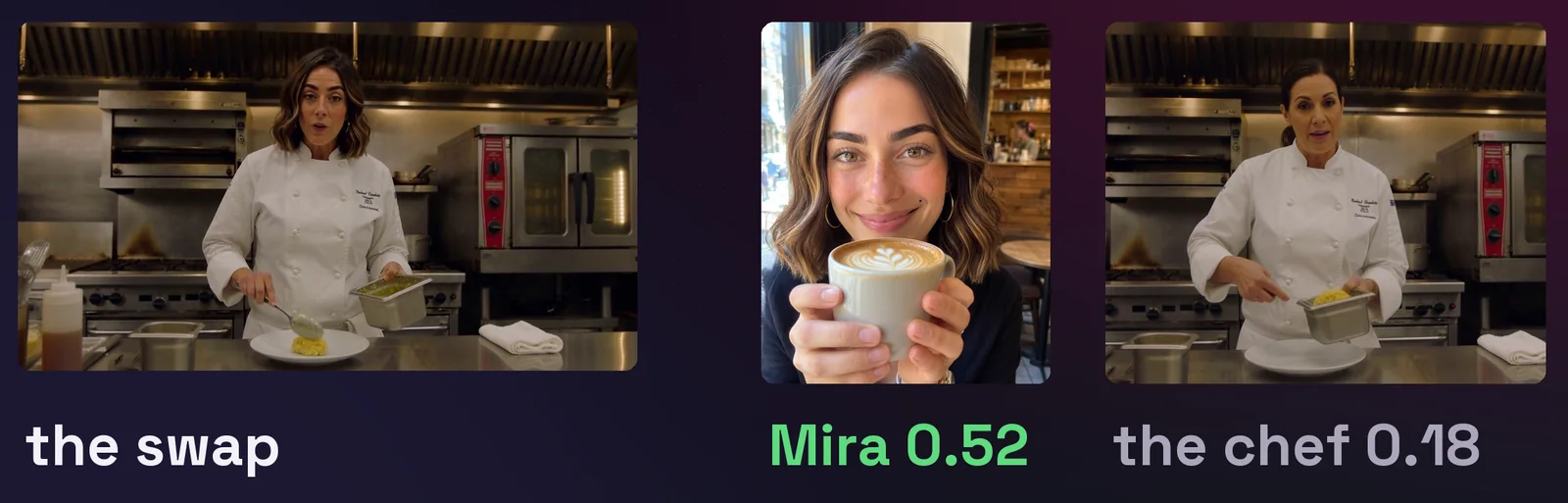
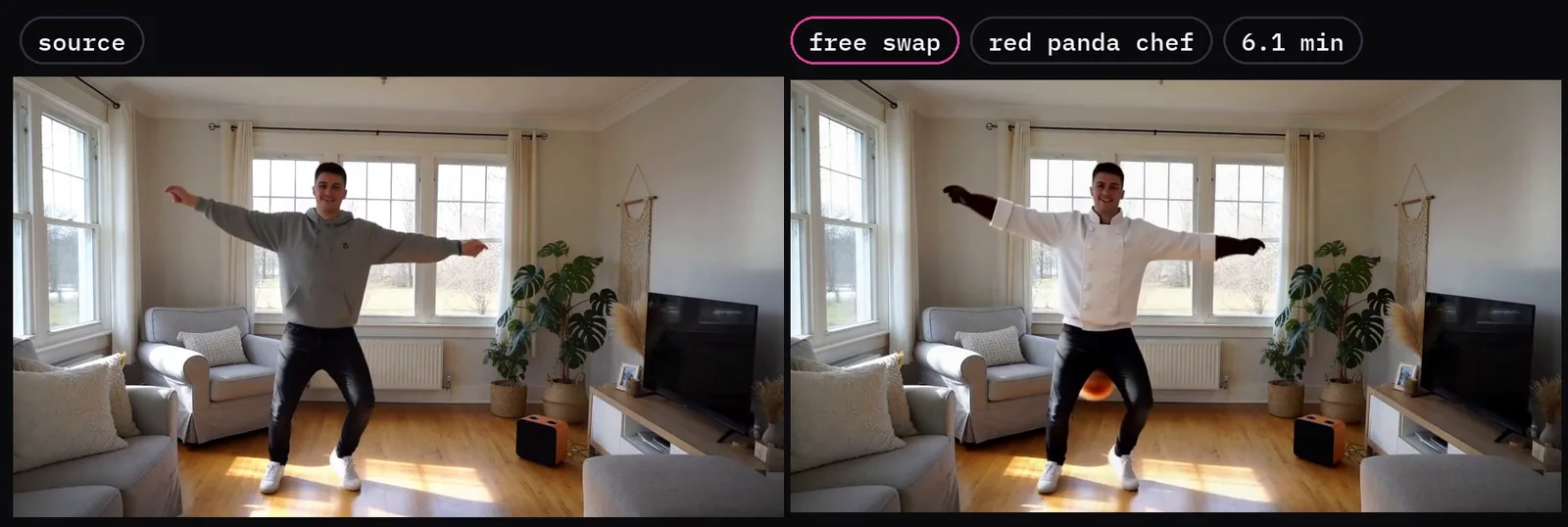
Two of three were clean: the chef became Mira and the walker became the astronaut. The red panda swap drifted back to the dancer for 3.7 of 8 seconds. Mira's face matched her picture at 0.52, against 0.18 for the chef she replaced.
All the footage is AI-made, with no real people. I rendered the source clips with MiniMax H3 in my Stubelius Ultimate H3 workflow (Pika H3 Flex, Reference mode, text only). The red panda chef and the astronaut are MOSS Image pictures, and Mira is the AI influencer from my free AI influencer post.
- Dancer to red panda chef (8 s): the spins came through, but from 2.42 to 6.12 s, measured frame by frame, he turned back into the dancer, wearing the panda's chef jacket, then became the panda again. Akatz's LoRA card warns about this return to the source identity.
- Chef to Mira (8 s): by ArcFace, Mira's face scored 0.52 against her picture and 0.18 against the source chef, so it really is Mira, not the chef with new hair. She says the chef's line in the chef's own voice.
- Walker to astronaut (6.6 s): the cleanest: the suit, the raised visor, the wave, and the street untouched.
Where does the MiniMax H3 character swap break?
At hard cuts, with more than one person, and on drift. In my extra tests, a cut brought the original person back for about 1.5 seconds, and with two people only the larger one was swapped. Length was fine: 15 seconds held to the last frame.
| Clip | Character | Length | Render | Sound | What I saw |
|---|---|---|---|---|---|
| Dancer, 768 | Red panda chef | 8.0 s | 367 s | 0.9993 | Back to the dancer for 3.7 s; 3 held frames |
| Chef, 768 | Mira | 8.0 s | 372 s | 1.000 | Face 0.52 to Mira, 0.18 to the chef |
| Walker, 768 | Astronaut | 6.6 s | 332 s | 1.000 | Clean |
| Woodworker, 768 | Astronaut | 15.1 s | 822 s | 0.9999 | Held from first frame to last |
| Two people, 768 | Red panda chef | 8.0 s | 385 s | 0.9993 | Only the man in front swapped; the panda kept his jeans |
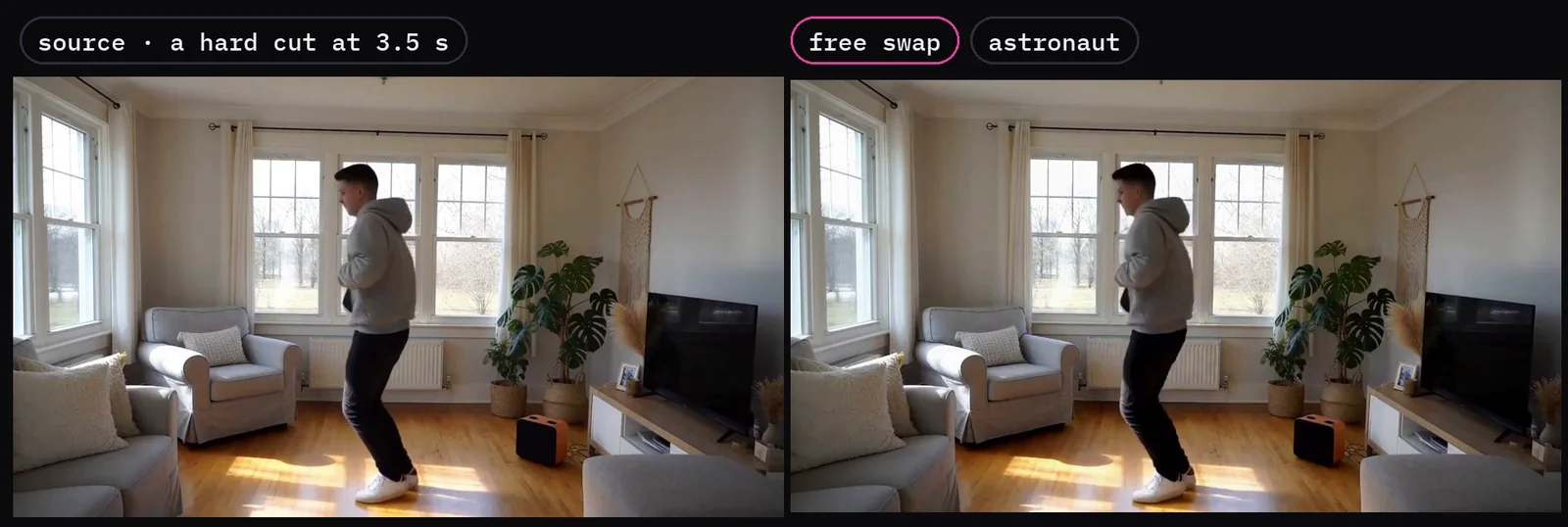
| Hard cut, 768 | Astronaut | 7.0 s | 377 s | 0.9955 | The dancer back for about 1.5 s after the cut; 1 held frame |
| Chef, 480 | Mira | 8.0 s | 165 s | 1.000 | Face 0.30 to Mira, 0.32 to the chef |
- Fifteen seconds: the astronaut held the whole way, and the woodworker's line stayed in his own voice.
- Two people: SAM's "largest" setting picked the man in front; the woman behind him stayed exactly as she was.
- A hard cut: I joined 3.5 s of the walker and 3.5 s of the dancer. After the cut the dancer was back for about 1.5 s, then the astronaut took over. Split your video at the cuts and swap each shot on its own; Openjutsu's README also says a hard cut breaks the swap.
How long does a MiniMax H3 character swap take on an RTX 5090?
About 6 minutes per 8-second clip at the 768 setting, roughly three quarters of a minute per second of video, and 13.7 minutes for 15 seconds. The 480 setting cut 8 seconds to 2.7 minutes, but the character's face no longer took, so for faces stay at 768.
At 480 the chef swap matched Mira at 0.30 and the source chef at 0.32, halfway between the two. I tested 480 only on the chef clip. Times are each job's time from my run log.
Tested 2026-11-03 on an RTX 5090 (32 GB), 96 GB RAM, Windows 11. Face match: ArcFace on the largest face in every 3rd frame against Mira's picture and against the source chef's face, the median. Sound: cross-correlation with the source clip after alignment, lag 0.0 s on every swap.
Is the free MiniMax H3 swap as good as Higgsfield Genjutsu?
I can't say, because I didn't run Genjutsu. For one continuous shot of one person at 768, the free swap did the job in three of my four such clips on an RTX 5090: the face, the clothes, the motion and the sound, for render time instead of credits.
On paper, Genjutsu covers more: clips up to 30 s, 1080p and no GPU of your own. The free route keeps everything on your PC, with every setting in view. Watch for drift, split at the cuts and keep it at 768.
What do the licences allow for MiniMax H3 character swaps?
MiniMax H3 and the swap LoRA are under the MiniMax H3 Community License: commercial use allowed, but not in the EU, UK, US or South Korea; label the result as AI; no impersonation without consent. Read it before commercial use; this isn't legal advice.
SAM 3.1 is under the SAM License, the node pack GPL-3.0 and the workflow MIT. Swap in characters, not real people who didn't say yes: everyone in my tests is AI-made, and no voice was cloned.
New to ComfyUI? The free Part 1 of ComfyUI From Zero covers workflows and model folders, and the course goes on from there.
Test setup and limits
- Seven swaps, one run each, all on seed 904239, on one RTX 5090 (32 GB), Windows 11, on 2026-11-03.
- Every source clip is an AI-made MiniMax H3 render, not camera footage, and every character is AI-made. No real people.
- Face match was measured only on the chef-to-Mira swap (ArcFace). The red panda and the astronaut were judged by my eye alone.
- I ran the int8 text encoder and int8 video VAE, not the nvfp4 and fp16 files the recipe names, and no anchor image.
- Not measured: peak VRAM and lip sync. Not tested: Genjutsu itself, Openjutsu's optional paid first-frame step, Akatz's H3 Relay 2.0 canvas, LoRA V1, other GPUs, and camera footage.
Sources and files
- Higgsfield Genjutsu vs ComfyUI - Create Character Swaps Locally (8:47), the video this post belongs to: what Genjutsu does at 1:05, the free version at 1:37, setting it up at 2:35, three clips at 3:11, pushing it at 4:43, what it costs at 6:19, the rules at 6:54 and the verdict at 7:47.
- Akatz Labs: h3-character-swap-tool at 0670e4f (workflow MIT, node pack GPL-3.0), its validation record, and the Character Swap LoRA.
- Comfy Org: Openjutsu and the SAM 3.1 files for ComfyUI, repackaged from Meta's SAM 3.1.
- The MiniMax H3 model card and LightX2V's MiniMax H3 turbo LoRAs.
- Higgsfield: the Genjutsu blog post and the Genjutsu help-centre guide. This post isn't affiliated with or endorsed by Higgsfield.
- On this site: the free AI influencer, the Stubelius Ultimate H3 workflow, MiniMax H3 on 8 GB and MiniMax H3 sampler settings.
Common questions
How much VRAM does the MiniMax H3 character swap need?
It ran on my 32 GB RTX 5090; I did not measure peak VRAM. Akatz's validation record says a 24 GB RTX 4090 ran out of memory at 1 MP with everything kept on the GPU and passed with normal ComfyUI offloading, on a host with 128 GB RAM.
Is the H3 Character Swap free to use?
Yes. The workflow is MIT, the node pack GPL-3.0, and the LoRA, SAM 3.1 and MiniMax H3 are free downloads; it costs render time on your own GPU. The LoRA and H3 are under the MiniMax H3 Community License, so read it before commercial use.
Does the H3 Character Swap work on Windows?
Yes, it ran fine on my Windows 11 PC with FFmpeg and FFprobe on PATH. Akatz Labs qualified it only on Linux, so Windows is outside what they tested.
Does the swapped video keep the original voice and sound?
Yes. The workflow keeps the source clip's soundtrack, and my seven swaps matched their sources at 0.9955 to 1.000 correlation. I did not measure lip sync.
Can I swap a real person into a video with MiniMax H3?
Not without their consent: the MiniMax H3 Community License forbids impersonating anyone without consent and asks you to label the result as AI. My tests use only AI-made characters in AI-made clips.