STUUBZZZ
pi-H3 and Spark-H3 vs PDMD on MiniMax H3: 6x faster in ComfyUI, but PDMD looked best blind
 Watch the video · pi-H3 Makes MiniMax H3 6x Faster in ComfyUI But There's a Catch
pi-H3 by Lakonik, a 2- or 4-step distill of MiniMax H3's first/last-frame model, made a 15-second clip in 58 seconds at 2 steps on my RTX 5090 with Spark-H3. That is about 6 times faster than PDMD's 362 seconds (medians of 4 takes each). But in my blind look at full size, PDMD still looked best in both shots.
- On one RTX 5090 in ComfyUI 0.45.0 (overnight 2026-11-23 to 24), a 15-second MiniMax H3 first/last-frame clip at 1344×768 took 58.5 s with pi-H3 at 2 steps plus Spark-H3, against 362.5 s for PDMD at 4 steps with full attention: about 6.2 times faster (medians of 4 takes, clean start).
- With full attention, a pi-H3 step on MiniMax H3 took as long as a PDMD step, about 85 s for a 15-second clip on an RTX 5090. Spark-H3 sparse attention cut it to about 21 s at 4 steps (medians of 4 takes, 2026-11-24).
- In Stuubzzz's blind look at full size (one judge, 2 shots × 2 seeds, 2026-11-24), PDMD's 4-step MiniMax H3 take looked best in both the talking café shot and the rooftop runner. pi-H3 4-step + Spark came second on the café shot, last on the runner.
- pi-H3's DWD adapters skip MiniMax H3's video VAE decode, saving about 7 s per 15-second clip on an RTX 5090 (355.9 s against 362.9 s). Blind, the normal decode handled the runner's movement clearly better.
- Spark-H3 0.2.0 lists ComfyUI up to 0.44, but ran on ComfyUI 0.45.0 on Windows 11, where its first Triton compile crashed until ComfyUI was started with a console window.
What are pi-H3 and Spark-H3?
pi-H3 is a 2-step or 4-step distillation of MiniMax H3's first/last-frame model (FL2VA) by Hansheng Chen of Stanford, who publishes as Lakonik, released as Lakonik/pi-H3 on Hugging Face on 21 November 2026. It makes the video and its sound in 2 or 4 steps, and its adapters load as LoRAs on the int8 first/last-frame base.
MiniMax H3 is MiniMax's video model with sound (model card). pi-H3 covers its first and last frame mode only: a prompt plus a first frame, a last frame, both or neither. There is no reference-mode version.
The ComfyUI side is ComfyUI-piFlow 1.4.2 by the same maker (Apache-2.0), whose guide calls the pi-H3 DWD workflows "the fastest way to generate MiniMax H3 videos". With DWD, the adapters predict the video frames directly at the last step, so the video skips the VAE decode, and the video VAE only encodes your first and last frame.
Every pi-H3 workflow uses sparse attention, which skips token pairs that barely matter, in one of three kinds:
- Spark-Attn from Spark-H3 by zechengtang (Apache-2.0): the makers' strong pick, and the one that stays closest to dense attention. Built per GPU.
- Kijai's Sol-Attn from ComfyUI-SolAttn_triton, which needs Triton.
- ComfyUI's built-in Sol-Attn: no install, but the makers say it "visibly degrades pi-H3 videos". I tested neither Sol option.
My reference point is PDMD, the 4-step LoRA in my free Stubelius Ultimate H3 workflow (tested here).
How did I test pi-H3 against PDMD on MiniMax H3?
I rendered six setups at 15 seconds (362 frames, 1344×768) in first and last frame mode on one RTX 5090: two shots × two seeds each, with the same prompts and frames for every setup. Every take started clean, with the models out of VRAM and the caches dropped.
The café shot is a woman by a rainy window saying one line to camera, for faces and dialogue; the rooftop runner sprints, leaps a gap and rolls, for fast movement. All setups used the int8 base minimax_h3_fl2va_pruned_int8_convrot and Euler:
- PDMD 4-step: the PDMD LoRA,
simplescheduler, normal VAE decode, full (dense) attention, set up like Ultimate H3's PDMD mode. - pi-H3 4-step and 2-step DWD, dense: the makers'
pi-H3-DWD.json, sparse attention bypassed. - pi-H3 4-step with VAE decode, dense: the makers'
pi-H3.json, without DWD. - pi-H3 4-step and 2-step DWD + Spark:
pi-H3-DWD-Spark-SM120.jsonas shipped, Spark-H3 0.2.0 inspeedmode.
"Whole take" is ComfyUI's execution time from that clean start, model loading included. I then judged every take blind, as lettered sets with both seeds back to back, and opened the key after my verdict.
How fast is pi-H3 on MiniMax H3 with an RTX 5090?
With Spark-H3, pi-H3 made a 15-second MiniMax H3 clip in 58.5 seconds at 2 steps and 104.7 at 4 steps on my RTX 5090, against 362.5 for PDMD with full attention (medians of 4 takes). Without Spark, 4-step pi-H3 was barely faster than PDMD, at 355.9 seconds.
| Setup | Attention | Whole take | Seconds per step | Against PDMD | Peak VRAM (card) |
|---|---|---|---|---|---|
| PDMD 4-step | dense | 362.5 s (6:02) | 85.0 | 1.0× | 27.4 GB |
| pi-H3 4-step DWD | dense | 355.9 s (5:56) | 85.2 | 1.02× | 29.2 GB |
| pi-H3 4-step + VAE decode | dense | 362.9 s (6:03) | 85.0 | 1.0× | 29.0 GB |
| pi-H3 2-step DWD | dense | 185.4 s (3:05) | 91.0 | 2.0× | 29.0 GB |
| pi-H3 4-step DWD + Spark | Spark-Attn | 104.7 s (1:45) | 21.4 | 3.5× | 27.6 GB |
| pi-H3 2-step DWD + Spark | Spark-Attn | 58.5 s (0:58) | 28.0 | 6.2× | 27.4 GB |
Tested overnight 2026-11-23 to 24 on an RTX 5090 (32 GB), 96 GB RAM, Windows 11, ComfyUI 0.45.0, ComfyUI-piFlow 1.4.2, Spark-H3 0.2.0. Two shots × two seeds per setup, every take from a clean start. Peak VRAM is the whole card, desktop included.
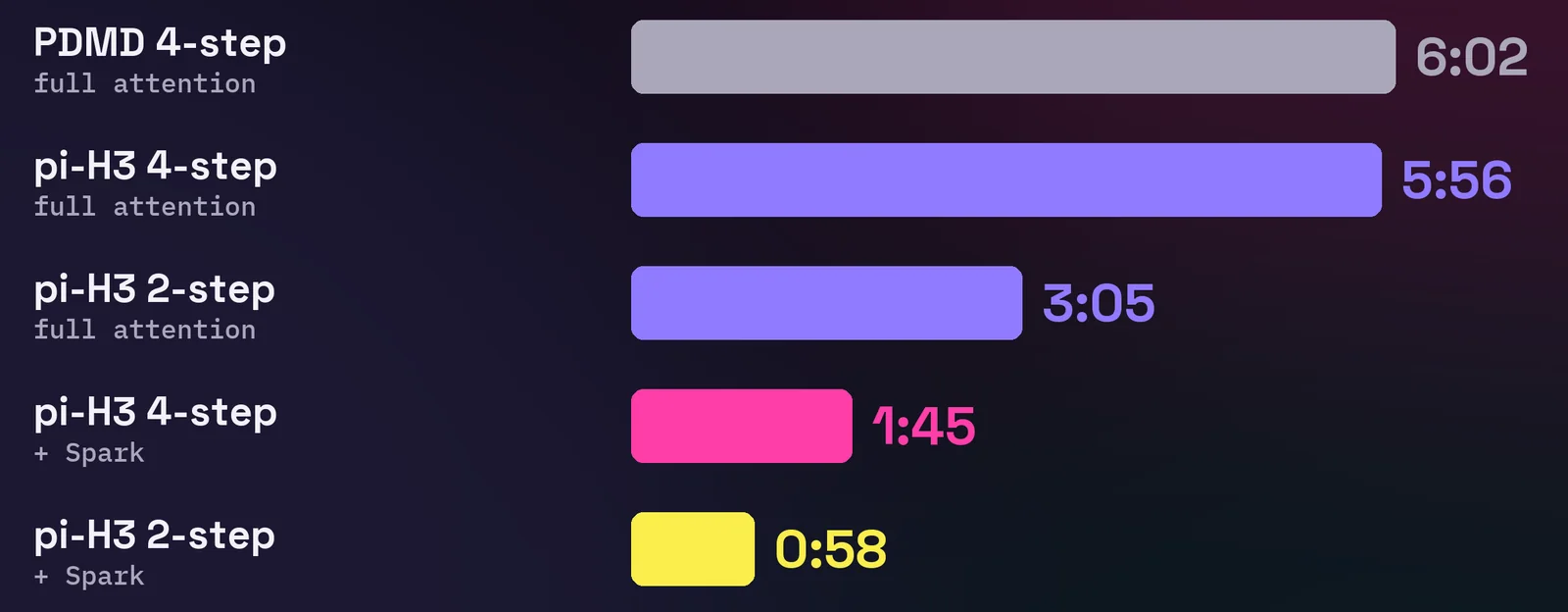
One fair note: PDMD ran with full attention, the way it ships in my workflow, not with Spark. So the 6× is pi-H3 plus Spark against PDMD as I run it, not the two distills on equal terms. These times include model loading from a clean start, so don't compare them with my other posts.
A 5-second café take at 2 steps with Spark took 24.1 seconds from a clean start and 14.1 warm (one take each). The makers list 34.6 seconds on an unlocked RTX 3090, timed with the models loaded: not like for like.
Where does pi-H3's speed on MiniMax H3 come from?
Mostly from Spark-H3; pi-H3's fewer steps add the rest. With full attention a pi-H3 step took about 85 seconds on a 15-second clip, like a PDMD step. Spark cut that to about 21 seconds at 4 steps, and skipping the VAE decode saved about 7 more.
- Fewer steps: with full attention, 2 steps took 185.4 seconds against 355.9 for 4.
- Sparse attention: Spark-H3 took the 4-step take from 355.9 to 104.7 seconds, about 3.4 times faster.
- No video decode: the 4-step adapter took 355.9 seconds with DWD and 362.9 with the normal decode.
Peak VRAM was 27.4 to 29.2 GB on the 32 GB card: what ComfyUI's dynamic loading filled, not the minimum pi-H3 needs. Smaller cards: MiniMax H3 on an 8 GB RTX 3060 Ti and AI at every VRAM size; I did not run pi-H3 there.
Does pi-H3 look as good as PDMD on MiniMax H3?
No, not to my eye. Judged blind at full size with sound, PDMD looked best in both shots. On the runner, pi-H3 at 4 steps with the normal VAE decode came close; on the café shot, pi-H3 at 4 steps with Spark came next. The fastest setup, 2 steps with Spark, smeared fast movement.
| Setup | Café shot (talking) | Rooftop runner (movement) |
|---|---|---|
| PDMD 4-step, dense | Best, good sound | Best, some smearing |
| pi-H3 4-step + VAE decode, dense | Bad background sound | About level with PDMD: less smearing, worse sound |
| pi-H3 2-step DWD, dense | Good on the second seed | Third |
| pi-H3 4-step DWD, dense | Not good | Fourth |
| pi-H3 4-step DWD + Spark | Second | Worst |
| pi-H3 2-step DWD + Spark | Third, cleanest pi-H3 sound | Fifth: fastest movement, lots of smearing, the body broke on one seed |
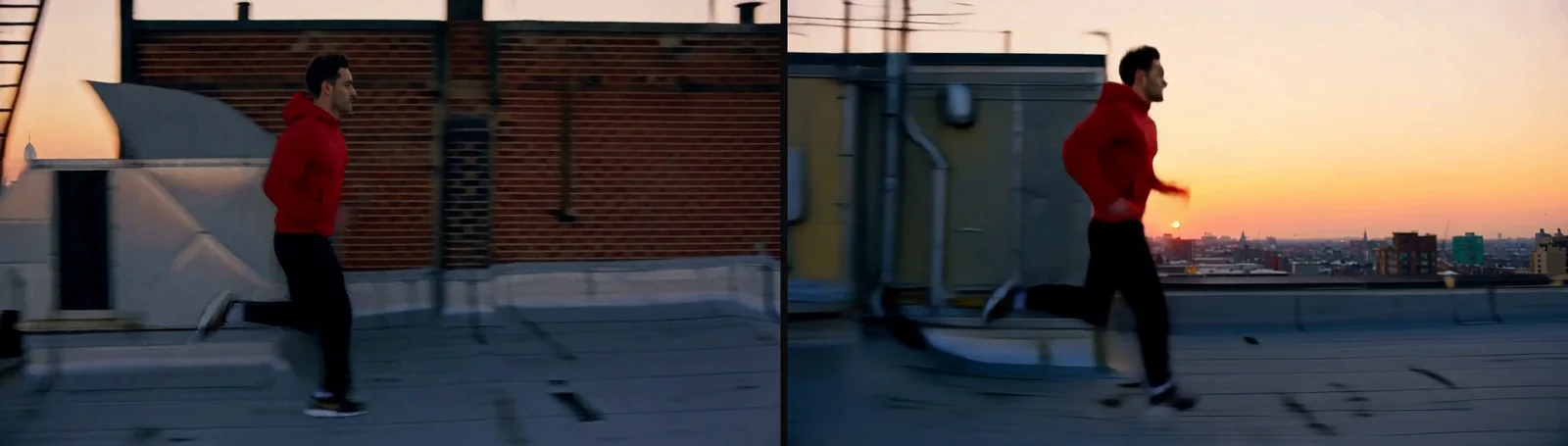
On the café shot I ranked only the top three; most pi-H3 café takes had bad background audio.
A sound number agrees: above 4 kHz, against the whole mix (lower is more muffled), PDMD measured −25.2 dB and pi-H3 −30.1 to −33.7 dB. My ear decided, though, and it's one person's eye on two shots.
Does skipping the VAE decode with pi-H3's DWD cost quality?
On movement, yes, in my blind look. The same 4-step pi-H3 adapter with the normal VAE decode handled the rooftop runner clearly better than with DWD, almost level with PDMD. On the café shot, though, the decode take had bad background sound. DWD saved about 7 seconds per 15-second clip.
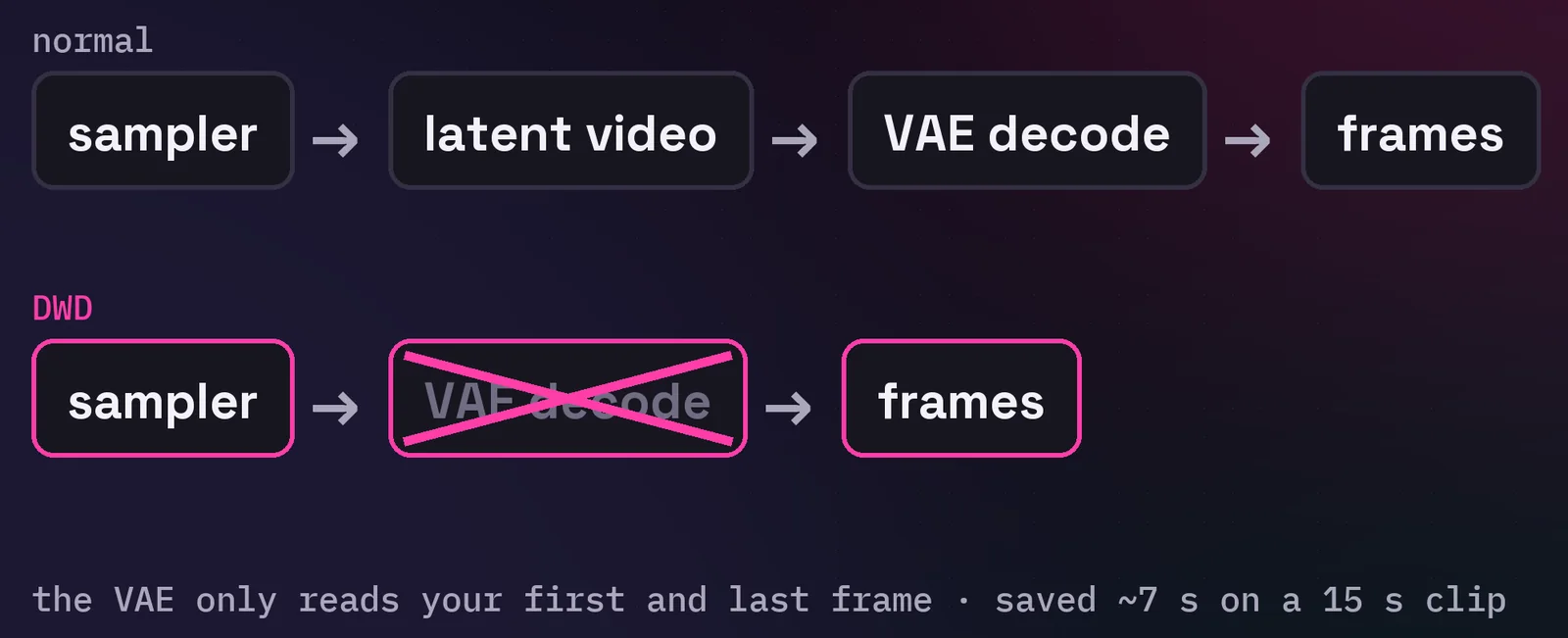
The catch is time: with the decode and full attention, pi-H3 at 4 steps took 362.9 seconds, as long as PDMD's 362.5. I didn't test the decode version with Spark (pi-H3-Spark-SM120.json).
How do I set up pi-H3 and Spark-H3 in ComfyUI?
Install ComfyUI-piFlow, add the int8 base and the pi-H3 adapters, install Spark-H3 for your GPU, then load the makers' DWD + Spark workflow and set 2 or 4 steps on the pi-H3 Adapter node. On Windows, start ComfyUI with a console window.
- Install ComfyUI-piFlow 1.4.2. It is in the ComfyUI Manager registry under the publisher lakonik.
- Put the files in their model folders:
minimax_h3_fl2va_pruned_int8_convrotindiffusion_models;pi_h3_2step_dwd_adapter_int8_convrotandpi_h3_4step_dwd_adapter_int8_convrot(2.19 GB each) inloras; the text encoderqwen3vl_32b_minimax_h3_nvfp4_awqintext_encoders;minimax_h3_video_vae_int8_convrotandminimax_h3_audio_vae_fp32invae. The adapters are on Lakonik/pi-H3, the rest on Comfy-Org/MiniMax-H3. - Download the Spark-H3 release zip for your system and GPU, unpack it into
custom_nodesand runinstall.pywith the Python that runs ComfyUI. It adds one package,spark-h3-kitchen, to that Python, so back up first if your setup matters to you. - Load
pi-H3-DWD-Sparkfor your card:SM86for an RTX 30,SM89for an RTX 40,SM120for an RTX 50. - Set
stepson thepi-H3 Adapter (2 or 4 steps)node. It sets thepi-Flow Schedulerfor you:max_raw_t0.93 at 2 steps, 0.96 at 4,final_step_size_scale0.6. - On Windows, start ComfyUI with a console window. Started without one, Spark's first Triton compile crashed; with a console, it just worked.
Spark-H3 0.2.0 lists ComfyUI 0.38 to 0.40 and 0.42 to 0.44 as supported; it ran fine on my 0.45.0. New to custom nodes? The free Part 1 of ComfyUI From Zero starts there.
Which should you use for MiniMax H3, pi-H3 or PDMD?
For final shots I still use PDMD: it looked best in both shots of my blind look, at about 6 minutes per 15-second clip on an RTX 5090. pi-H3 at 4 steps with Spark is my fast, decent option for talking shots at 1:45, and 2 steps with Spark is my draft mode at 0:58.
- PDMD, 4 steps (6:02) for the keeper.
- pi-H3 4-step + Spark (1:45) for talking shots and quick tests: second on the café shot, last on the runner.
- pi-H3 2-step + Spark (0:58) for drafts: under a minute to see whether a prompt works, then I render the keeper slowly.
For reference pictures, see FastH3 Omni vs PDMD.
Test setup and limits
- Two shots × two seeds per setup, one take each; times are medians of four, on one RTX 5090.
- The quality verdict is mine alone: one judge, blind, on two shots.
- PDMD ran with full attention, as it ships in Ultimate H3. I did not run PDMD with Spark-H3, or pi-H3 with either Sol-Attn.
- Every take used my int8 text encoder,
qwen3vl_32b_minimax_h3_int8_convrot, not the nvfp4 file the makers' workflow names. - The 5-second times are one take each. Peak VRAM is on a 32 GB card, not a tested minimum; no numbers for other cards or resolutions.
- There is no pi-H3 mode in Stubelius Ultimate H3; the test used the makers' own workflows.
Sources and files
- pi-H3 Makes MiniMax H3 6x Faster in ComfyUI But There's a Catch, the video for this post: what pi-H3 is at 0:37, setup at 2:18, the speed test at 3:56, does it still look good at 5:40 and the verdict at 7:49.
- pi-H3 by Hansheng Chen / Lakonik (Stanford), MiniMax H3 Community License, and the maker's blog post.
- ComfyUI-piFlow 1.4.2 (Apache-2.0) and Spark-H3 by zechengtang (Apache-2.0).
- MiniMax H3 model card; read the licence before commercial use. My free workflow: stuubszzz/Stubelius-Ultimate-H3.
- On this site: PDMD vs SoL Refiner, FastH3 Omni vs PDMD, FastH3 vs the turbo LoRA and the MiniMax H3 prompt format.
Common questions
How much VRAM does pi-H3 need for MiniMax H3?
27.4 to 29.2 GB was the whole-card peak for a 15-second pi-H3 take at 1344×768 on my 32 GB RTX 5090. That is what ComfyUI filled on that card, not a tested minimum: I haven't run pi-H3 on smaller cards.
Is pi-H3 free to use?
Yes, the weights are a free download on Hugging Face under the MiniMax H3 Community License, and ComfyUI-piFlow and Spark-H3 are Apache-2.0. Read the MiniMax H3 licence before any commercial use.
Does pi-H3 work with reference images in MiniMax H3?
No. pi-H3 distils the first/last-frame model only: text plus a first frame, a last frame, both or neither. There is no reference-mode (Ref2VA) version.
Is there a pi-H3 mode in Stubelius Ultimate H3?
No. I tested pi-H3 with the makers' own ComfyUI-piFlow workflows. Ultimate H3's fast 4-step option is its PDMD mode, which looked best in my blind look.
Does Spark-H3 work on RTX 30 and RTX 40 cards?
Yes, Spark-H3 ships builds for RTX 30 (SM86), RTX 40 (SM89) and RTX 50 (SM120), with a pi-H3 workflow for each. I only ran the SM120 build on an RTX 5090, and the makers note that the 0.2.0 Linux archives for RTX 30 and 40 need a one-line fix to register their node.