STUUBZZZ
RelayVSR vs Regenerate 2K IC for MiniMax H3: same face, 13 seconds vs 2.5 minutes
 Watch the video · I Tested RelayVSR vs NVIDIA's New MiniMax H3 Upscaler, One Keeps the Face in Seconds
In my RTX 5090 test on six MiniMax H3 clips, RelayVSR 2x and NVIDIA's Regenerate 2K IC both kept the face: ArcFace 0.97 on a talking clip where the first Regenerate 2K at full strength scored 0.71. RelayVSR finished a 5-second clip in about 13 seconds; IC took about 2.5 minutes and added less detail.
- On two talking MiniMax H3 clips (RTX 5090, November 2026, one run each), RelayVSR 2x scored 0.97 and 0.97 for the same face (ArcFace), NVIDIA's Regenerate 2K IC 0.97 and 0.96, and the first Regenerate 2K at full 0.71 and 0.54.
- On an RTX 5090 (November 2026), RelayVSR 2x upscaled a 5-second MiniMax H3 clip in 12 to 14 seconds, whole job, and 4x in 34 to 36; Regenerate 2K IC at 1080p took 132 to 152 seconds.
- On two talking MiniMax H3 clips (RTX 5090, November 2026), RelayVSR 2x added 2.1 to 2.6 times the 768p take's face detail, RelayVSR 4x 2.3 to 4.0 times, Regenerate 2K IC 1.5 to 1.6 times.
- On an RTX 5090 (November 2026), RelayVSR 2x peaked at about 11 GB of video memory and ran at full speed with the card limited to 16 GB; RelayVSR 4x peaked at about 22 GB; Regenerate 2K IC at about 30 GB.
- RelayVSR 2x and 4x are upscaler choices in the Output window of the free Stubelius Ultimate H3 workflow from 0.16.2, on the nodes built into ComfyUI 0.45.0 or newer.
What are RelayVSR and Regenerate 2K IC?
They are two new upscalers that keep the face in MiniMax H3 clips (MiniMax's open video model with sound). IC redraws the clip with the original as a reference; RelayVSR doesn't redraw it at all.
Open-H3-Regenerate-2K-IC is NVIDIA's in-context LoRA for MiniMax H3 (8.3 GB, Efficient-Large-Model/Open-H3-Regenerate-2K-IC), with a project page. Your take stays in the model as <Video 1> of a Ref2VA request while the LoRA draws the bigger copy beside it. The first Regenerate 2K (my test of it) added a lot of noise and let H3 guess; it guessed glasses onto a runner.
RelayVSR is an open video super-resolution model (kopperx/RelayVSR, Apache-2.0) that upscales the take as it is. As the Ultimate H3 README puts it, a Wan 2.2 model runs one step on every 15th frame, and a small decoder builds every frame from those and the take's own frames. The 2x model is LightX2V's, tuned for MiniMax H3; 4x is the original. Comfy-Org repacked the files at Comfy-Org/RelayVSR.
How did I test RelayVSR and Regenerate 2K IC on MiniMax H3?
I ran both on the same six 768p MiniMax H3 takes as my earlier Regenerate 2K test and scored every finish the same way. IC takes at most 124 frames (5.2 s), so the short clips compare their first 124 frames; the 18-second chef ran whole.
- The takes, 1344×768 at 24 fps: a café woman and a bearded man talking to the camera, hands on a piano, a rooftop runner in profile, a lake village with seagulls, and an 18-second chef (498 frames).
- IC at 1080p and at 2K, two steps (σ 0.835 → 0.469 → 0), using the example workflow from ThomasUK888's node pack.
- RelayVSR 2x, 2x at Detail 0.6, and 4x, with Ultimate H3 0.16.2's own code, out at 2520×1440.
Same face is ArcFace similarity to the take at the same frame (1 means identical); the take against itself a third of a second later scores 0.89 to 0.92, and 0.50 on the runner. Detail is the sharpness of the face crop at 1080p, as a multiple of the take enlarged.
Tested 2026-11-11 (IC) and 2026-11-13 (RelayVSR, ComfyUI 0.45.0) on an RTX 5090 (32 GB), 96 GB RAM, Windows 11. One run per clip and finish. Regenerate 2K and RTX VSR renders come from my earlier test on the same takes, scored here the same way.
Which keeps the face better, RelayVSR or Regenerate 2K IC?
RelayVSR, by a little. On the two talking clips and the chef, RelayVSR 2x scored 0.93 to 0.97 and IC 0.92 to 0.97, a tie; on the fast runner, 0.72 against 0.64. Gentle and full Regenerate 2K reached at most 0.84; light strength (two clips, earlier test) kept the café woman at 0.88.
| Clip | Regen 2K gentle | Regen 2K full | IC | RelayVSR 2x | RelayVSR 4x | RTX VSR only |
|---|---|---|---|---|---|---|
| Café woman | 0.84 | 0.71 | 0.97 | 0.97 | 0.98 | 0.99 |
| Bearded man | 0.71 | 0.54 | 0.96 | 0.97 | 0.97 | 0.99 |
| Runner (take vs itself 0.50) | 0.37 | 0.21 | 0.64 | 0.72 | 0.75 | 0.90 |
| Chef, 18 s | 0.61 | 0.48 | 0.92 | 0.93 | 0.94 | 0.97 |
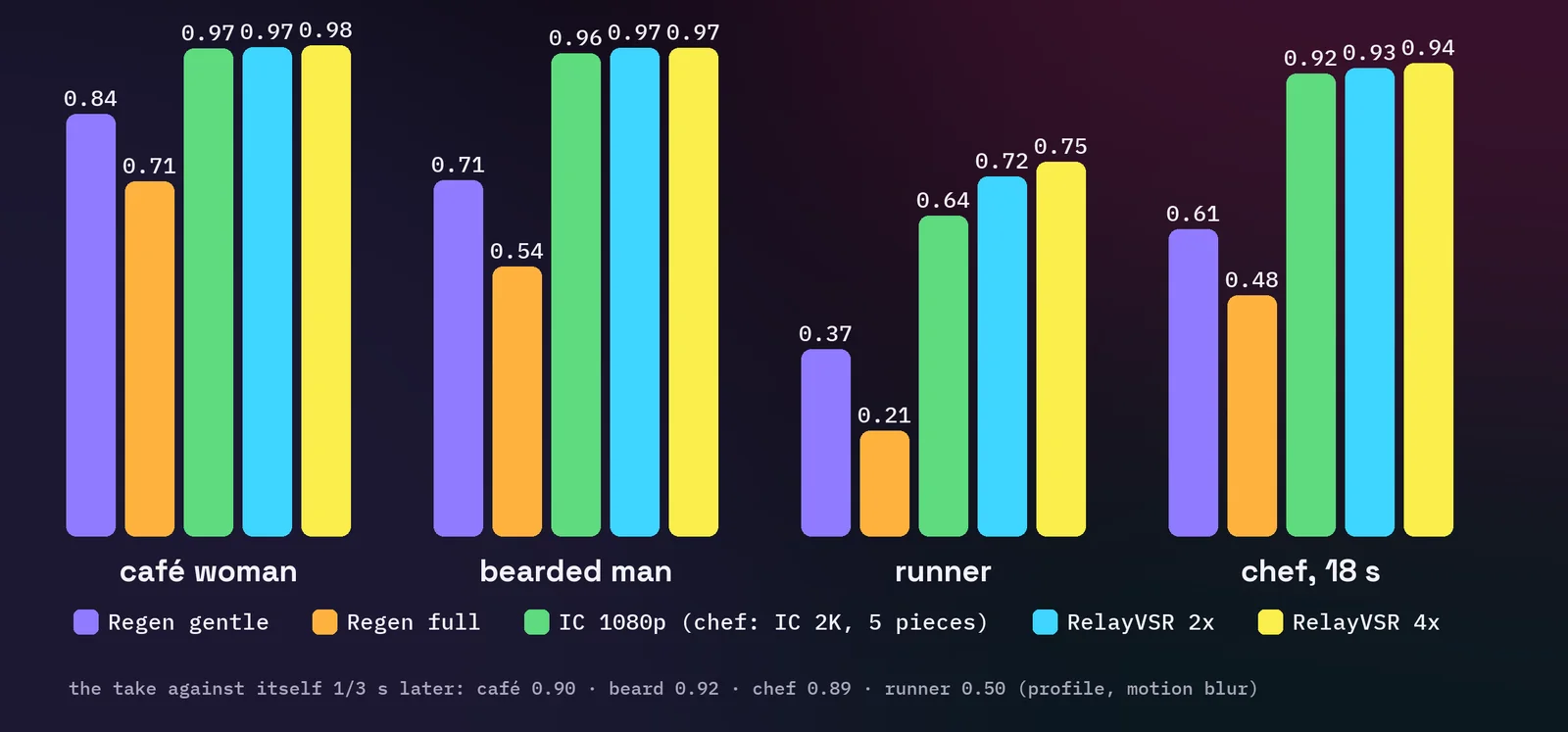
The eye checks agree. Full Regenerate 2K put glasses on the runner in every frame I checked; IC and RelayVSR never did. Both kept the café woman's freckles (a little crisper at 4x), and IC kept the bearded man's grey. Full Regenerate deleted the lake village's seagulls; IC and RelayVSR kept every one. On the piano, with no face, RelayVSR 2x stayed closer to the take (37.4 dB PSNR) than IC (32.2 dB).
Plain RTX VSR scored highest everywhere, 0.90 even on the runner, but adds only about 1.2 times the take's face detail (DLSS 5 vs RTX VSR).
How much detail do RelayVSR and IC add to a MiniMax H3 clip?
RelayVSR adds more. On the two talking clips, RelayVSR 2x gave 2.6 and 2.1 times the take's face detail, 4x 4.0 and 2.3 times, and Regenerate 2K IC 1.6 and 1.5 times. IC sharpens what is there and stops.
| Finish | Café woman | Bearded man |
|---|---|---|
| RTX VSR only | 1.2× | 1.2× |
| Regenerate 2K IC, 1080p | 1.6× | 1.5× |
| RelayVSR 2x, Detail 0.6 | 1.7× | 1.4× |
| RelayVSR 2x | 2.6× | 2.1× |
| RelayVSR 4x | 4.0× | 2.3× |
| Regenerate 2K gentle | 3.2× | 2.8× |
| Regenerate 2K full | 4.4× | 3.9× |
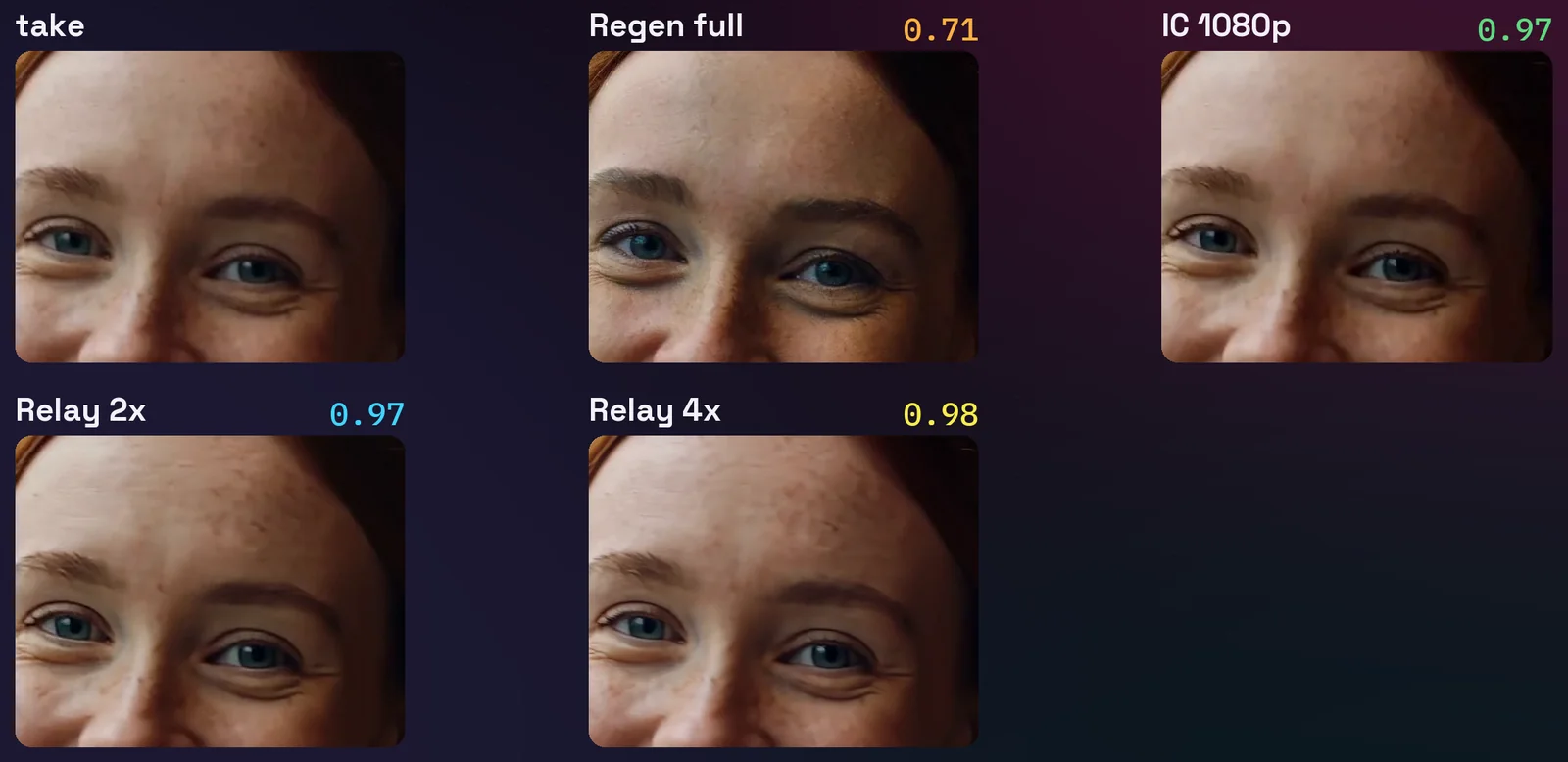
RelayVSR is the only finish here with both: twice the detail or more, and the face still at 0.97. Full and gentle Regenerate draw new pores and hairs, and change the faces. IC at 2K was no sharper on the faces than IC at 1080p, so 1080p is enough unless people watch at 2K.
What does RelayVSR's Detail setting do?
Detail sets how much of the decoder's added detail is kept; 1, ComfyUI's default, keeps all of it. At 0.6, RelayVSR 2x added about as much detail as IC and kept faces closer: 0.99 on both talking clips and 0.83 on the runner, against 0.72 at 1. In Ultimate H3 the slider sits under the RelayVSR cards; turn it down if skin looks too sharp.
How do RelayVSR and Regenerate 2K IC handle an 18-second clip?
RelayVSR did the 18-second chef (498 frames) in one go: 41 seconds at 2x and 130 at 4x on an RTX 5090. Regenerate 2K IC needed five overlapping 124-frame windows with crossfades, about 17 minutes in all. The face held with both: 0.93 (2x), 0.94 (4x) and 0.92 (IC), against 0.48 for full Regenerate, which aged her.
At every IC join, the frame-to-frame change about matched the take's own at that frame (at frame 374, 21.5 against 20.7) and I couldn't find the seams. For long videos made in chunks, see long MiniMax H3 videos in Ultimate H3.
One go costs RAM: RelayVSR peaked at 32 GB (2x) and 39 GB (4x), decoded in pieces; gentle Regenerate peaked at 64 GB.
How fast are RelayVSR and Regenerate 2K IC on an RTX 5090?
RelayVSR is more than ten times faster. A 5-second MiniMax H3 clip took 12 to 14 seconds at RelayVSR 2x and 34 to 36 at 4x, whole job; Regenerate 2K IC took 132 to 152 seconds at 1080p and 208 to 257 at 2K.
| Finish | Time | Peak GPU memory | Peak RAM |
|---|---|---|---|
| RelayVSR 2x | 12–14 s | 11.2–11.5 GB | 12.1–14.3 GB |
| RelayVSR 2x, Detail 0.6 | 10–11 s | 11.2–11.5 GB | 11.6–14.0 GB |
| RelayVSR 4x | 34–36 s | 21.7–22.1 GB | 12.5–13.7 GB |
| Regenerate 2K IC, 1080p (warm, four clips) | 132–152 s | 29.5–30.2 GB | 14.4–15.0 GB |
| Regenerate 2K IC, 2K | 208–257 s | 29.6–30.2 GB | 15.3–18.2 GB |
Per second of video: about 2.6 seconds for RelayVSR 2x, 28 for IC at 1080p, and in the earlier test 33 for gentle Regenerate and 45 for full.
Does RelayVSR run on a 16 GB card?
RelayVSR 2x does, in my test: with my RTX 5090 limited to 16 GB, it ran at full speed, the 18-second clip included. RelayVSR 4x didn't fit: it spilled 3.9 GB into shared memory, and I stopped the run after 900 seconds.
At a 24 GB limit, both ran. These are limits set on one card, not real 16 or 24 GB GPUs, and I didn't try IC under a limit. For what fits at each VRAM size, see AI at every VRAM size and MiniMax H3 on an 8 GB RTX 3060 Ti.
How do I set up RelayVSR in Ultimate H3?
Update ComfyUI to 0.45.0 or newer, download two files per scale, and pick RelayVSR in the Output window of Ultimate H3 0.16.2. No custom nodes are needed.
- From Comfy-Org/RelayVSR, for 2x:
relayvsr_x2_lightx2v_int8_convrot.safetensors(5.2 GB) intomodels/diffusion_modelsandrelayvsr_flash_vae_x2_fp32.safetensors(0.13 GB) intomodels/vae(model folders). - For 4x:
relayvsr_x4_int8_convrot.safetensors(5.2 GB) andrelayvsr_flash_vae_x4_fp32.safetensors(0.13 GB), in the same folders. Each model needs the decoder of its own factor. - Install or update Stubelius Ultimate H3 from GitHub main (0.16.2 or newer).
- In the Output window, under Upscaler, pick
RelayVSR 2xorRelayVSR 4x, and setDetailif you want it below 1.

It works in any mode; in Quality mode it replaces the polish, and past its factor RTX VSR does the rest. Outside the pack, ComfyUI's recipe is RelayVSR Conditioning, one sampler step at CFG 1 (euler, simple), and VSR Decode with the Flash decoder of the same factor. The four windows are in the Ultimate H3 guide.
How do I set up Regenerate 2K IC in ComfyUI?
You need three model files, about 46 GB together, and two free node packs. The IC pack's ready workflow puts your clip in as Video 1, draws the new size in two steps and puts the original sound back.
- The non-pruned MiniMax H3 Ref2VA,
minimax_h3_ref2va_int8_convrot.safetensors(34.0 GB), from Comfy-Org/MiniMax-H3. The pruned files lack the time embedder HyperFlow needs. - The IC LoRA,
open_h3_regenerate_2k_ic_lora.safetensors(8.3 GB), from NVIDIA's IC repo. - The full HyperFlow 8-step build,
custom_node_hyperflow_8step_v1.0_comfyui.safetensors(3.9 GB), from drbaph/Hyperflow-Comfyui. - The node packs, both Apache-2.0: ComfyUI-OpenH3-Regenerate-IC by ThomasUK888, with the workflow, and ComfyUI-Hyperflow by Saganaki22.
Keep the two-step schedule: NVIDIA's three-step default gave the same faces and detail and took 2.4 times as long on the runner (344 s against 141 s). IC is not in Ultimate H3.
Which upscaler should you use for MiniMax H3 clips?
RelayVSR 2x for most clips: the same face as IC, about twice the take's detail, in seconds. On my six clips RelayVSR matched or beat IC on face, detail and speed.
- Most clips: RelayVSR 2x.
- Big faces, more detail: RelayVSR 4x, on a 24 GB card or bigger.
- Small faces moving fast, like the runner: plain RTX VSR (0.90), or RelayVSR at Detail 0.6 (0.83).
- No face, most detail: Regenerate 2K gentle, from the earlier test.
RelayVSR is Apache-2.0. The IC LoRA and HyperFlow are under the MiniMax H3 Community License, like H3 itself; read it for where you live before any commercial use. What steps, CFG and a LoRA do is in the free Part 1 of ComfyUI From Zero.
Test setup and limits
- Six MiniMax H3 takes, one RTX 5090, one run per clip and finish, no repeats.
- The piano and lake clips have no face score. The runner's take scores only 0.50 against itself, so read its numbers as a ranking. The earlier post has no runner score (its face finder missed him); he was re-scored here with a fixed one.
- The eye checks (glasses, freckles, seagulls) are my own look at chosen frames, not a blind test.
- Not tested: other video models, portrait clips, and IC with its own text encoder (I used my int8 one).
Sources and files
- I Tested RelayVSR vs NVIDIA's New MiniMax H3 Upscaler, One Keeps the Face in Seconds, the video this post belongs to. Chapters: how they work 1:10, the faces 3:30, detail 6:12, the 18 s clip 7:47, speed and memory 8:58, setup 10:13, which to use 11:35.
- RelayVSR: the code and the ComfyUI repack. NVIDIA: the Regenerate 2K IC LoRA and the project page; the base model at Comfy-Org/MiniMax-H3.
- The IC nodes by ThomasUK888, the HyperFlow nodes by Saganaki22 and the HyperFlow file from drbaph.
- Stubelius Ultimate H3 on GitHub (RelayVSR from 0.16.2).
- On this site: NVIDIA's Regenerate 2K on MiniMax H3, measured, DLSS 5 vs RTX VSR, the Ultimate H3 guide and the ComfyUI From Zero course.
Common questions
How much VRAM does RelayVSR need?
About 11 GB for RelayVSR 2x on a 5-second MiniMax H3 clip, and it ran at full speed with my RTX 5090 limited to 16 GB. RelayVSR 4x peaked at about 22 GB and needed a 24 GB limit. Peaks, not tested minimums.
Is RelayVSR free to use?
Yes. The RelayVSR code and the Comfy-Org repack are Apache-2.0, and the free Stubelius Ultimate H3 workflow offers it from 0.16.2.
Do I need custom nodes for RelayVSR or Regenerate 2K IC?
Not for RelayVSR, which ComfyUI has built in from 0.45.0. Regenerate 2K IC needs two, ComfyUI-OpenH3-Regenerate-IC and ComfyUI-Hyperflow.
Can Regenerate 2K IC upscale a clip longer than 5 seconds?
Not in one run: IC takes at most 124 frames (5.2 s). My 18-second clip in five overlapping windows showed no seams but took about 17 minutes on an RTX 5090; RelayVSR 2x did it whole in 41 seconds.
Does RelayVSR keep the clip's sound?
Yes. In Ultimate H3 the take's sound is copied to the upscaled video unchanged; RelayVSR renders nothing again.