STUUBZZZ
Qwen-Image 2.1 Turbo in ComfyUI: Qwen's 8-step schedule, settings and speed in 300 renders
 Watch the video · Qwen Image 2.1 Turbo Is 3x Faster, IF You Change This One Setting
Qwen-Image 2.1 Turbo made a native 2K (4 MP) image in 11.8 seconds on average against 36.9 for the 30-step base model on my RTX 5090, about 3.1 times faster, and was on par in almost everything I tested. In ComfyUI that quality holds only with Qwen's own 8-step sigma schedule and at 2 to 4 megapixels.
- On an RTX 5090 with int8 files, Qwen-Image 2.1 Turbo averaged 11.8 s per native 2K (4 MP) image at 8 steps, against 36.9 s for the base model at 30 steps (32 renders each, 2026-10-10).
- Qwen-Image 2.1 Turbo in ComfyUI needs Qwen's saved 8-step schedule in
ManualSigmas, with euler and CFG 1. ComfyUI'ssimple,betaandsgm_uniformat 8 steps gave cracked-looking skin (two prompts, two seeds, RTX 5090, 2026-10-10). - Render Qwen-Image 2.1 Turbo at 2 to 4 MP. At 1 MP its skin went smooth and small faces went soft; at 4 MP it matched the base model (four prompts, one seed each, RTX 5090, 2026-10-10).
- Across 16 image types and 14 edits (120 renders, RTX 5090, 2026-10-10), Qwen-Image 2.1 Turbo was on par with the base model, but dropped the word "COFFEE" from a logo on both seeds and varied less between seeds (two prompts, four seeds each).
- My Qwen-Image 2.1 Turbo All-in-One workflow for ComfyUI (2026-10-10, free on Patreon, free tier included) ships Qwen's schedule and a 4 MP canvas, with the enhancer and ControlNet as options.
What is Qwen-Image 2.1 Turbo?
Qwen-Image 2.1 Turbo is Qwen's official 8-step version of Qwen-Image 2.1: a distilled checkpoint with the same 7B architecture, text encoder and VAE, for text-to-image and editing at CFG 1. Qwen runs the base model at 40 steps; I used 30.
Comfy-Org's ComfyUI repackage has the Turbo checkpoint as an int8 file (7.3 GB) and in bf16, plus a 0.9 GB LoRA that turns the base model into Turbo. Keep the LoRA at 1.0: at 0.6 and 0.8 the skin turned soft and waxy, and at 1.0 it looked like the full checkpoint (three prompts, one seed each). The weights are under the Qwen Research License, linked from the model card.
Why does Qwen-Image 2.1 Turbo need its own 8-step schedule?
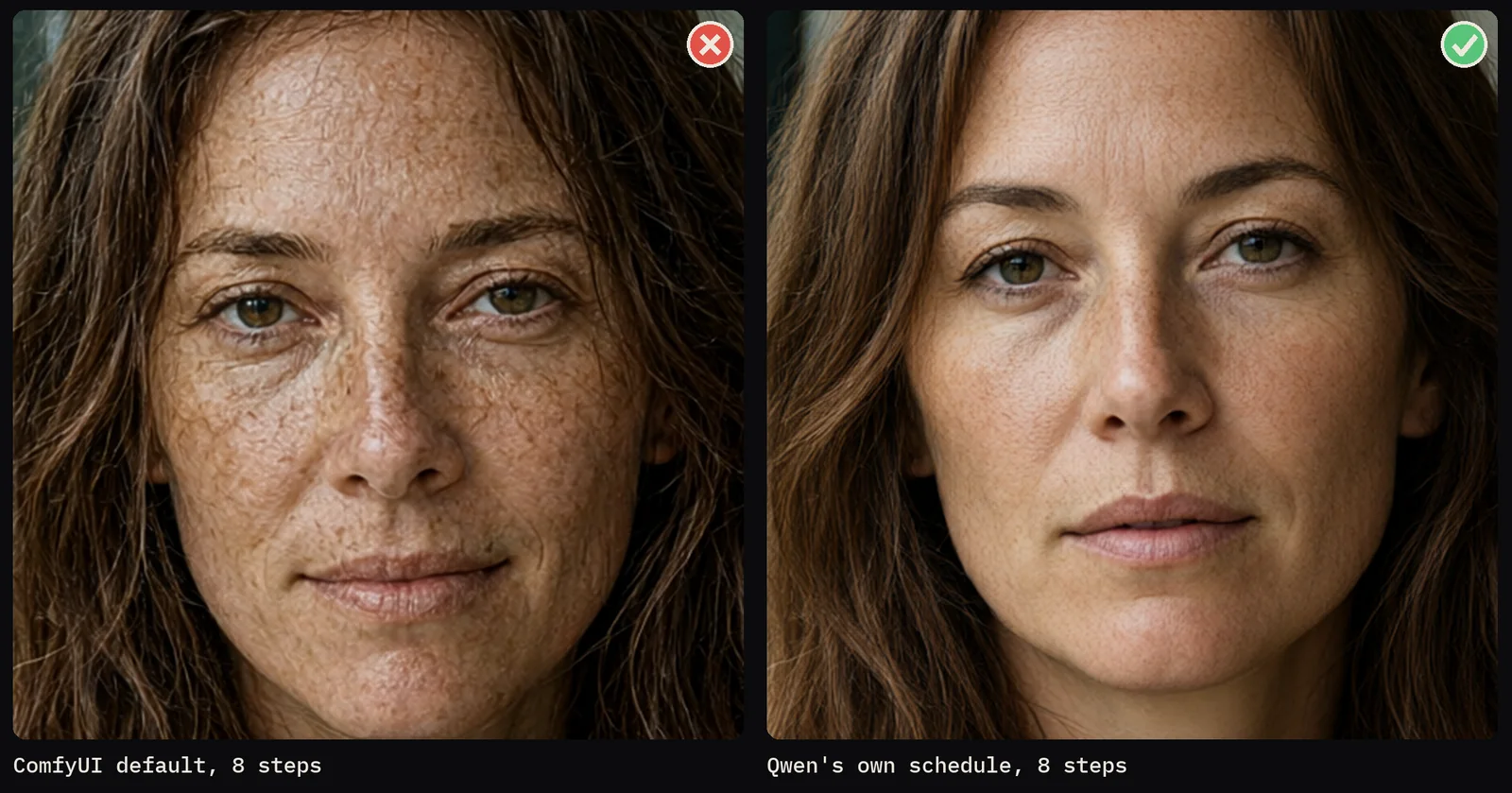
Because Turbo was trained on one exact list of eight noise levels, and ComfyUI doesn't read it. Qwen saved the list in the checkpoint's model_index.json as sample_sigmas. With ComfyUI's simple scheduler at 8 steps, Turbo gave crunchy, cracked-looking skin and grainy snow (two prompts, two seeds each). With Qwen's list it was clean, at the same speed.
| Step | 1 | 2 | 3 | 4 | 5 | 6 | 7 | 8 |
|---|---|---|---|---|---|---|---|---|
| Qwen's schedule | 1.000 | 0.978 | 0.954 | 0.927 | 0.895 | 0.845 | 0.705 | 0.415 |
simple | 1.000 | 0.933 | 0.857 | 0.769 | 0.666 | 0.545 | 0.399 | 0.222 |
Qwen's schedule stays at high noise for six of the eight steps, then drops fast. simple walks down evenly, so most steps land where Turbo never learned to work. Qwen's model card says other schedules have not been evaluated.
I tried the alternatives on a close-up portrait and a samurai in a snowy bamboo forest at 1 MP: simple at 8 and 12 steps, beta at 8 and sgm_uniform at 8. All four gave crunchy skin; only Qwen's list was clean.
Keep the sampler on euler, the official one. res_multistep looked punchier at 1 MP, but at 4 MP it over-textured the skin with harsh creases (three prompts, one seed). euler_ancestral gave a softer, different picture.
How do I set up Qwen-Image 2.1 Turbo in ComfyUI?
Load the Turbo file, then sample with SamplerCustomAdvanced: ManualSigmas with Qwen's numbers, KSamplerSelect on euler and a CFGGuider at 1, on a 4 MP canvas. All are core nodes; I tested on ComfyUI 0.39.
- From Comfy-Org/Qwen-Image-2.1, put
qwen_image_2.1_turbo_int8_convrot.safetensors(7.3 GB) inmodels/diffusion_models,qwen3vl_8b_int8_convrot.safetensors(9.4 GB) inmodels/text_encodersandqwen_image_2.1_vae_bf16.safetensors(0.7 GB) inmodels/vae. For the LoRA route, use the base file plusqwen_image_2.1_turbo_lora_avg_rank_178_bf16.safetensorsinLoraLoaderModelOnlyat 1.0. - Load the model with
UNETLoaderand the text encoder withCLIPLoader, typeqwen_image. Encode withTextEncodeQwenImage21. - Type
1.0, 0.978453, 0.95418, 0.926626, 0.89508, 0.845148, 0.704534, 0.414568, 0intoManualSigmas. Add the final 0 yourself: Qwen's list has eight values, andManualSigmasdoesn't add the end point the way Diffusers does. - Feed
RandomNoise, the guider (cfg 1.0), the sampler, the sigmas and a 4 MPEmptyLatentImageintoSamplerCustomAdvanced, thenVAEDecode.
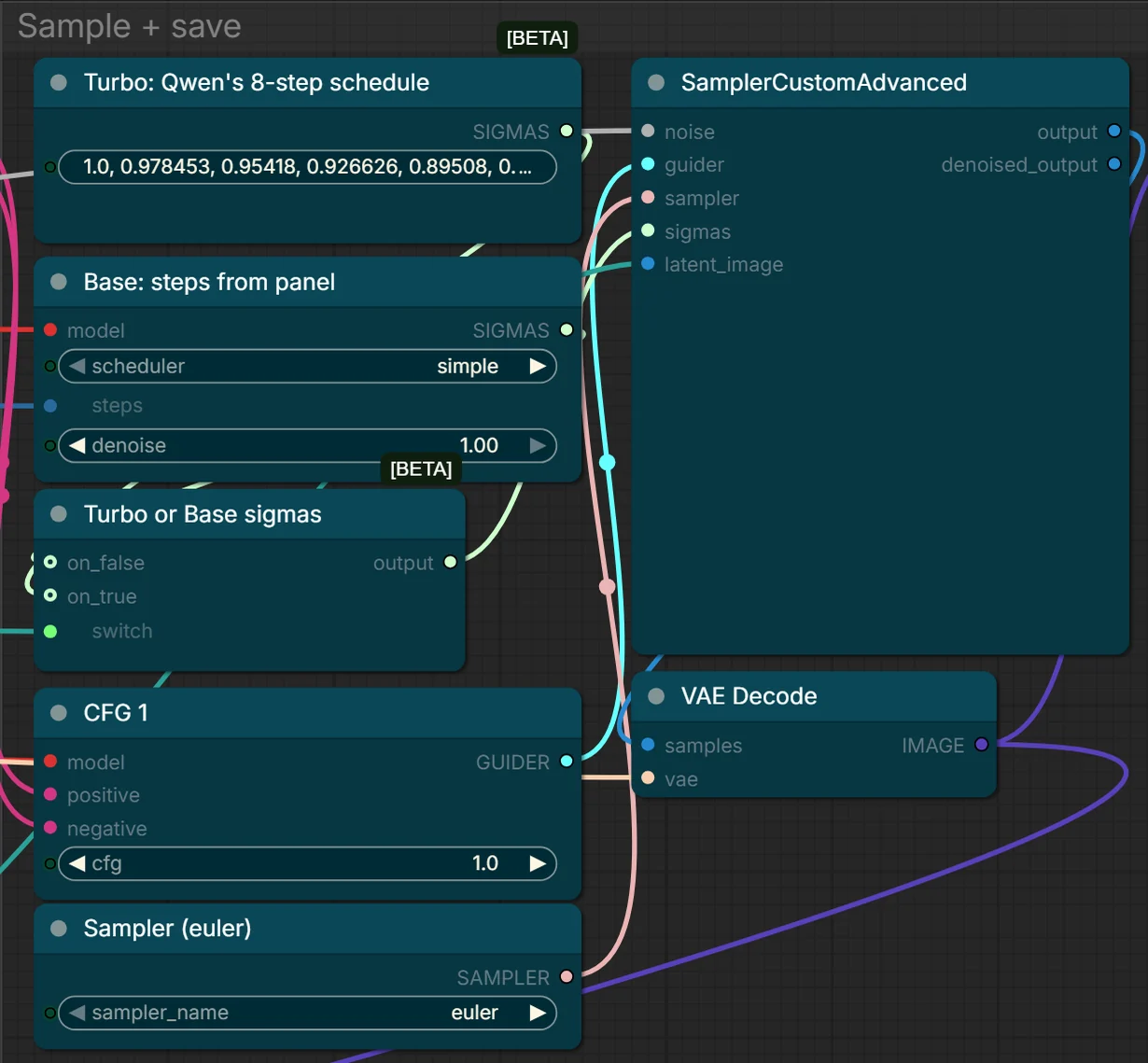
For the base model, my workflow adds ModelSamplingFlux (max 0.6935, base 0.5) for Qwen's resolution-scaled shift instead of ComfyUI's fixed 0.69. At 4 MP the skin came out slightly smoother (four prompts, one seed each). Turbo ignores it.
How fast is Qwen-Image 2.1 Turbo?
About 3.1 times faster than the 30-step base model at native 2K on an RTX 5090: 11.8 seconds per 4 MP image against 36.9, over 32 renders each. The gap shrinks at smaller sizes, but Turbo at 2 MP (4.5 to 5.0 s) was faster than the base model at 1 MP (5.1 to 6.7 s).
| Size | Base, 30 steps | Turbo, 8 steps | Turbo is |
|---|---|---|---|
| 1 MP | 5.1–6.7 | 2.5–2.8 | about 2.3× faster |
| 2 MP | 12.2–14.0 | 4.5–5.0 | about 2.8× faster |
| 4 MP (native 2K) | 33–37 | 10.6–12.0 | about 3.1× faster |
| 4 MP, 16 image types | 36.9 | 11.8 | 3.1× faster |
| Edits, about 1.5 MP, 14 types | 13.8 | 4.7 | 2.9× faster |
Tested 2026-10-10 on an RTX 5090 (32 GB), 96 GB RAM, Windows 11, ComfyUI 0.39. Turbo on Qwen's schedule, base on simple, both euler at CFG 1, model already in VRAM.
Which resolution should I render Qwen-Image 2.1 Turbo at?
2 to 4 megapixels, with 4 MP (native 2K, 2048×2048 for a square) as the default. At 1 MP Turbo smoothed the skin, with fewer freckles than the base model, and small faces in wide shots went soft. At 2 and 4 MP it had the base model's skin texture and freckles, and the small faces were clean (four prompts, one seed each).
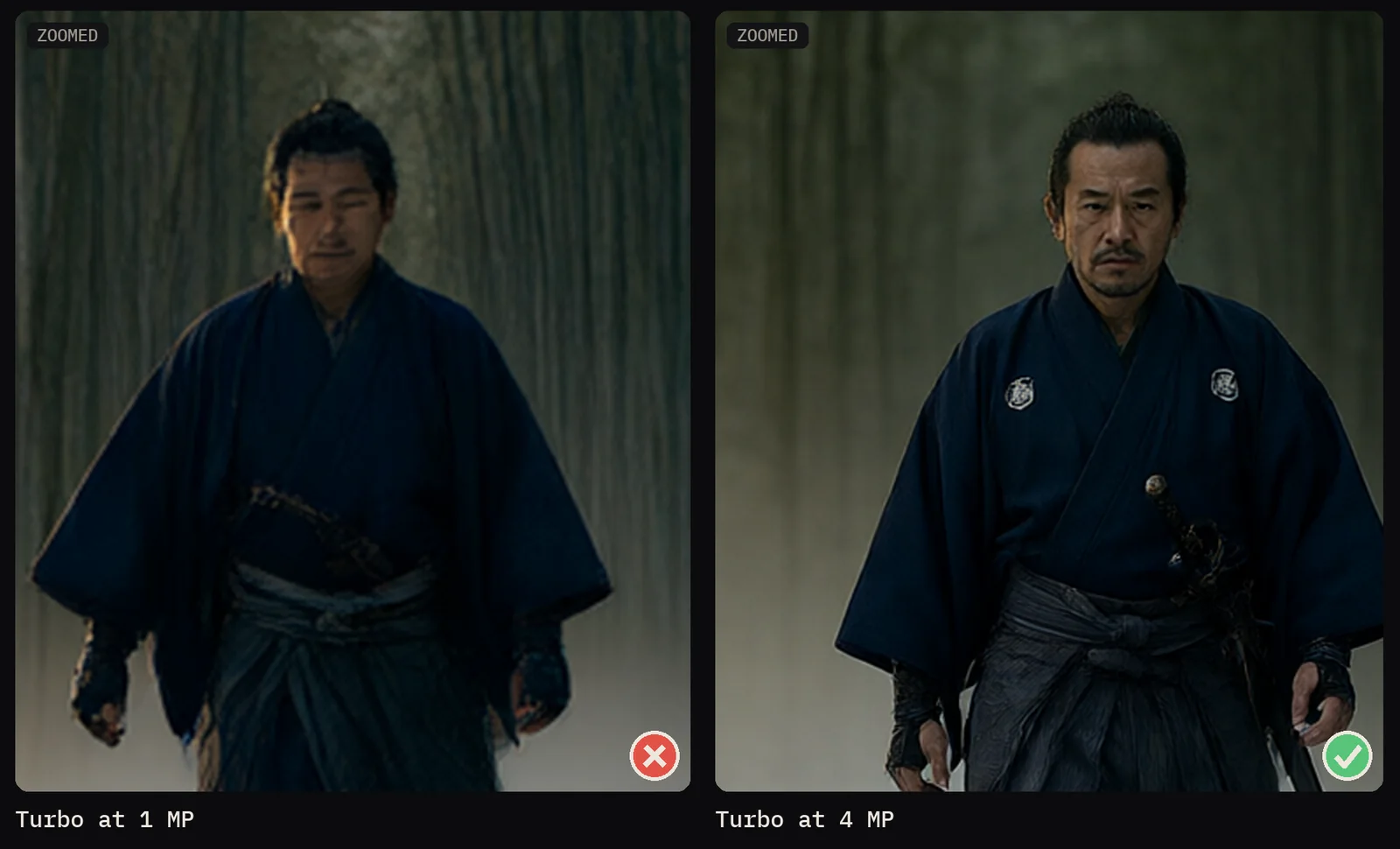
Qwen's own Turbo examples are 1696×2528 for text-to-image and 2048×2048 for editing. And don't render small and upscale. Turbo at 1 MP plus an edit-mode upscale pass to 4 MP took 29 to 30 seconds against about 11.3 for rendering 4 MP directly, and the second pass changed the face and came out softer (three prompts, one seed each).
Is Qwen-Image 2.1 Turbo as good as the base model?
Yes, on almost everything: 16 image types at 4 MP and 14 kinds of edit at about 1.5 MP, two seeds each, 120 renders. For photos (fashion, product, food, landscape, interior, wildlife, hands) and styles (anime, 3D animation, painting) I couldn't pick a winner at full size, though Turbo framed photos slightly more frontally.
Text was the surprise. On dense layouts Turbo was the more reliable one: its recipe infographic, weather app screen and comic page came out right, while the base model shrank one recipe card into a tiny band and dropped the "46" from a speech bubble. Transparent stickers had real alpha on all four renders.
Edits, from outfits to combining three images, were the most consistent: Turbo stayed very close to the base model's result for the same seed.
Where does Qwen-Image 2.1 Turbo lose?
In three places: it dropped a word from a logo, it varies less from seed to seed, and, like the base model, it does poorly with short prompts. None of these looks broken, so read every word and try a few seeds.
- Logo text. Asked for "NORTH PEAK COFFEE", Turbo wrote "NORTH PEAK" on both seeds. The base model garbled the word on one seed and got it right on the other.
- Seed variety. On two prompts with four seeds each, the base model changed angle and framing; Turbo kept a frontal, centred shot. Change the prompt instead, or use the base model.
- Short prompts. A one-line brief for a "Blue Note Nights" jazz festival poster gave photos of a band on both models (three seeds each). Long prompts or the enhancer fix it.
Does the prompt enhancer help Qwen-Image 2.1 Turbo?
Yes, it was the biggest quality jump in the test. Qwen's prompt enhancer is a 9B language model that turns a short idea into a full description. With thinking off it added 6.5 to 11 seconds per Turbo image (three briefs, one seed each) and turned the failed jazz brief into a real poster.
Raw, three short briefs gave a plain close-up of a cat, a portrait instead of the poster, and a stiff studio shot of a knight. Enhanced, they became full posters and scenes. With thinking on it took 19 to 20 seconds extra and invented a year, web addresses and venue text.
In a later test (2026-10-17) a text-heavy brief came back as broken JSON, JsonExtractString returned an empty prompt, and the image ignored the brief. If that happens, check the Final prompt box.
Do ControlNet, inpaint and outpaint work with Qwen-Image 2.1 Turbo?
ControlNet and inpaint do, and outpainting works through an edit instead. With alibaba-pai's Fun ControlNet Union patch, Turbo followed canny, depth and pose maps on par with the base model in about 5 seconds instead of 16 to 33 (one render each).
- ControlNet: strength 1.0 follows the map strictly; at 0.6 the prompt added a fern and a floor lamp. The patch loads with the core
ModelPatchLoaderandZImageFunControlnetnodes. - Inpaint: a painted mask through the same patch and a red box drawn on the photo with an edit prompt both worked, in 5.9 to 6.2 s against 14.6 (one render each).
- Outpaint: padding the photo and filling the pad through the ControlNet gave blurry stone pillars. The edit route worked on both models: the photo as
image_1, a wider canvas, and "Extend <image1> to the left and right" (one render each).
Can Qwen-Image 2.1 Turbo go faster with int8 attention?
Yes, about 28% less time at 4 MP with no visible change: 8.4 seconds instead of 11.6, with the core ModelAttentionBackend node set to comfy kitchen attention (RTX 5090, 2026-10-11, two prompts, two seeds). The base model went from 36.3 to 24.6 s in one render, so Turbo stays about 3 times faster.
Comfy-Org re-uploaded the Turbo int8 file on 2026-10-09. The tensors I compared were identical, and it adds an int8 attention setting on 31 of 32 blocks: 8.7 s without the node. Without Comfy Kitchen, the node falls back to PyTorch attention. My 2026-10-10 workflow doesn't have the node, and the 11.8-second figures are without it.
What is in the free Qwen-Image 2.1 Turbo All-in-One workflow?
Everything from the 2026-10-10 tests that worked, in one ComfyUI workflow: Qwen's schedule, euler at CFG 1 and a 4 MP canvas, with switches for the rest. It is free on my Patreon, free tier included, and needs only core nodes plus rgthree-comfy's custom nodes.
- Control panel: the TURBO switch, base steps, the canvas (4 MP by default), Transparent PNG and the seed.
- Options, all off by default: reference images 1 to 4, the prompt enhancer, ControlNet, inpaint and the Turbo LoRA, so you only need the files you use.
Set TURBO on for the Turbo file or the base file with the Turbo LoRA, off for the base file alone. The free Part 1 of ComfyUI From Zero covers what the sampler and scheduler do.
Test setup and limits
- 300 renders on one RTX 5090 (32 GB) on 2026-10-10, int8 files, plus the attention test on 2026-10-11.
- One to four seeds per prompt, mostly one or two; the speed ranges come from four prompts, one render each. Quality calls are mine, by eye at full size.
- The base model ran 30 steps, not Qwen's 40, with ComfyUI's fixed shift except in the shift test and one workflow run.
- 291 of the 300 renders loaded a community int8 variant of the Qwen3-VL 8B text encoder. The nine workflow runs and the attention test used the official file, which the free workflow uses too.
- Not tested: other cards, the bf16 files, and CFG above 1 on Turbo.
Sources and files
- Qwen Image 2.1 Turbo Is 3x Faster, IF You Change This One Setting: the schedule from 1:13, resolution from 2:15, where Turbo loses from 4:38, the prompt enhancer from 5:10 and the workflow from 6:37.
- The Qwen-Image 2.1 Turbo model card and its model_index.json. The model is Qwen's, under the Qwen Research License.
- QwenLM/Qwen-Image-2.1 and the prompt enhancer.
- Comfy-Org/Qwen-Image-2.1, the ComfyUI files, and alibaba-pai's Fun ControlNet Union.
- On this site: Flux 3 Klein vs Qwen-Image 2.1, MiniMax H3 sampler settings and MiniMax H3 in 4 steps.
Common questions
How much VRAM does Qwen-Image 2.1 Turbo need?
I only tested on an RTX 5090 with 32 GB, so I can't give a minimum. With the int8 files, the Turbo model is 7.3 GB and the text encoder 9.4 GB.
Is Qwen-Image 2.1 Turbo free to use?
The weights are on Hugging Face under the Qwen Research License, linked from the model card: read it before commercial use. My All-in-One workflow is free on Patreon, free tier included.
Should I use the Turbo checkpoint or the Turbo LoRA?
If you already have the Qwen-Image 2.1 base model, the 0.9 GB LoRA saves a 7.3 GB download. Keep it at strength 1.0.
Can I use a negative prompt with Qwen-Image 2.1 Turbo?
Turbo runs at CFG 1, as Qwen's model card and my workflow use it, and at CFG 1 the negative prompt does nothing. I did not test higher CFG on Turbo.
Does Qwen-Image 2.1 Turbo work with the normal KSampler?
It runs, but not on Qwen's schedule: KSampler takes its sigmas from a scheduler, and the three I tried at 8 steps all gave crunchy skin. Use ManualSigmas with SamplerCustomAdvanced.