STUUBZZZ
LTX 2.5 blurry in ComfyUI: render the first pass at full size
A common cause of soft LTX 2.5 video in ComfyUI is a first pass rendered at half size: the x2 latent upscale and refine that follow cannot add detail the half-size render never had. Rendering the first pass at full size took 61.1 s instead of 46.2 s for one 8-second 1280×704 clip on my RTX 5090, same seed.
- An LTX 2.5 first pass at scale 0.5 renders a quarter of the pixels. The x2 latent upscale and refine that follow cannot add the detail a full-size render has.
- On an RTX 5090 (32 GB), one 8-second 1280×704 LTX 2.5 clip took 61.1 s with a full-size first pass (58.4 s seed, 2.7 s finish) and 46.2 s with a half-size first pass (13.4 s seed, 32.8 s latent x2 refine). One clip, one seed.
- In my Stubelius Ultimate LTX 2.5 workflow a refine strength of 0.3 to 0.45 keeps the look of the seed you picked. Higher values change the look of the clip and, by my eye, add little detail.
- Full-size settings for the LTX 2.5 distilled model: first pass scale 1.0, 8 steps, cfg 1, euler_ancestral with the linear_quadratic scheduler.
- Half size is still the right choice for scouting many seeds: one 8-second 1280×704 candidate took 13.4 s at half size, against 45.5 to 58.4 s for single full-size seeds on an RTX 5090 (32 GB).
Why do LTX 2.5 videos look soft in ComfyUI?
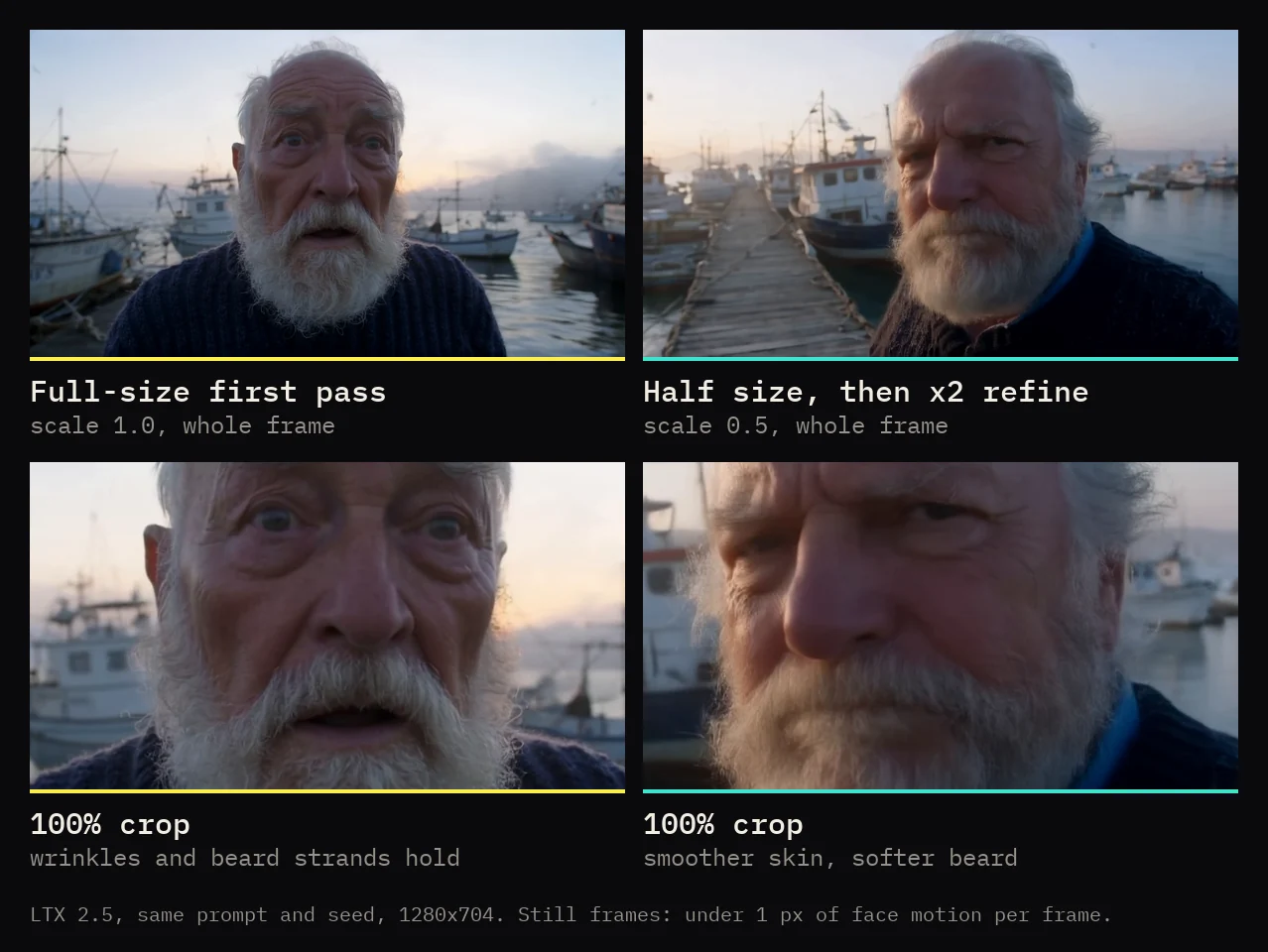
A common cause is a first pass rendered at half size. The usual two-stage recipe renders small first, and fine detail is the price. ComfyUI's official LTX 2.5 text-to-video template divides the width and the height by two before the first sampler, runs 8 steps, enlarges the latent with the x2 spatial upscaler (ltx-2.5-latent-spatial-upscaler-x2-bf16-1.0.safetensors), then runs a 3-step second stage at full size.
That is a sensible default. Half the width and half the height is a quarter of the pixels, so the first stage is quick and light on memory, and a template has to run on many different cards.
The upscaler enlarges what is already in the latent, and the second stage cleans it up. Neither one can add the detail a half-size render never had. So the softness is a property of the 0.5 setting, and any graph that starts there inherits it, mine included.
I compared the two paths on one clip, a close-up of an old fisherman on a dock, with the same prompt and the same seed. At 100% zoom the half-size path loses fine detail. That is my by-eye verdict on one clip and one seed, not a measured sharpness score. The side-by-side is in the video's chapter on steps, CFG and first pass scale.
Does raising the refine strength add detail?
Very little, by my eye. Refine strength is the noise level the second stage restarts from. In my workflow a value between 0.3 and 0.45 keeps the look of the seed. Higher values let the model repaint more, which changes the look but adds little detail. A half-size seed stays soft either way. I have no measured figure for this part, only what I saw while building the workflow.
ComfyUI's official template restarts higher, at sigma 0.85. That suits a template, which runs both stages in one go and has no seed preview to stay faithful to.
It matters in a seed hunt. You choose a winner by watching the seeds, and a strong refine hands you a clip that no longer looks like the one you chose.
How much longer does a full-size first pass take?
For one finished clip, not much: 61.1 s in total at full size against 46.2 s at half size, in the table below. The time moves from the finish to the seed.
| Stage | First pass 1.0 (full size) | First pass 0.5, then latent x2 refine |
|---|---|---|
| Seed render, 1 seed | 58.4 s | 13.4 s |
| Finish | 2.7 s (finished as rendered, no refine) | 32.8 s (latent x2 upscale, 4 refine steps from strength 0.35) |
| Total | 61.1 s | 46.2 s |
| Peak VRAM in use during the seed job (whole card) | 30.9 GB | 26.2 GB |
| Output file | 1280×704, 25 fps, 201 frames | 1280×704, 25 fps, 201 frames |
The full-size column is a little pessimistic. That seed job ran first, and the half-size job after it got the Models and Director nodes from ComfyUI's cache. By the ComfyUI log timestamps I noted that night, the seed itself took 53.8 s of the 58.4 s. The side-by-side in the video is labelled with that figure, rounded to 54 s. A later re-render of the same seed with the models already loaded took 46.1 s. So full size cost this clip between 2.6 s and 14.9 s extra.
The gap opens when you scout several seeds. At full size every candidate is a full render: single seeds of seven different 8-second clips took 45.5 to 50.1 s each with the models already loaded, and a 4-seed hunt on another clip took 199.3 s. I have no logged timing for a 4-seed half-size hunt. Four times 13.4 s plus the 32.8 s finish would be about 86 s, which is arithmetic and not a measurement.
The VRAM figures are whole-card readings from nvidia-smi, polled every 5 s. The half-size path peaked at 27.7 GB during its refine. They come from one 32 GB card and are not minimum requirements. I have no data for smaller cards.
With MSR character references
With Licon MSR, the multi-reference image conditioning for LTX 2.5, a first pass scale of 1.0 also means there is no second MSR pass to tune, because the refine does not run. Two full-size seeds of a 5-second 1280×704 clip at 50 fps with three reference views took 174.2 s on the RTX 5090, and 171.6 s on a second prompt. The first prompt again, with the same two seed numbers and a written description in place of the references, took 121.4 s. One run each, and I have no logged half-size MSR timing to set against it.
Tested 2026-09-29 on an RTX 5090 (32 GB), 96 GB RAM, Windows 11, ComfyUI 0.37.0. Official LTX 2.5 distilled int8 checkpoint, Sage attention, text-to-video. One seed per setting unless stated.
Settings for a full-size first pass
These are the settings behind the table, in my free Stubelius Ultimate LTX 2.5 workflow, where first pass scale is one number on the Setup node and 1.0 is the default.
- Size: set the Director to the size you want out of the sampler. I used 1280×704 at 25 fps.
- Setup: first pass scale 1.0, 8 steps, cfg 1.
- Sampler: euler_ancestral with the linear_quadratic scheduler. At 8 steps, linear_quadratic gives the same sigma list the official template types in by hand (1.0, 0.99375, 0.9875, 0.98125, 0.975, 0.909375, 0.725, 0.421875, 0).
- Model: the official distilled checkpoint,
ltx-2.5-22b-distilled-transformer-comfy-int8-convrot.safetensors, with no extra LoRAs. - Finish: pick the winner. At 1.0 the refine settings are ignored and the winner is finished as rendered.
I have only measured this through my own nodes. In a hand-built two-stage graph the same idea is to give the first sampler the full width and height and decode its result directly. I have not timed that variant.
When is a half-size first pass still the right choice?
- Scouting many seeds. A half-size candidate took 13.4 s here. If you look at many takes and keep one, the seeds are where the time goes.
- Less VRAM. The first stage works on a quarter of the pixels, and the half-size path peaked 3.2 GB lower on my card (27.7 GB against 30.9 GB, one clip). In my workflow the Models node has memory options for smaller cards. Part 2 of ComfyUI From Zero has fit tables for 8, 12, 16 and 24 GB cards.
Sources and files
- The video: the chapter on steps, CFG and first pass scale starts at 03:04
- Stubelius Ultimate LTX 2.5 on GitHub: the workflow and nodes used for every number here
- Lightricks/LTX-2.5 on Hugging Face: the official checkpoint, VAEs and latent upscaler
- ComfyUI's official LTX 2.5 text-to-video template: the half-size first stage, the x2 latent upscale and the second stage from sigma 0.85
- liconstudio/ComfyUI-LTX2.5-MSR: multi-reference image conditioning for LTX 2.5
- WhatDreamsCost's LTX Director: the timeline node my Director is forked from
- ComfyUI-KJNodes: Sage attention
- LTX 2.5 sampler settings: euler_ancestral, res_2s and the distilled LoRA
- The LTX 2.5 Director timeline
Common questions
Why is my LTX 2.5 video blurry in ComfyUI?
Check the first pass scale. A first stage at half the width and height, brought back up by a x2 latent upscale and refine, gives a softer clip than one sampled at full size. Set the first pass to the full output size and compare on the same seed.
How much VRAM does a full-size LTX 2.5 first pass use?
On my RTX 5090 (32 GB) the card showed a peak of 30.9 GB in use while rendering one 8-second 1280×704 seed at full size, against 26.2 GB at half size. Those are readings from one 32 GB card, not minimum requirements. I have no measurements on smaller cards.
Can I still upscale to 2K or 4K after a full-size first pass?
Yes, that is a separate step on the finished video. On one 8-second 1280×704 clip on an RTX 5090 (32 GB), RTX VSR took 11.3 s to 2K (1440p) and 23.5 s to 4K, and DLSS 5 with Color Lock took 54.4 s to 2K.