STUUBZZZ
MiniMax H3 timeline in ComfyUI: middle frames, extending a clip, pinned sounds and clips
 Watch the video · 3 New Ways to Direct MiniMax H3 in ComfyUI, Second by Second
Stubelius Ultimate H3 0.11, my free MiniMax H3 workflow for ComfyUI, adds three ways to direct a clip over time, all in First/Last Frame mode: up to two middle frames the video reaches at the second you set, a video in the First Frame box that the render continues, and up to 8 sounds or short clips pinned to their second. Use middle frames for what a moment looks like, a clip to carry footage on, and pins for when something plays. The catch: a pinned sound plays on time, but in my door-slam test it did not time the action on its own.
- Stubelius Ultimate H3 0.11, a free, MIT-licensed MiniMax H3 pack for ComfyUI, adds middle frames, clip continuation, and sounds and clips pinned on the timeline, all in First/Last Frame mode. It has been on the repo's main branch since 2026-10-08.
- With Stubelius Ultimate H3, one MiniMax H3 render on an RTX 5090 (PDMD mode, 4 steps, 2026-10-05) passed through two middle frames set at 2.2 s and 4.4 s on the exact frames.
- With seitanism's ComfyUI-H3-Motion-Context-MultiRef installed, continuing a clip in Ultimate H3 0.11 carries the clip's last 1.6 s of picture and sound into the MiniMax H3 render. In one render on an RTX 5090 (2026-10-06), a 6.6 s clip ran on to 13.7 s with no jump at the join.
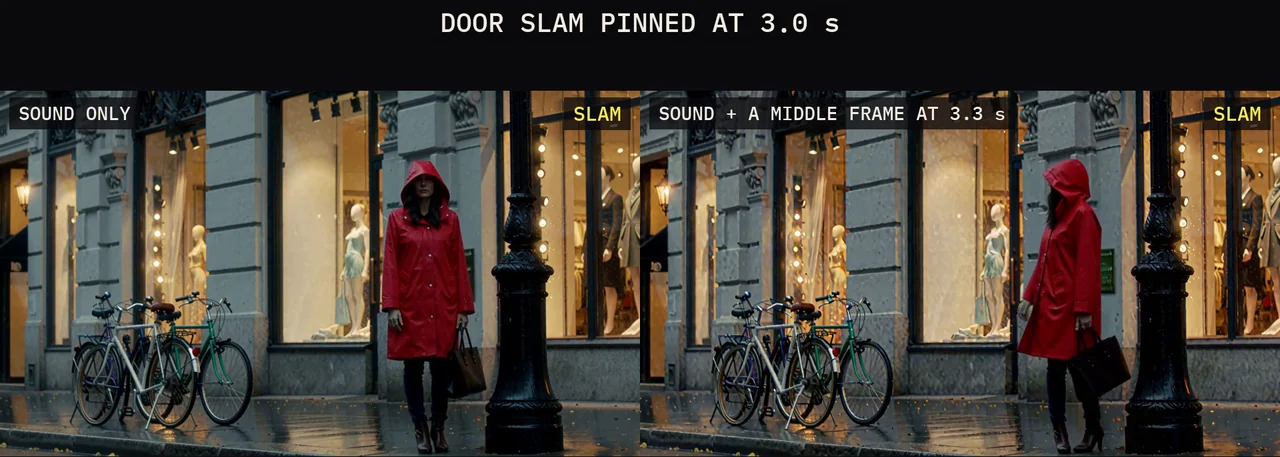
- Two recorded lines pinned at 0.8 s and 3.6 s on the Ultimate H3 timeline landed within about 40 ms of their pins in one MiniMax H3 render, by Whisper's word times (RTX 5090, 2026-10-06). A door slam pinned at 3.0 s played on time, but the character turned at about 4.5 s in all three versions without a middle frame.
- A clip pinned in MiniMax H3 belongs on its 17-frame grid, every 0.71 s at 24 fps. Off the grid, a test clip had two grey frames at 17 dB against its source; on it, about 33 dB on every frame (RTX 5090, 2026-10-06, one render each). Ultimate H3 0.11 snaps clips there.
Which of the three should you use?
Pick by what you need to fix: what the picture shows at a given second (a middle frame), how the video starts (a clip), or when something plays (a pin). All three sit on the Director node (Stubelius H3 Director V2) and combine on one timeline.
| Tool | Where you set it | Use it for |
|---|---|---|
| Middle frames | Middle 1 and Middle 2, or the strip above the timeline | A pose, a position or a reaction at a set second |
| Continue a clip | A video in the First Frame box | Extending footage or a take you like |
| Sounds and clips | The strip under the frames, up to 8 | A recorded line, a sound effect, music, a moment from another take, a bridge, a loop |

How do middle frames work in MiniMax H3?
A middle frame is a keyframe between the first and the last frame. Drop a picture on the Middle 1 or Middle 2 box, or onto the strip above a chunk's timeline, then drag it to the second the video should reach it, or type the second. Middle frames stay at least half a second apart, and half a second from the first and the last frame.
Each one is pinned on its own frame with ComfyUI's Add Guide for MiniMax H3 node, as in ComfyUI's own multiframe template. The text encoder still sees only the first and the last frame, so describe the way between them in the prompt. In the video's example, the take passed through two frames from another take at 2.2 and 4.4 seconds, on the exact frames, and kept moving.
Two defaults changed while I built it. Showing the pictures to the text encoder as well made longer videos stall and then jump, so Add Guide alone is the default. And the Quality polish no longer pins them again, which made the background pop for four frames.
Rendered 2026-10-05 on an RTX 5090 (32 GB), 96 GB RAM, Windows 11. PDMD mode (4 steps with PDMD's 4-step LoRA), 1344×768, 24 fps, one render.
How do you extend a video clip with MiniMax H3?
Drop a video into the First Frame box instead of a picture. The new video starts where the clip ends: its last 1.6 seconds of picture and sound are carried in, the way one chunk of a long video continues the one before. The carry-over uses seitanism's custom node pack ComfyUI-H3-Motion-Context-MultiRef. Without it, the video starts from the clip's last frame.
- The render takes the clip's shape (the aspect ratio setting does not apply), and Total Duration is the new part only. Middle frames and a Last Frame still work.
- A clip at another frame rate is read on H3's 24 fps clock, a silent clip is continued in silence, and a phone clip is turned upright.
clip_in_outputon the Output node gives clip + new part as one video (the default) or new part only, for an editor. Changing it re-runs only the finish.
| Clip and mode | Result |
|---|---|
| 24 fps, PDMD | 13.7 s in all. The two frames at the join measured 44 dB PSNR, against 38 dB between ordinary neighbouring frames: no jump. The sound runs on, at -40 dB right at the join |
| 30 fps, PDMD | Sound at the join -42.8 dB. Before a fix in 0.11 it was digital silence (-180 dB), because the clip's sound ended a few frames before its picture |
| Two chunks after the clip, PDMD | 17.9 s in all |
Tested 2026-10-06 on an RTX 5090 (32 GB), 96 GB RAM, Windows 11. PDMD mode, 1344×768, 24 fps. PSNR (frame similarity, higher is closer): the two frames at the join against the median of the pairs just before it. Sound level over 20 ms at the join.
In Quality mode to 1080p the motion ran on smoothly, but the polished part shows more fine detail than the clip, which is only upscaled. For an even look, continue a clip at its own size, in the mode it was made in.
How do you pin a sound to the exact second?
Drop a sound file on the strip under the frames and it is pinned at that second with the same Add Guide node, so the video is made around it. A sound plays from its second to its end, may run on into the next chunk, and sounds that overlap are mixed. For a spoken line, also type its words in the CUT, in quotes, at that moment, or the lips may not follow. The Director wraps quoted words in H3's dialogue tags.
| What I pinned | What happened |
|---|---|
| Two recorded lines at 0.8 s and 3.6 s | Every word within about 40 ms of its pin, and the lips followed. With nothing pinned: the same words in H3's own voice and timing |
| A door slam at 3.0 s | Played exactly there (0.98 match), but she turned at 4.5 s |
| The slam plus a middle frame of her looking back at 3.3 s | She turned on the slam |
| A 120 BPM beat from the start | Played as pinned (0.97 match). She swayed instead of clapping as the prompt asked, but on the beat |
Tested 2026-10-06 on an RTX 5090 (32 GB), 96 GB RAM, Windows 11. PDMD mode, 1344×768, the same prompt and seed for each side-by-side, except the slam with a middle frame, whose prompt says she looks back instead of spinning around. Word times from Whisper. Match is the correlation of the pinned file with the soundtrack (1.0 is perfect).
On its own, the sound did not time the action. With the slam pinned, she turned at about 4.5 s with the plain prompt, with At 00:03.000 written into the shot, and with a CUT starting at 3.0 s. H3 timed the action from its own reading of the prompt, and only a middle frame of the reaction, just after the slam, moved it.
Music did change how she moved: how strongly her motion followed the beat's 2 Hz rhythm measured 0.48 with the beat pinned and 0.06 with nothing pinned, where she clapped to H3's own music. I made the two lines with Fish Audio S2, in a designed voice, not a real person's.
How do pinned clips work, and why the 17-frame grid?
A clip on the strip plays its own frames from its second, with its own sound unless you switch off the speaker on its block. It is pinned for as many frames as H3's clip lengths allow, 5, 22, 39, 56 and so on (17k+5), so a 2-second clip becomes 1.6 s, and it stays inside its chunk. In the examples, the new video walks her into a 39-frame wave from the first take, pinned at about 3 s, and out of it again. A clip at the start and another at the end make a bridge, and the same clip at both ends makes a loop. In both, the pinned ends matched their clips at about 33 dB.
Clips also start on H3's 17-frame grid, every 0.71 s, which I found while making the video. H3 builds video in groups of 17 frames, a 1-frame token and then four 4-frame tokens, and a pinned clip comes in the same groups. Pinned at frame 72, between two group starts, my wave clip came out with two grey, washed-out frames (85 and 102) and matched its source at 28 dB on average and 17 dB on those two. At frame 68, on the grid, every frame matched at about 33 dB (33.4 on average).
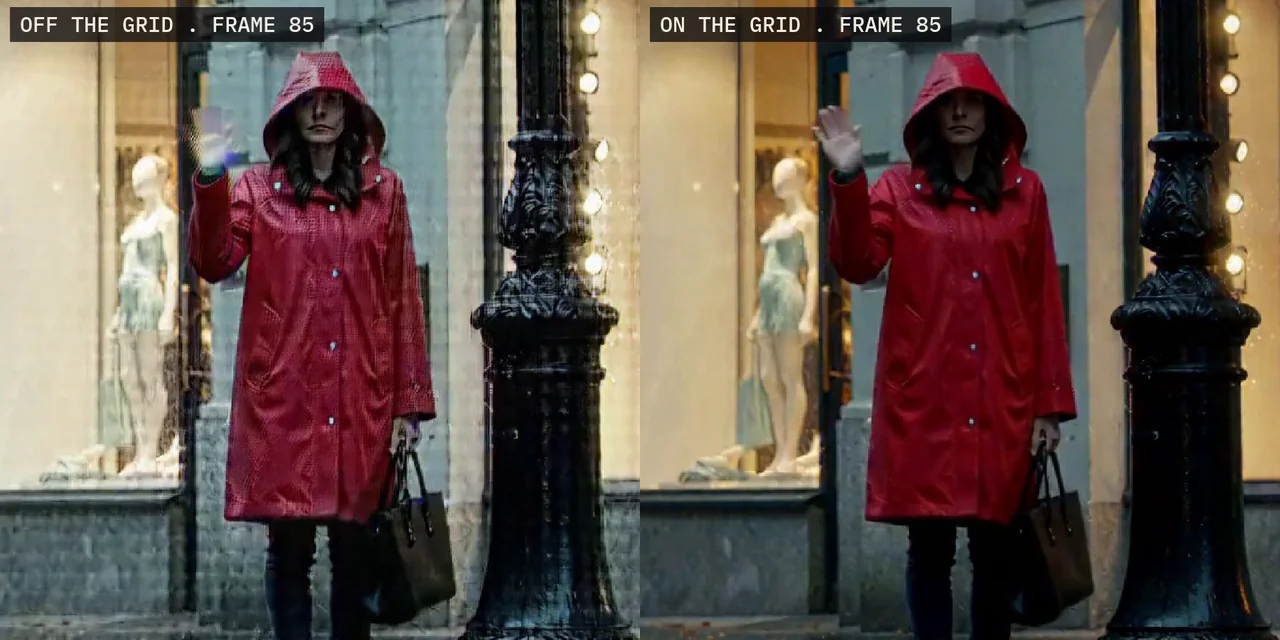
So 0.11 moves each clip to the nearest group start in its chunk, its own sound with it, and the strip snaps clip blocks there. In the examples, 3.00 s became 2.83 s and 4.00 s became 4.25 s. Sounds and middle frames are not snapped.
How do you update to 0.11?
0.11 has been on the repo's main branch since 2026-10-08. Run Manager → Update All, or git pull in custom_nodes/Stubelius-Ultimate-H3, then restart ComfyUI. New installs follow the Ultimate H3 post. The update also fixes what a cancelled MiniMax H3 render used to leave behind: a memory-leak warning, and slower jobs after it until a restart. And it adds a de_stutter switch on the Output node, which the video does not cover.
Test setup and limits
- One scene (a woman in a red raincoat on a rainy street), one RTX 5090, one render per variant.
- PDMD mode at 1344×768 and 24 fps, apart from one continuation in Quality mode. The renders loaded a community variant of the text encoder in the same int8 format, not the official file.
- Every clip I continued was the same 6.6 s H3 take (the 30 fps and silent versions were made from it), not camera footage.
- The examples ran on test builds on 2026-10-05 and 2026-10-06, before the merge. I have not re-rendered them on main, which has since gained de-stutter.
- No timings: I rendered these to show the tools, not to benchmark them.
- Her brown bag renders black whenever she turns side-on, with nothing pinned too: an H3 trait in this scene, not the pins.
Sources and files
- 3 New Ways to Direct MiniMax H3 in ComfyUI, Second by Second (6:44): middle frames from 0:43, continue a clip from 1:38, sounds and clips from 2:40, the door slam from 3:31 and the rules from 5:30.
- stuubszzz/Stubelius-Ultimate-H3: the pack, its example workflow and README (MIT).
- ComfyUI's stock MiniMax H3 nodes, which include Add Guide for MiniMax H3.
- seitanism/ComfyUI-H3-Motion-Context-MultiRef: the carry-over between chunks and from a clip.
- PDMD by Zimo Wang et al. (Apache-2.0): the 4-step LoRA behind PDMD mode, from pdmd2026/pdmd_4NFE_lora.
- The MiniMax H3 model card. The model is MiniMax's, under the MiniMax H3 Community License.
- On this site: the Stubelius Ultimate H3 workflow, the MiniMax H3 prompt format and the older Stubelius Director. Part 2 of ComfyUI From Zero covers structured prompting, with MiniMax H3 on screen.
Common questions
Do middle frames and pinned sounds work in Reference (Omni) mode?
No, all three tools are First/Last Frame mode. For a recording that should be a whole video's sound, Reference (Omni) mode has Lip Sync: every chunk follows the recording, and the finished video plays the file itself.
Why did my pinned clip move a little?
It snapped to H3's 17-frame grid, every 0.71 s at 24 fps. Off the grid, my test clip came out with two grey frames (one render, RTX 5090). Sounds and middle frames are not snapped.
Can I continue camera footage, or only an H3 take?
The First Frame box takes any video file as a clip (.mp4, .webm, .mov, .mkv, .m4v, .avi) and turns a phone clip upright. But every clip I continued was an H3 take of the same scene, so I have not measured a join on camera footage.