STUUBZZZ
Claude Code edits an AI video in FilmCraft, the free ArtCraft editor, with MCP scripts
 Watch the video · Claude Edited My ComfyUI Video in a Free Adobe Clone
Claude Code edited my 88-second MiniMax H3 short film in FilmCraft 0.17.1, Storytold's free, open-source video editor, by writing Python scripts that sent commands to the live app through its MCP server. The recorded run, a script replaying steps Claude had rehearsed and checked, took about 66 seconds from empty project to exported file. The cut list was mine.
- On 2026-11-05, Claude Code cut my 88-second MiniMax H3 film in FilmCraft 0.17.1 by writing Python scripts that drove the live app through its MCP server in bridge mode. The recording script, a replay of rehearsed steps, placed 21 pieces one command at a time in about 8 seconds.
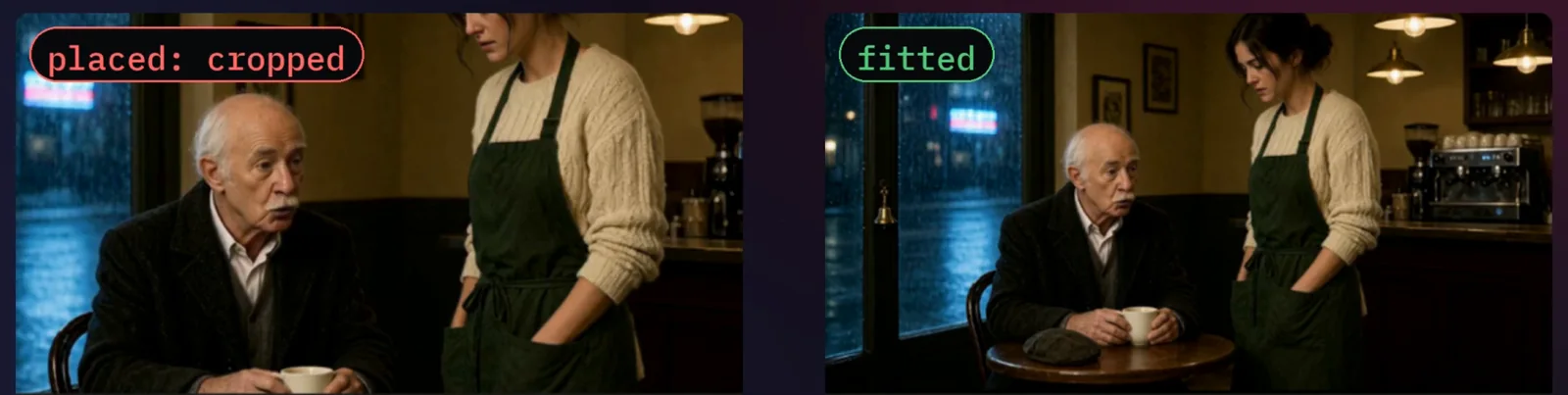
- The recording script's self-check flagged 3 of 19 MiniMax H3 clips as cropped: 3808x2160 takes placed at 100% in a 2560x1472 sequence. It spotted them by take size; my headless frame test measured the crop. One command, Scale to Frame Size, fixed all three.
- FilmCraft exported the 2,104-frame film as 2560x1472 H.264 in 44 seconds from the open app (33 s headless). My headless export and the rehearsal's export from the open app both measured -23.7 LUFS, against -23.8 LUFS for the same cut exported from my own editor.
- The creative calls in the FilmCraft edit stayed mine: which take, where and how long came from my cut list. While rehearsing, Claude made three mistakes of its own and caught each by checking again.
- FilmCraft's README for 0.17.1 (numbers re-measured 2026-10-10) rates it about 86% feature breadth and 56% ready for real work. After testing 0.17.1 I agree: useful for AI clips, not yet for paid client work.
What are ArtCraft and FilmCraft, and what did Claude do with them?
FilmCraft is Storytold's free, open-source video editor from the ArtCraft family of apps, and Claude Code wrote scripts that drove it over its MCP server to cut, check, title and export my 88-second MiniMax H3 film without me touching the timeline. Because an AI agent can drive it, it works as a free AI video editor.
ArtCraft is Storytold's family of free, open-source creative apps, more than a dozen of them, written from scratch in Rust. FilmCraft has the familiar panels, tools and shortcuts of a professional editor. Claude Code is Anthropic's AI agent that runs on your computer.
The apps are listed as Crafting Apps on getartcraft.com: FilmCraft, EffectCraft for motion graphics, PhotoCraft, WordCraft and more. Storytold calls them clean-room rebuilds, and FilmCraft's README says even its codecs are "written in Rust from the public specifications".
The film is Two Cups: 19 clips made with MiniMax H3, MiniMax's video model with sound, plus one still and one music track. The clips came from my free Stubelius Ultimate H3 workflow in ComfyUI, a free, open-source program that runs image and video models on your own computer. The characters are AI-made adults. This post is only the edit; for the clips, see how Claude Code ran ComfyUI to make a MiniMax H3 video.
Tested 2026-11-05 on my own Windows PC (how I test): AMD Ryzen 9 9950X, RTX 5090 (32 GB), 96 GB RAM as installed today. FilmCraft 0.17.1 and EffectCraft 0.21.1, Windows x64 portable builds, driven through filmcraft-cli mcp --bridge by Python scripts Claude Code wrote and ran (fc_rehearsal.py, fc_record.py). One recorded run that replayed the steps of a full rehearsal.
How long did the FilmCraft edit and export take?
About 66 seconds of commands and export, from an empty FilmCraft project to the finished file, in a recorded run where a script Claude wrote replayed steps rehearsed earlier, so no thinking time is in it. Placing all 21 pieces took about 8 seconds, checking and fixing every clip about 9.5, the other steps (setup, sound, titles, film look, save) about 5, and the export 44.
The time Claude spent writing, running and checking those scripts isn't in these numbers, and neither time includes the EffectCraft titles and film look, rendered just before. The rehearsal was a script too: about 98 seconds from start to export, app launch included, by its files.
| Step | Live app, bridge mode | Headless test |
|---|---|---|
| Place 21 pieces (20 pictures, the music) | about 7.8 s, one command at a time | 0.13 s, one command_batch |
| Check 19 clips, fix 3 | about 9.5 s | done in separate scripts, not timed |
| Other steps: new project and import, music gain and fade, titles on V2, film-look swap, save | about 4.9 s (1.2 + 1.1 + 1.5 + 0.7 + 0.4 s) | not timed |
| Export, 2560x1472 H.264 + AAC | 44 s (36 to 40 s in the rehearsal) | 33 s (about 65 fps) |
| Empty project to exported file | about 66 s (no thinking time) | not run as one timed pass |
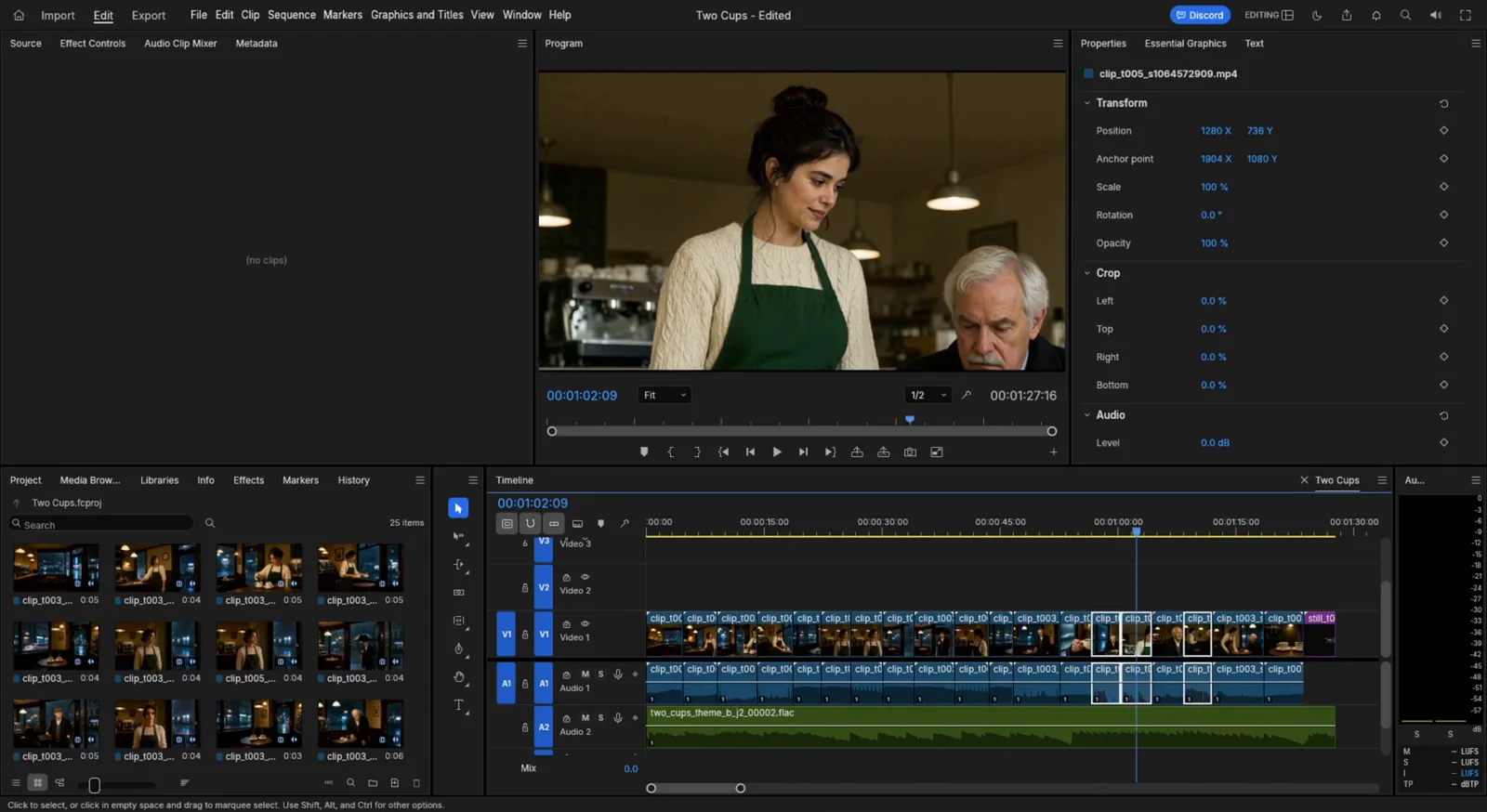
The live run is slower because each command waited for a screenshot. Headless, the same 21 placements took 0.13 seconds, all 20 pictures frame-exact against my own cut.
How does Claude edit video in FilmCraft through MCP?
MCP (Model Context Protocol) is an open-source standard for connecting AI apps to outside tools, so an agent can call an app's commands. Through FilmCraft's MCP server, anything that speaks MCP can send commands, ask what the timeline looks like and render frames to look at. In my test, Claude's Python scripts did that, and Claude read what they saved.
Claude Code never called FilmCraft's tools as its own MCP tools here. It wrote a small MCP client in Python, ran the six steps as a rehearsal script in the open app, read the screenshots and numbers that script saved, and fixed what was wrong. Then it wrote a recording script that replayed the same steps through the bridge, one command at a time with a screenshot after each. Claude first tried a headless claude -p run for the recording, but its standalone CLI couldn't sign in on my PC.
FilmCraft's "Built for agents" section says every menu item, button, slider and drag is a command, and the UI, the CLI, a control channel and an MCP server all run the same commands.
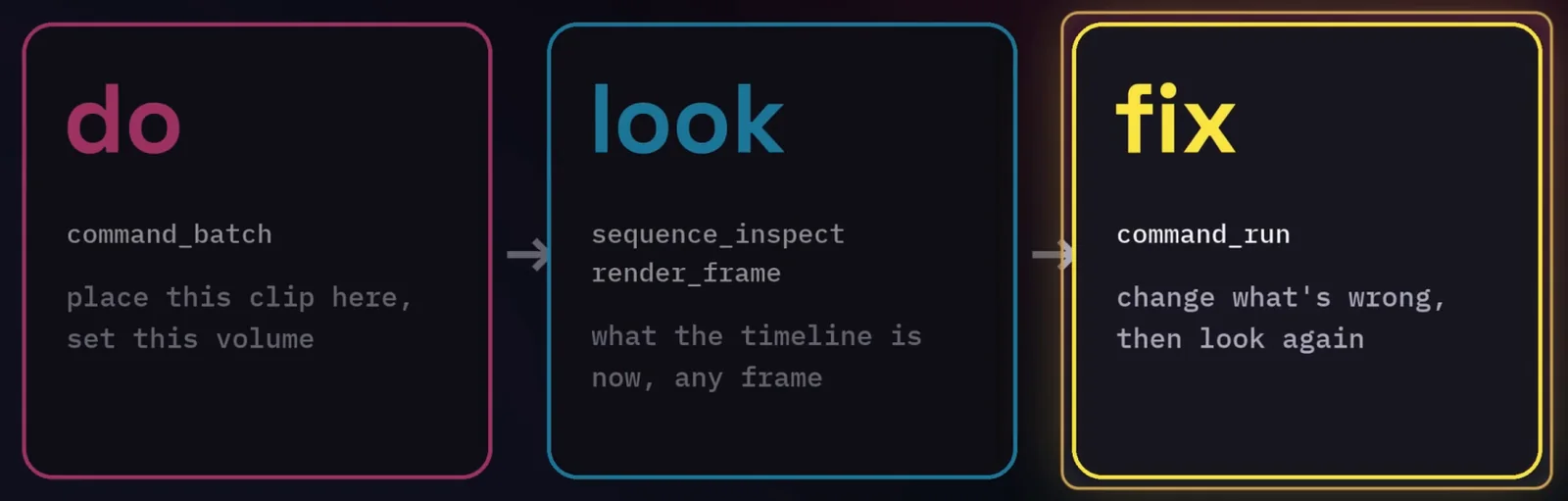
filmcraft-cli commands listed 716 commands in 0.17.1. The MCP server, filmcraft-cli mcp, offers 17 tools. Claude's scripts used three kinds:
- Do:
command_batchandcommand_run, for exampletimeline.placeorclip.audioGain. - Look:
sequence_inspectfor the timeline's clips, andrender_framefor a picture of any frame. - Fix: change what's wrong, then look again.
Bridge mode connects the MCP server to FilmCraft's control port (--control 9876), so whatever talks to the server drives the window on screen; my scripts started it with filmcraft-cli mcp --bridge 127.0.0.1:9876. One catch: there, render_frame is only a Program-monitor screenshot (573x490), so exact picture checks are better done headless. Claude can also make clips in a cloned voice over MCP.
How do I connect Claude Code to FilmCraft and EffectCraft?
Install both apps with the ArtCraft Launcher, start FilmCraft with its control port and a token, then add each app's MCP server to Claude Code. The apps are free; Claude needs a paid plan. Download only from getartcraft.com or Storytold's GitHub.
- Install FilmCraft and EffectCraft with the ArtCraft Launcher, one click per app. On Windows it installs per user, in
%LOCALAPPDATA%\Programs\ArtCraft\<App>. - In PowerShell, make a token:
$env:FILMCRAFT_CONTROL_TOKEN = -join ((1..32) | ForEach-Object { '{0:x2}' -f (Get-Random -Max 256) }) - Start FilmCraft with its control port:
& "$env:LOCALAPPDATA\Programs\ArtCraft\FilmCraft\filmcraft.exe" --control 9876 - Add FilmCraft to Claude Code in bridge mode:
claude mcp add filmcraft -e FILMCRAFT_CONTROL_TOKEN=$env:FILMCRAFT_CONTROL_TOKEN -- "$env:LOCALAPPDATA\Programs\ArtCraft\FilmCraft\filmcraft-cli.exe" mcp --bridge 127.0.0.1:9876 - Add EffectCraft:
claude mcp add effectcraft -- "$env:LOCALAPPDATA\Programs\ArtCraft\EffectCraft\effectcraft-cli.exe" mcp
I didn't run these claude mcp add lines in my test; they follow the bridge setup in FilmCraft's agent docs. Without --bridge, the MCP server works headless: faster, but nothing shows on screen.
What did Claude's scripts do in each of the six editing steps?
Six steps took the film from a folder of MiniMax H3 clips to a titled, graded, mixed export. Claude ran them inside its rehearsal and recording scripts, not as six live prompts. Each prompt below is word for word as on screen in the video, so you can try it with Claude Code connected.
| Step | The prompt, as on screen | What the scripts did |
|---|---|---|
| 1. Rough cut | New project, import everything in cutlist.csv, make a 2560x1472 24 fps sequence and place every row on its track, from its source in, for its length. Then tell me how many pieces you placed. | 21 timeline.place commands, 0 failed: 20 pictures on V1, 19 clip sounds on A1, the music on A2 |
| 2. Check your own work | For every clip, render the frame at its middle and compare it with the same moment in its take. Tell me which don't match and why, fix them, and check again. | Flagged 3B, 3C and 3E as cropped 3808x2160 takes; selected them and ran clip.scaleToFrameSize |
| 3. The sound | Set the music on A2 to minus 8 dB and fade it out over the last 2 seconds. Leave the clips' own sound as it is. | clip.audioGain at -8 dB and a 48-frame constant-power fade |
| 4. Titles in EffectCraft | From the title-card and lower-third templates, make a Two Cups title and lower third in my colours, hide the templates' backgrounds, render them as ProRes 4444 with alpha and lay them on V2, scaled to the frame. | Both rendered as ProRes 4444 with alpha and laid over the film |
| 5. Film look | Give the opening shot a film look in EffectCraft: a soft glow, light grain and a vignette. Swap it in at the same timing and show me a before and after. | Glow (threshold 80, radius 30), CC Vignette 40, Add Grain 0.35, swapped in at the same timing |
| 6. Export | Export the sequence as H.264 at full size. Then tell me its length, frame count, size and loudness. | file.exportMedia: 87.7 s, 2,104 frames, 2560x1472, -23.7 LUFS (measured on the rehearsal's live export) |
In the recorded run, the script flagged 3B, 3C and 3E by comparing each take's size with the sequence's. The exact picture comparison is from my headless test, by PSNR (peak signal-to-noise ratio), a number for how alike two images are. There, the three 4K takes scored only 11.6 to 12.9 dB before the fix; after it, all 19 clips matched their takes at 34 to 37 dB. For the titles, ProRes 4444 keeps a see-through layer, so 98.8% of the frame under the title card stays the picture underneath.
What broke during the edit?
Four things broke or fell short in FilmCraft 0.17.1: 4K takes came in cropped, the music lost its volume when placed, export renders mostly on the processor, and Premiere project files can't be opened. The first two took one command each, but only because Claude's test scripts checked.
- 4K takes came in cropped. Takes bigger than the sequence go in at 100%. Fix:
timeline.select, thenclip.scaleToFrameSize. - The music lost its volume.
timeline.placedoesn't carry a clip's gain, so set it after withclip.audioGain. You'd only notice by listening. - Export runs mostly on the CPU. FilmCraft's status section says colour grading, keys and export rendering still run on the CPU. H.264 is the only software export; H.265 needs a hardware encoder, NVIDIA's on Windows. On my PC it was still fast; on a laptop it won't be.
- No Premiere project import.
.prprojfiles can't be opened yet; FilmCraft's README says to bring sequences over as FCP7 XML, AAF or OTIO.
One more from the rehearsal: the constant-power fade works mostly in the last second. Volume keyframes give a fuller fade.
While preparing the edit, Claude made three mistakes of its own. Its first title card covered the whole film in purple, because the template has a solid "Background" layer. When it hid that, the next render said "Your Title Here", the template's sample text instead of mine. And at one point it told me the music fade was broken; it wasn't, it had measured the sound wrong. It caught every one by checking again.
FilmCraft also moves fast: v0.16.0, v0.17.0 and v0.17.1 came out within five days. Yours will be newer, and some of this may already be fixed.
What still needed a human?
In the FilmCraft edit, the creative choices still needed a human: which take, where it starts, how long it runs and where in the take to begin all came from my own cut list. The editing work was Claude's, done through scripts it wrote.
The cut list is just a spreadsheet, one row per shot. With clips from your own workflow, there are two ways to start:
- Write it yourself: which clip, in what order, how long.
- Let Claude suggest one: give it your script and the folder, ask it to look at each clip's first and last frame, and check its order before you go on.
Either way, keep the step where it checks its own frames. That's the one that flagged the crop.
Can FilmCraft replace Premiere Pro for AI video?
For a paid client job, not yet: 0.17.1 can't open Premiere projects, and its export renders mostly on the CPU. For AI clips, it's already useful. FilmCraft's README for 0.17.1 (numbers re-measured 2026-10-10) puts it at about 56% ready for real work, and after this test I agree.
But cutting, titles, a look, the sound and an export are the grunt work every batch of AI clips needs. With ComfyUI for the clips, FilmCraft for the cut and EffectCraft for titles and the look, the whole film ran on free software on one PC; the only subscription was Claude. New to ComfyUI? The free Part 1 of ComfyUI From Zero starts from the install.
Why not let Claude edit in free DaVinci Resolve instead?
Because outside scripts can't drive the free version of DaVinci Resolve, Blackmagic Design's editor. Blackmagic's DaVinci Resolve Studio page lists the remote scripting API as a feature of the paid Studio version. FilmCraft is free and built to be driven from outside, which is exactly what an AI agent needs.
| What matters | FilmCraft 0.17.1 | DaVinci Resolve (free) | DaVinci Resolve Studio |
|---|---|---|---|
| Cost model | Free, open source (MIT or Apache-2.0) | Free | Paid |
| Driven by outside scripts or an agent | Yes: 716 commands through the CLI, a control channel and an MCP server | No | Yes: remote scripting API, Python and Lua |
| H.265 export | Only with a hardware encoder, NVIDIA's on Windows; H.264 in software | Not checked | Hardware H.264 and H.265 encoding listed |
Resolve is still what I normally edit in. I didn't test Resolve Studio with Claude.
What are the limits of this test?
This is one scripted recorded run of one 88-second film on one Windows PC, with a cut list I wrote, so the times are one example, not a benchmark; Claude sending each command live, long timelines, camera footage, laptops, macOS, Linux and the H.265 export were not tested.
- One recorded run on 2026-11-05, after a rehearsal and a headless test, on one Windows PC. FilmCraft 0.17.1, EffectCraft 0.21.1.
- Claude Code ran in the desktop app and never called FilmCraft's tools as its own MCP tools. It wrote Python scripts with a small MCP client instead; a headless
claude -prun for the recording failed because the standalone CLI couldn't sign in on my PC. The recorded run was the recording script (fc_record.py), replaying the rehearsed steps one command at a time with a screenshot after each, so the 66 seconds is command and export time, not Claude's thinking time. - Not tested: the
claude mcp addsetup above, with Claude Code calling FilmCraft's MCP tools itself, prompt by prompt. - The cut list came from my own edit of the film, so this tests the editing work, not Claude's creative choices. I didn't test Claude choosing the order.
- One 88-second film. Not tested: long timelines, camera footage, a laptop, macOS or Linux, the H.265 export, or the other ArtCraft apps.
- The 86% and 56% figures are Storytold's own, from the FilmCraft README, not mine.
- The run's own files don't record the Claude Code version or model; the Claude Code session that ran it does: Claude Code 2.1.317 in the desktop app, on Claude Opus 5.5 (
claude-opus-5-5).
Sources and files
- Claude Edited My ComfyUI Video in a Free Adobe Clone, the video this post belongs to: ArtCraft at 0:31, connecting Claude at 2:13, why not Resolve at 2:48, the edit at 3:37, EffectCraft at 4:52, the export at 5:33, what broke at 6:10 and the verdict at 7:34.
- Storytold: getartcraft.com, the FilmCraft repo and its releases, the EffectCraft repo.
- Claude Code by Anthropic; the MiniMax H3 model card; the free Stubelius Ultimate H3 workflow the clips came from.
- On this site: Claude Code and ComfyUI, the Ultimate H3 workflow, MiniMax H3 keyframes on a timeline and the ComfyUI From Zero course.
Common questions
What do I need to let Claude Code edit in FilmCraft?
A paid Claude plan for Claude Code, plus FilmCraft and EffectCraft from the ArtCraft Launcher, which are free. Then make a control token and add one claude mcp add line per app, as in the setup steps. I tested on Windows only, with Claude driving the bridge from scripts it wrote rather than through those lines.
Does FilmCraft work on Mac or Linux?
Yes, there are builds: the FilmCraft 0.17.1 release lists a macOS universal build and Linux builds as well as Windows ones. I tested only the Windows x64 portable build, so I can't say how well the others run.
Can Claude choose the edit itself in FilmCraft?
Not in this test: the takes, in and out points came from my own cut list, and Claude did the editing work. I didn't test Claude choosing the order of the shots.
Is FilmCraft free?
Yes. FilmCraft and EffectCraft are free and open source, dual-licensed MIT or Apache-2.0 with both licence files in each repo; read them before commercial use.
Does Claude upload my video files when it edits in FilmCraft?
Not the files themselves: they stay on your PC, and FilmCraft reads and renders them locally. But what Claude reads is sent to Anthropic as part of the conversation: the frames it renders to check its work, the file names and the tools' output. Anthropic's Claude Code data-usage page says your prompts and the model's outputs go over the network, encrypted in transit.
Do I need a big GPU to edit in FilmCraft?
Not for the export: FilmCraft's README says colour grading, keys and export rendering still run on the CPU, while blend modes and the most common effects use the GPU. My 88-second 2K export took 44 seconds on my own PC; I didn't test a laptop or a smaller card. For the MiniMax H3 clips themselves, see what runs at each VRAM size.