STUUBZZZ
LTX 2.5 VAE decode: flicker every 56 frames and the shared-memory stall on Windows
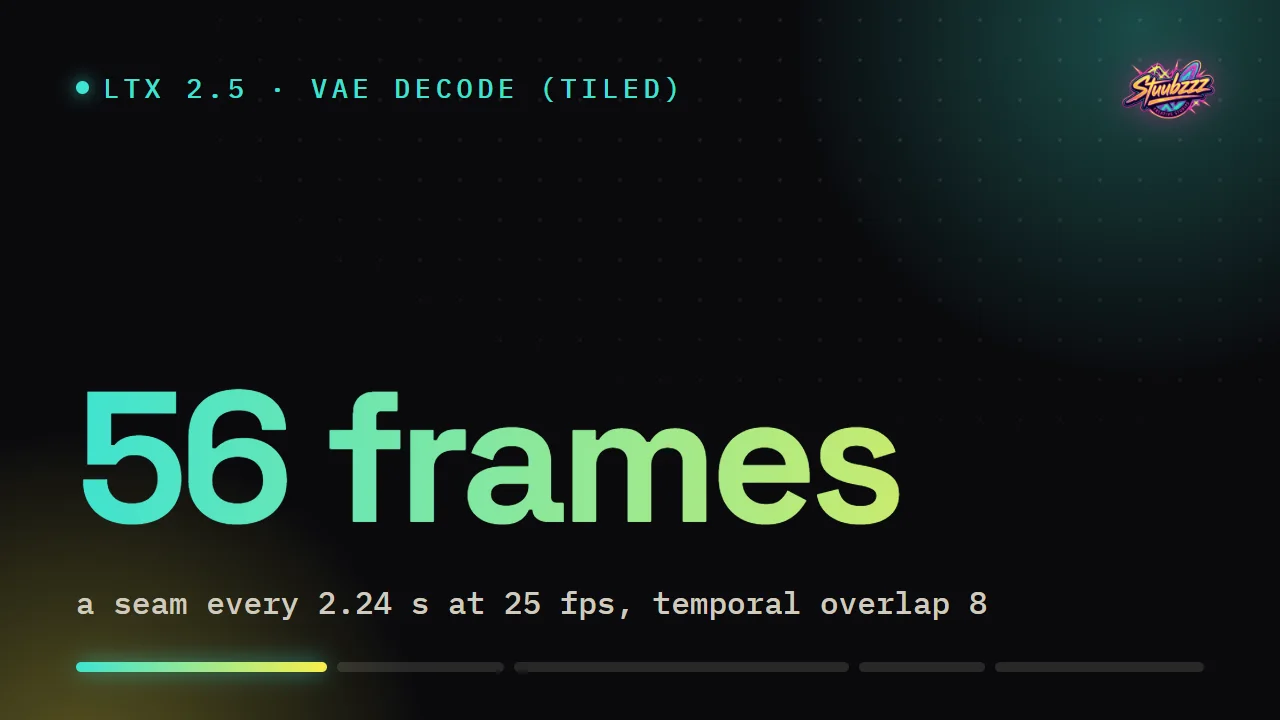
An LTX 2.5 video that pops every 56 frames (2.24 s at 25 fps) was decoded by VAE Decode (Tiled) at temporal overlap 8, which joins chunks of 8 latent frames with a 1-frame blend. Temporal overlap 16, or one temporal pass at temporal size 4096, removes that pop.
A decode that stalls on Windows with no error is a second, separate problem. The clip needs more VRAM than the card has (33.4 GB estimated on my 32 GB RTX 5090 for 6 s at 50 fps), and the NVIDIA driver spills into shared memory instead of raising an out-of-memory error. The fix is a smaller decode tile, chosen before the decode starts.
- In ComfyUI 0.37.0 and 0.38.0 the VAE Decode (Tiled) node defaults to temporal size 64 and temporal overlap 8. With the LTX 2.5 video VAE that is 8-latent chunks joined by a 1-frame blend, which puts a seam every 56 frames (2.24 s at 25 fps).
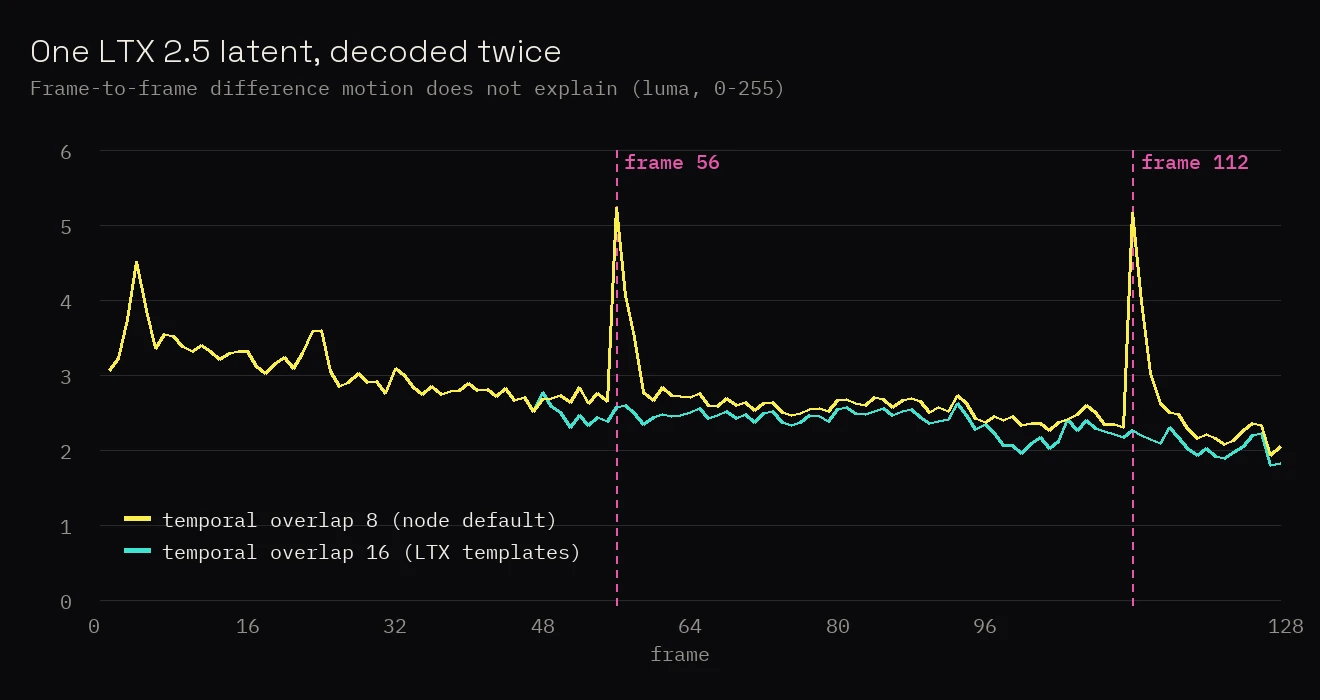
- On one 129-frame 1280×704 LTX 2.5 latent decoded on an RTX 5090, the frame-to-frame difference at frames 56 and 112 was 2.01 times the rest of the clip with temporal 64 / overlap 8, and 1.32 times with every frame decoded in one pass.
- ComfyUI's bundled LTX 2.5 templates set temporal overlap 16 on VAE Decode (Tiled), a 9-frame crossfade between chunks. On one 640×352 test latent on an RTX 5090, the jump at frames 56 and 112 was 1.24 times the rest of the clip with overlap 16, against 1.76 with overlap 8 and 1.26 in one pass. On a second, freshly sampled 1280×704 latent, decoded with 768 px tiles, it was 0.92 with overlap 16 against 1.67 with overlap 8.
- ComfyUI estimates 33.4 GB to decode 305 frames (6 s at 50 fps) of 1280×704 LTX 2.5 video in one pass with 768 px tiles, and an RTX 5090 reports 31.8 GB. On Windows 11 that decode raised no out-of-memory error: the log went silent for 5 minutes 52 seconds, then the NVIDIA driver logged an error.
- The same 305-frame LTX 2.5 clip, decoded in one pass with 576 px tiles chosen from the free VRAM before starting, took 25 seconds on an RTX 5090 under Windows 11, with shared GPU memory flat at 0.31 to 0.34 GB.
Why does LTX 2.5 flicker every two seconds in ComfyUI?
Because VAE Decode (Tiled) decodes each temporal chunk as a standalone clip, and at the node's defaults the chunks meet with a 1-frame blend every 56 frames. The decoder in the LTX 2.5 video VAE is a one-step diffusion model. It expands the latent into a context volume, then denoises a block of random noise into pixels in a single step. In ComfyUI the class is CausalDiffusionVAE, in na_diffusion_decoder.py. The file's docstring calls it the LTX 2.4 decoder, and ltx-2.5-video-vae-bf16.safetensors loads through the same class.
Two things in its decode() matter. The noise comes from a generator with a fixed seed (generator.manual_seed(0)), sized to whatever latent it is handed. And the first latent frame is treated as the start of the video, the last one as the end.
VAE Decode (Tiled) runs ComfyUI's generic tiler, which cuts the latent into tiles, calls decode() on each and blends the overlaps. For this decoder, every temporal chunk becomes a standalone clip with its own start, end and noise. The decoder has switches for chunked callers (drop_leading_frame, pad_trailing), but the generic path does not pass them.
The node's defaults are temporal_size 64 and temporal_overlap 8, in frames. This VAE compresses time by 8, so you get chunks of 8 latent frames that overlap by 1, and one latent frame of overlap is one frame of video. In a 129-frame clip the chunks start at frames 0, 56 and 112, and frames 56 and 112 are a plain average of two unrelated decodes. That is the pop: every 56 frames, 2.24 s at 25 fps, 1.12 s at 50 fps.
None of the three parts is wrong by itself. The tiler is generic, the decoder is correct when it sees a whole clip, and 64 / 8 are ordinary defaults. The flicker lives where they meet.
This still holds as of ComfyUI 0.38.0, released 2026-09-29: its nodes.py, comfy/utils.py and decoder file are byte-identical to the 0.37.0 checkout I tested on. I compared the files and did not render on 0.38.0.
Which VAE Decode (Tiled) settings remove the seam?
Temporal overlap 16, or one pass at temporal size 4096: on my 640×352 test latent both brought the jump at the seam frames down to about the level of an untiled decode. I encoded two finished 129-frame clips back into latents with the LTX 2.5 VAE and decoded each latent several ways, all with 512 px spatial tiles. The score is the motion-compensated difference between neighbouring frames (luma, 0 to 255): the mean over the four transitions around frames 56 and 112, divided by the mean over the rest of the clip.
| Decode | Size | Peak VRAM | At frames 56 and 112 | Rest of clip | Ratio |
|---|---|---|---|---|---|
| Tiled, temporal 64 / overlap 8 | 640×352 | 3.6 GB | 3.86 | 2.20 | 1.76 |
| Tiled, temporal 64 / overlap 16 | 640×352 | 3.6 GB | 2.64 | 2.13 | 1.24 |
| Tiled, temporal 4096 (one pass) | 640×352 | 6.0 GB | 2.67 | 2.12 | 1.26 |
| VAE Decode, untiled | 640×352 | 7.0 GB | 2.67 | 2.11 | 1.27 |
| Tiled, temporal 64 / overlap 8 | 1280×704 | 4.4 GB | 3.47 | 1.73 | 2.01 |
| Tiled, temporal 4096 (one pass) | 1280×704 | 7.8 GB | 2.22 | 1.68 | 1.32 |
The untiled decode has no seams at all and scores 1.27, so roughly 1.26 to 1.27 is this clip's own level at those frames. Two settings bring the tiled node down to it:
- Temporal overlap 16. Two latent frames of overlap, a 9-frame crossfade, no extra VRAM. ComfyUI's bundled LTX 2.5 templates ship with exactly this (tile 512, overlap 64, temporal size 64, temporal overlap 16), so if you started from one of them you may never have seen the flicker. I measured it at 640×352 in the table, and at 1280×704 on a second latent, below.
- Temporal size 4096. The node's maximum: every frame in one pass, so there is no join in time. Spatial tiles still cap the memory, but it costs more, 7.8 GB against 4.4 GB for 129 frames at 1280×704.
One limit of that score. With overlap 16 the joins move: chunks start at frames 48 and 96 and crossfade over frames 48 to 56 and 96 to 104, so a score taken at frames 56 and 112 only catches the tail of the first crossfade. The second check covers it better. Against the untiled decode, frames 48 to 64 came out at 34.1 dB PSNR with overlap 16, 34.3 dB in one pass and 32.5 dB with overlap 8. One latent, one size.
A later check fills the gap at full size. On 2026-10-01 I sampled a fresh 129-frame, 1280×704 text-to-video latent and decoded it twice with VAE Decode (Tiled), 768 px tiles and temporal size 64, changing only the temporal overlap. With overlap 8 the transitions into frames 56 and 112 were the two largest jumps in the whole clip, and the score was 1.67. With overlap 16 it was 0.92: no bump at the joins.
My own pack used to call the node with 64 and 8, which is how I met the seam. It now decodes in one temporal pass and keeps 16-overlap chunks as the last resort.
Why does the VAE decode hang on Windows without an out-of-memory error?
Because the clip needs more VRAM than the card has, and on Windows the NVIDIA driver moves the overflow into shared GPU memory instead of raising an out-of-memory error. One pass has a price. Every frame goes through each spatial tile at once, so memory grows with clip length. ComfyUI's own estimate for this VAE at 1280×704 with 768 px tiles is 14.6 GB for 129 frames and 33.4 GB for 305 frames (6 s at 50 fps). An RTX 5090 reports 31.8 GB.
At the time, my decode tried one pass and caught the out-of-memory error to retry in chunks. On 2026-09-29 I queued that 305-frame clip with 768 px tiles. ComfyUI logged the VAE load at 23:11:00 and then nothing: no error, no progress. At 23:16:52, 5 minutes 52 seconds later, Windows logged an NVIDIA driver error (nvlddmkm, Event ID 153) and ComfyUI had to be restarted.
NVIDIA's support article System Memory Fallback for Stable Diffusion describes the mechanism. Since driver 536.40, an application that exhausts GPU memory is moved into shared memory and keeps running at lower speed, where it used to crash. Shared GPU memory is ordinary system RAM. No error reaches PyTorch, so an except OutOfMemoryError branch has nothing to catch. I was not logging GPU memory during that run, so the spill itself is inferred from the estimate, the missing error and the driver event.
ComfyUI's plain VAE Decode has the same shape: try the full decode, catch the out-of-memory error, fall back to tiles (VAE.decode in comfy/sd.py). I read that code, I did not test it in the spilled state. ComfyUI 0.38.0 adds a shortcut there: when the estimate exceeds the free VRAM it goes straight to tiles, for VAEs that mark their estimate as reliable. The only VAE I found setting that flag is SeedVR2's. The LTX decoder is not flagged.
The fix: size the decode before it starts
Catching the error cannot work here, so the decode in Stubelius Ultimate LTX 2.5 plans ahead. The video for the workflow this shipped in does not cover any of it.
- Ask ComfyUI for its estimate of the whole-clip decode at the chosen tile size, and let it make room the way it does before any decode.
- Read the free VRAM and subtract ComfyUI's reserve for other programs (the
--reserve-vramvalue, if you set one). - Step the spatial tile down 64 px at a time, from the chosen size (768 by default) to 256, and take the largest that fits. Every frame still decodes in one pass, so there are no seams in time.
- Only if 256 px does not fit: temporal chunks with a 16-frame overlap, as long as the memory allows.
- Keep the out-of-memory retry as a backstop, replanned at half the memory, three attempts at most.
| Decode tile | 129 frames (5 s at 25 fps) | 305 frames (6 s at 50 fps) |
|---|---|---|
| 768 px | 14.6 GB | 33.4 GB |
| 640 px | 11.0 GB | 25.3 GB |
| 576 px | 8.9 GB | 20.5 GB |
| 512 px | 7.1 GB | 16.2 GB |
| 384 px | 4.0 GB | 9.1 GB |
| 256 px | 1.8 GB | 4.0 GB |
The estimate ran about 10% above the one peak I measured. For 129 frames at 512 px tiles it says 7.1 GB, and the measured 7.8 GB peak includes 1.4 GB of VAE weights, which leaves about 6.4 GB of working memory. GB here is what ComfyUI and Windows report, 1,024³ bytes.
Then the clip that took ComfyUI down, queued again: official LTX 2.5 distilled int8 checkpoint, Licon's MSR LoRA with three reference images, seed 20261009, decode tile set to 768.
[StubeliusLTX] decode: 305 frames at 768 px tiles would need ~33.4 GB, 23.6 GB VRAM is free - one pass at 576 px tiles instead (~20.5 GB).The decode took 25 s. During it, dedicated GPU memory peaked at 27.3 GB and shared GPU memory stayed between 0.31 and 0.34 GB, sampled every 3 seconds from the Windows performance counters. The output was 305 frames at 50 fps, and none of its five largest frame-to-frame outliers sat on a multiple of 56.
The same counter log shows shared memory climbing to 3.49 GB during sampling, before the decode began. That is a different stage, and nothing in this post changes it.
Does a smaller decode tile cost quality?
A little, on the one clip I checked. Spatial tiles are standalone decodes too. I rendered one clip three times with the same seed (42) and settings, 129 frames at 1280×704 on the official distilled checkpoint, and changed only the decode tile.
| Decode tile | ComfyUI estimate | Decode time | Detail (Laplacian variance) | PSNR vs 768 px |
|---|---|---|---|---|
| 768 px | 14.6 GB | 7.9 s | 44.4 | reference |
| 384 px | 4.0 GB | 11.1 s | 40.7 | 33.1 dB |
| 256 px | 1.8 GB | 11.4 s | 41.7 | 32.6 dB |
The smaller tiles scored 6 to 8% lower on the detail metric and took about 3 s longer. At 256 px the mean difference from the 768 px render (luma, 0 to 255) was 3.02 in the column blend zones and 3.16 in the row blend zones, against 2.77 and 2.73 elsewhere.
Two caveats. Each render was sampled again from the same seed, and I did not measure how much two identical runs differ, so part of the gap may not come from the tile at all. And it is one seed. Read it as "small", not as a figure for every clip.
What to change if you use the stock nodes
- Flicker. On VAE Decode (Tiled), set temporal overlap to 16. Or set temporal size to 4096 if the clip fits.
- Stall. If a one-pass decode stalls, lower the tile size on VAE Decode (Tiled) first: 512, then 384, then 256. The estimate falls with the tile's area. If a plain VAE Decode stalls, swap it for the tiled node. Temporal size 64 with overlap 16 is the other way out.
- Check for a spill. Watch shared GPU memory while the decode runs. These are the counters I logged, in PowerShell (values in bytes):
Get-Counter '\GPU Adapter Memory(*)\Dedicated Usage','\GPU Adapter Memory(*)\Shared Usage' - Ask the driver for a real error. NVIDIA Control Panel → Manage 3D Settings → Program Settings, add ComfyUI's
python.exe(python_embeded\python.exein the portable build), set CUDA - Sysmem Fallback Policy to Prefer No Sysmem Fallback, then restart ComfyUI. NVIDIA's article lists the setting from driver 546.01 and describes the trade as steady speed at the risk of a crash when a job needs more GPU memory. An oversized allocation should then fail with an ordinary out-of-memory error, which ComfyUI and custom nodes know how to catch. I have not tested a run with the policy switched.
Tested 2026-09-27 to 2026-10-01 on an RTX 5090 (32 GB), 96 GB RAM, Windows 11, ComfyUI 0.37.0. One run per setting, one seed each. For the 1280×704 overlap check, the motion compensation used OpenCV's Farneback optical flow, computed once on the overlap 16 decode and applied to both. ComfyUI code read at commit 7fbcfa8 (46 commits after v0.37.0) and compared by file with v0.38.0, which I did not render on. NVIDIA on Windows only: I did not test AMD cards, Linux or any other NVIDIA card.
Sources and files
- stuubszzz/Stubelius-Ultimate-LTX2.5: the pack and workflow. The decode planner is in stubelius_ltx.py
- Comfy-Org/ComfyUI: the tiled decode node, the VAE class and the LTX diffusion decoder linked above
- Comfy-Org/workflow_templates: the bundled LTX 2.5 templates (I read them in version 0.1.96 of the installed template package)
- Lightricks/LTX-2.5 model card, for the checkpoint and the video VAE
- liconstudio/ComfyUI-LTX2.5-MSR: Licon's multi-reference (MSR) conditioning for LTX 2.5, the method behind the three reference images in the 305-frame test
- NVIDIA support article System Memory Fallback for Stable Diffusion (answer ID 5490 on nvidia.custhelp.com): the driver behaviour and the control panel setting
- On this site: the Stubelius Ultimate LTX 2.5 workflow and why a half-size first pass looks soft on LTX 2.5.
Common questions
Why does my LTX 2.5 video flicker every two seconds in ComfyUI?
Because VAE Decode (Tiled) decodes each temporal chunk as a standalone clip, and at its defaults (temporal size 64, temporal overlap 8) the chunks meet with a 1-frame blend every 56 frames, 2.24 seconds at 25 fps. Set temporal overlap to 16, or temporal size to 4096 to decode every frame in one pass.
What temporal overlap should VAE Decode (Tiled) use for LTX 2.5?
16, the value in ComfyUI's bundled LTX 2.5 templates. It gives a 9-frame crossfade between chunks. On one 640×352 test latent on an RTX 5090 the jump at frames 56 and 112 was 1.24 times the rest of the clip, against 1.76 for overlap 8, and on a second latent at 1280×704, 0.92 against 1.67. Temporal size 4096 avoids the joins if the clip fits in VRAM.