STUUBZZZ
ComfyUI errors beginners hit: what each of the eight means and how to fix it
Module 9 of the free Part 1 of ComfyUI From Zero covers the eight ComfyUI errors beginners actually see: a missing custom node, "Value not in list", "CUDA out of memory", a shape mismatch, "Prompt has no outputs", a GGUF file that won't show up, a black image or buzzing audio, and "Required input is missing". Each has a short fix: install the node pack, put the file in the right folder, make the job smaller, match the model family, add an output node, use the GGUF loader, start without the speed-up, or plug in the cable. When the fix isn't obvious, walk upstream: an error shows where the workflow failed, not always why.
- Red nodes in a downloaded ComfyUI workflow, with the message "Missing node types", mean the workflow uses a custom node pack you haven't installed. Open the Manager, click Install Missing Custom Nodes and restart ComfyUI.
- In ComfyUI, "Value not in list" on a loader means it can't find the file it names: it isn't in that loader's folder, or ComfyUI hasn't refreshed its list. Put the file in the right subfolder of
ComfyUI/modelsand press R. - "CUDA out of memory" in ComfyUI means the job doesn't fit in your graphics card's VRAM. Lower the resolution or the batch size, use a smaller FP8 or GGUF file, or close other apps that use the GPU.
- "Prompt has no outputs" means nothing in the ComfyUI workflow saves or shows a result: add a
Save ImageorPreview Imagenode. "VAEDecode: Required input is missing: vae" means the vae socket onVAE Decodehas no cable. - A ComfyUI error shows where the workflow failed, not always why. In the course example,
VAE Decodereports "expected 16 channels, got 4", and the cause is a VAE from another model family two nodes upstream.
How do you read a ComfyUI error?
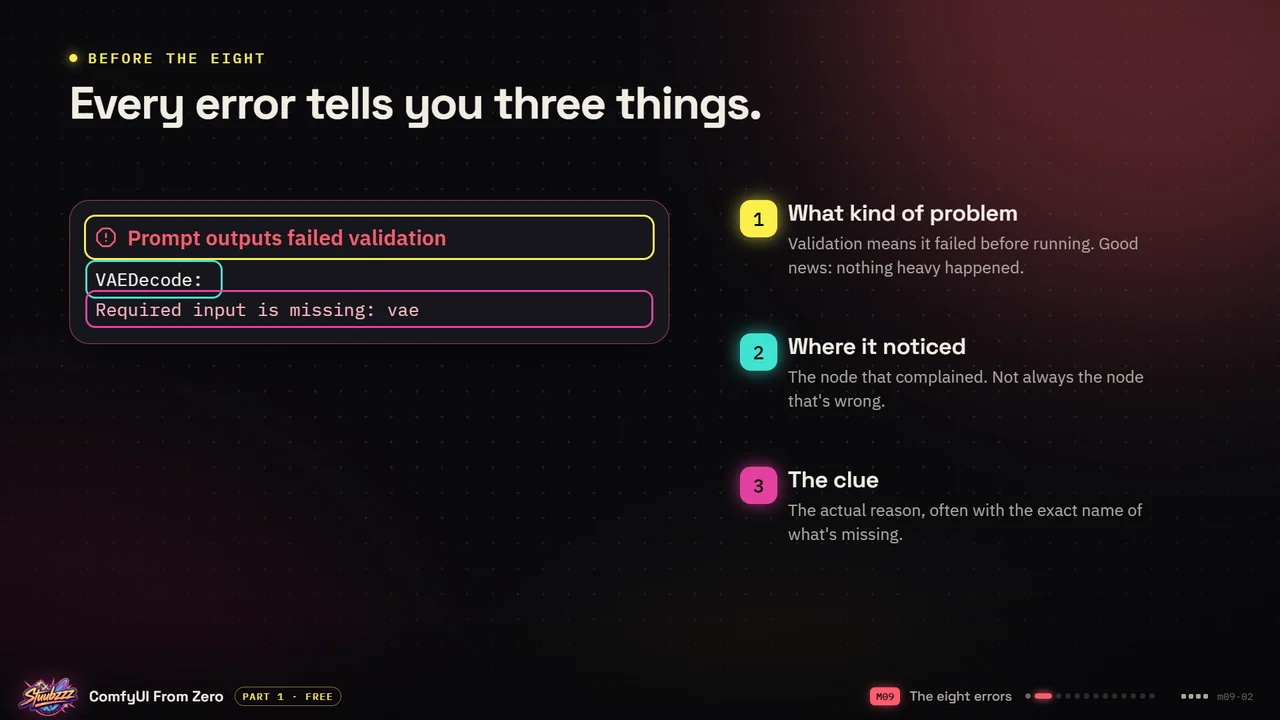
Every error tells you three things. This is the example from the course:
Prompt outputs failed validation
VAEDecode:
Required input is missing: vae- What kind of problem: the first line. Validation means it failed before running. Good news: nothing heavy happened.
- Where it noticed: the node that complained, here
VAEDecode. That is not always the node that's wrong. Errors use a node's internal name:VAEDecodeisVAE Decodeon the canvas, andCheckpointLoaderSimpleisLoad Checkpoint. - The clue: the actual reason, often with the exact name of what's missing. Here it's the
vaeinput.
The node turns red on the canvas, the error pops up at the top right, where you can open it, and the console shows it too. While you're learning, watch the workflow as it runs to see which box goes red. My own errors are often simple slips: a forgotten cable, a missing model, the wrong VAE.
How do you fix "Missing node types" and red nodes?
What you see (2:38:27 in the video): a downloaded workflow opens with red boxes and this message. The node names at the end are examples: yours lists what your workflow is missing.
Missing node types
When loading the graph, the following node types were not found:
HandyResize · HandySharpen
What it means: the workflow uses a node pack you haven't installed yet. Nothing is broken.
The fix:
- Open the Manager.
- Click Install Missing Custom Nodes.
- Restart ComfyUI. The red restart button at the bottom right of that window restarts the server as well.
If the Manager doesn't list a very new pack yet, clone it from GitHub by hand. Node packs are code: only install them from sources you trust.
How do you fix "Value not in list" in ComfyUI?
What you see (2:39:42 in the video): the loader turns red, still showing the name of the file it can't find, and:
Prompt outputs failed validation
CheckpointLoaderSimple:
Value not in list: ckpt_name:
'z_image_turbo_aio.safetensors' not in []
What it means: the model isn't in the folder this loader looks in, or ComfyUI hasn't noticed it yet. Any loader can show it, and so can a file type the loader doesn't read, such as a GGUF model in Load Checkpoint.
The fix:
- Download the file the error names.
- Put it in the right folder. Each kind of model file has its own subfolder of
ComfyUI/models, such ascheckpoints,diffusion_modelsorvae. - Press R to refresh, or restart ComfyUI. With ComfyUI open, R is the step that's easy to forget.
How do you fix "CUDA out of memory" in ComfyUI?
What you see (2:40:48 in the video), in the console:
torch.OutOfMemoryError: CUDA out of memory.
Tried to allocate 2.00 GiB. GPU 0 has a total
capacity of 8.00 GiB of which 312.00 MiB is free.
What it means: the job doesn't fit on the desk. Your GPU ran out of VRAM. (CUDA is Nvidia's language for the GPU.) Everyone gets this one, and I get it regularly when I try new things.
The fix:
- Lower the resolution in
Empty Latent Image, or the batch size. - Use a smaller file: the FP8 or GGUF version of the model.
- Close other apps using the GPU, such as games, a browser playing video or a LoRA training, and run again.
Sometimes there's no message at all: the GPU and CPU meters in ComfyUI's top bar are maxed out and the progress bar doesn't move. That's usually a silent crash, often an out-of-memory error the overloaded system never reported. If a three-minute job has run for five, close ComfyUI, start it again and try a smaller resolution. I get this with LTX 2.5 when I forget the tiled VAE Decode on a long, full-resolution clip (why a decode can hang on Windows).
On a Mac or an AMD card, FP8 files can fail, so in step 2 use a GGUF file instead. On a Mac, the install guide lists running out of memory as generation that crawls while the whole Mac slows down. See its common errors on a Mac and on an AMD card.
What does "mat1 and mat2 shapes cannot be multiplied" mean?
What you see (2:44:33 in the video), in the console. The scariest-looking error is usually the simplest, so don't read the numbers.
RuntimeError: mat1 and mat2 shapes
cannot be multiplied (154x2048 and 768x320)
What it means: parts from different model families are wired together: a VAE, text encoder, LoRA or ControlNet made for another model. Z-Image Turbo with an LTX VAE, for example.
The fix:
- Check that every helper matches the model family: the checkpoint or diffusion model, the VAE and the text encoder.
- Check the
typesetting onLoad CLIP. It has to match the model family too. - When you're unsure, use the files from the model's official template. It tells you exactly which VAE to run.
Why does ComfyUI say "Prompt has no outputs"?
What you see (2:45:53 in the video): you pressed Run and nothing happened, apart from this.
Prompt outputs failed validation
Prompt has no outputs
What it means: nothing in the workflow saves or shows a result, so ComfyUI refuses to run it.
The fix:
- Add a
Save ImageorPreview Imagenode. - Connect it to the
IMAGEoutput ofVAE Decode. - Run again.
The order to remember: after the KSampler comes VAE Decode, and after that a node that saves or previews the result, image or video.
Why doesn't my GGUF file show up in the loader?
What you see (2:46:53 in the video): no message. The file is in the folder, you've checked three times, and the loader's dropdown still says (none): on the slide, the_model-Q4_K_M.gguf sits in models/diffusion_models/ and Load Diffusion Model can't see it. Pressing R doesn't help.
What it means: it's a GGUF file, and the normal loader lists files such as .safetensors, not .gguf.
The fix:
- Install the GGUF node pack, ComfyUI-GGUF by city96.
- Use
Unet Loader (GGUF)instead ofLoad Diffusion Model, andCLIP Loader (GGUF)for a GGUF text encoder. - Leave the file where it is.
With little VRAM you'll run a lot of GGUF files, text encoders included. On a Mac, the install guide has one more note for a GGUF model that still won't load.
Why does ComfyUI give a black image or buzzing audio?
What you see (2:48:20 in the video): no error. It runs, finishes and gives you nothing: a completely black image, or audio that buzzes.
What it means: usually a speed-up setting, like sage attention, that this particular model doesn't agree with. Launch options that change how ComfyUI runs can clash with a model in the same way.
The fix:
- Start ComfyUI without sage attention, using the default launcher and no extra launch options.
- Run the exact same workflow again.
- Turn speed-ups back on only for models that like them: a model's page often says, or test it yourself.
It can also be the wrong VAE: early on, a VAE that didn't belong to my checkpoint gave me black and blurry images.
How do you fix "Required input is missing"?
What you see (2:50:46 in the video):
Prompt outputs failed validation
VAEDecode:
Required input is missing: vae
What it means: a socket on that node has no cable plugged in, and the message even tells you which one. VAE Decode and VAE Encode can't do anything without a VAE.
The fix:
- Find the node the error names, here
VAEDecode. - Find the socket it names, here
vae. - Connect the cable from the node that loads the VAE, such as the
VAEoutput ofLoad Checkpoint, and run again.
Why does the error point at a node that looks fine?
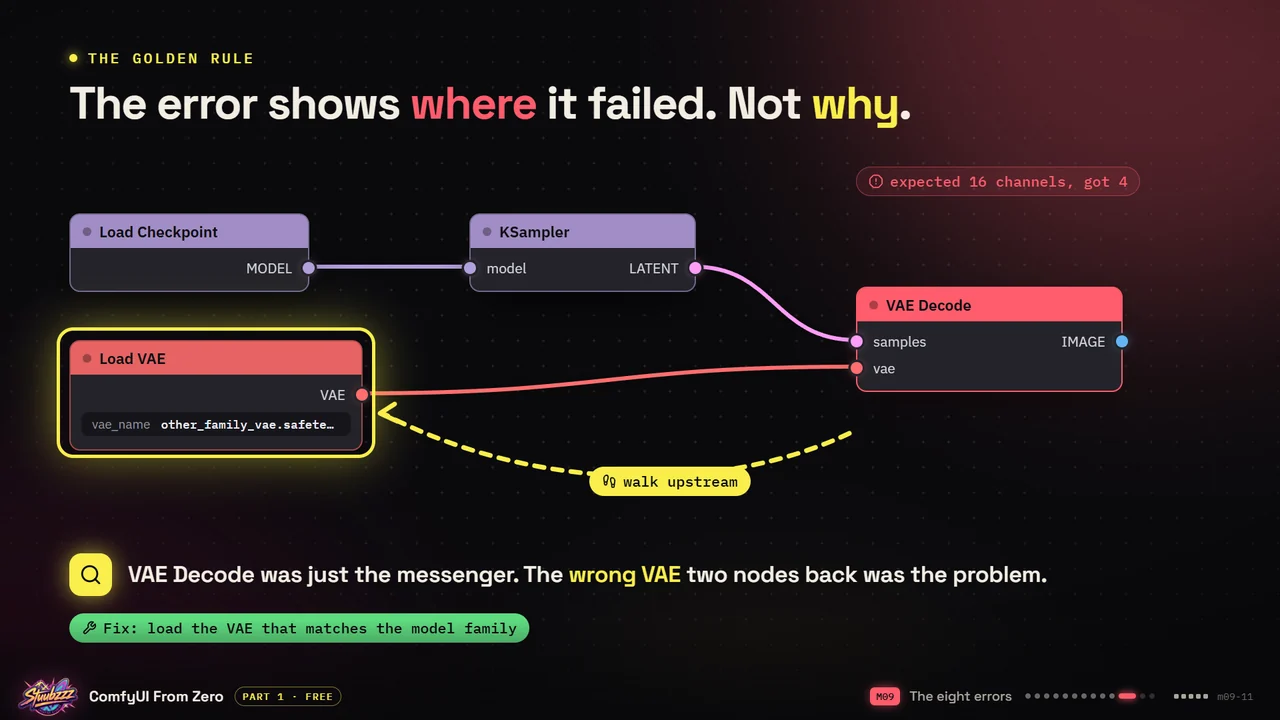
Because the error shows where the workflow failed, not always why. The red node is where the problem was noticed, and the cause can sit further back. The course example: VAE Decode fails with
expected 16 channels, got 4Nothing is wrong with VAE Decode. Follow its input cables backwards, upstream, from right to left on the canvas. Two nodes back, Load VAE holds a VAE from another model family: VAE Decode was just the messenger. The fix is to load the VAE that matches the model family. I made this exact mistake early on, and picking the right VAE in the dropdown fixed it.
How do you ask for help with a ComfyUI error?
Give the helper your machine, your ComfyUI and the error in one message. The free Part 1 files on the course page include this template, help-request-template.txt:
GPU:       (card, VRAM, system RAM, operating system)   e.g. RTX 4060 - 8 GB VRAM - 32 GB RAM - Windows 11
ComfyUI:   (Desktop or portable, and when you last updated)   e.g. Desktop, updated today
Workflow:  (a screenshot of the whole workflow, or the .json attached)
Error:     (the full error text, copied, not retyped)   e.g. VAEDecode - expected 16 channels, got 4
Tried:     (what you already did)   e.g. pressed R, restarted, re-downloaded the VAE
A request with those five lines gets answered. "It doesn't work, help" doesn't. On a Mac, say it's Apple Silicon and Comfy Desktop. The same details help on Civitai, Reddit, in a GitHub issue or with an AI assistant, and an AI agent has helped me fix every error I've had so far. Keep them in a text file so you don't retype them.
Sources and files
- Part 1 of ComfyUI From Zero on YouTube: Module 9, The eight errors, runs from 2:35:44 to 2:56:58, where Module 10 starts.
- The Part 1 files: the slides, the two-page cheat sheet with its first-week errors, the help-request template, and small workflows for five of the errors, each broken on purpose.
- Module 9 on the course page and the ComfyUI glossary.
- The install guides' error lists for a Mac and an AMD card.
- city96/ComfyUI-GGUF: the GGUF loaders.
- On this site: the LTX 2.5 VAE decode post, for a decode that hangs on Windows without an out-of-memory error.
All eight are in Module 9 of Part 1 of ComfyUI From Zero, which is free: about three hours, from installing ComfyUI to building text-to-image from an empty canvas. Start Part 1.
Common questions
What does "Prompt outputs failed validation" mean in ComfyUI?
It's the headline of an error ComfyUI caught before running anything, so nothing heavy happened. The lines under it name the node that noticed the problem and the clue: VAEDecode: Required input is missing: vae means the vae socket on VAE Decode has no cable. "Value not in list" and "Prompt has no outputs" use the same headline.
Why is my model missing from the loader's dropdown?
Either the file isn't in the folder that loader reads, or ComfyUI hasn't refreshed its list: put it in the right subfolder of ComfyUI/models and press R. A .gguf file doesn't appear in the normal loaders at all. Use Unet Loader (GGUF) or CLIP Loader (GGUF) from the GGUF node pack.
How do I fix CUDA out of memory in ComfyUI?
Make the job smaller: lower the resolution or batch size, use an FP8 or GGUF version of the model, and close other apps using the GPU. If ComfyUI sits with the GPU maxed out, no progress and no error, it's usually a silent crash: restart it and try a smaller resolution.