STUUBZZZ
MiniMax H3 character LoRA in AI Toolkit: 29 clips, 4,000 steps, and why I picked step 3,000
 Watch the video · This Is How I Train a MiniMax H3 Character LoRA Locally (Full Guide, 2026)
To train a character LoRA for MiniMax H3 by MiniMax locally, I used AI Toolkit by Ostris on an RTX 5090: 29 three-second clips, rank 16, 4,000 steps, about 15 hours of GPU time. In one run, by eye, the trigger word alone drew the character at all four tested checkpoints, and on one seed I picked step 3,000.
- A MiniMax H3 character LoRA trained in AI Toolkit 0.13.23 on an RTX 5090 (32 GB), from 29 clips at rank 16 and 4,000 steps, took about 15 hours of GPU time in October 2026. One run.
- In a full-resolution test of four MiniMax H3 LoRA checkpoints (22 renders, seed 42, RTX 5090, 2026-10-10), steps 3,000 and 3,500 tied on all five prompts, and I picked 3,000 as the earlier one. Step 2,500 lost the crown in a summer dress, and step 4,000 turned the teardrop back into a star. One render per cell, judged by eye.
- On one MiniMax H3 prompt naming the eyes and the mark, on four seeds (RTX 5090, October 2026), the base model gave four different women and the step 3,000 character LoRA gave the same character four times out of four, by eye.
- A GPU driver crash at step 571 of an AI Toolkit 0.13.23 run cost 71 steps and about 13 idle hours, because the toolkit kept showing the job as running. A planned pause, using save now before stop, lost no steps.
How do you train a MiniMax H3 character LoRA?
Turn one image of the character into captioned three-second clips, train on them in AI Toolkit, then test the saved checkpoints at full resolution and keep the earliest that holds. MiniMax H3 is an open video model with sound from MiniMax, and AI Toolkit is a free, open-source training suite from Ostris.
- Build the stills: one canonical image, then the same character in new scenes.
- Animate each still for 3 seconds in MiniMax H3's first-frame mode.
- Caption each clip: the trigger word, then only what changes.
- Check that every side is covered before you train.
- Install AI Toolkit and set up the job: rank 16, 4,000 steps, a checkpoint every 250.
- Watch the run, and press save now before any stop.
- Test the checkpoints at full resolution on one seed and keep the earliest that holds.
What is a MiniMax H3 character LoRA?
A MiniMax H3 character LoRA is a small add-on file for MiniMax H3, trained on clips of one character, that draws her whenever its trigger word is in the prompt. I gave mine details on one side only, so that any drift or mirroring shows at once.
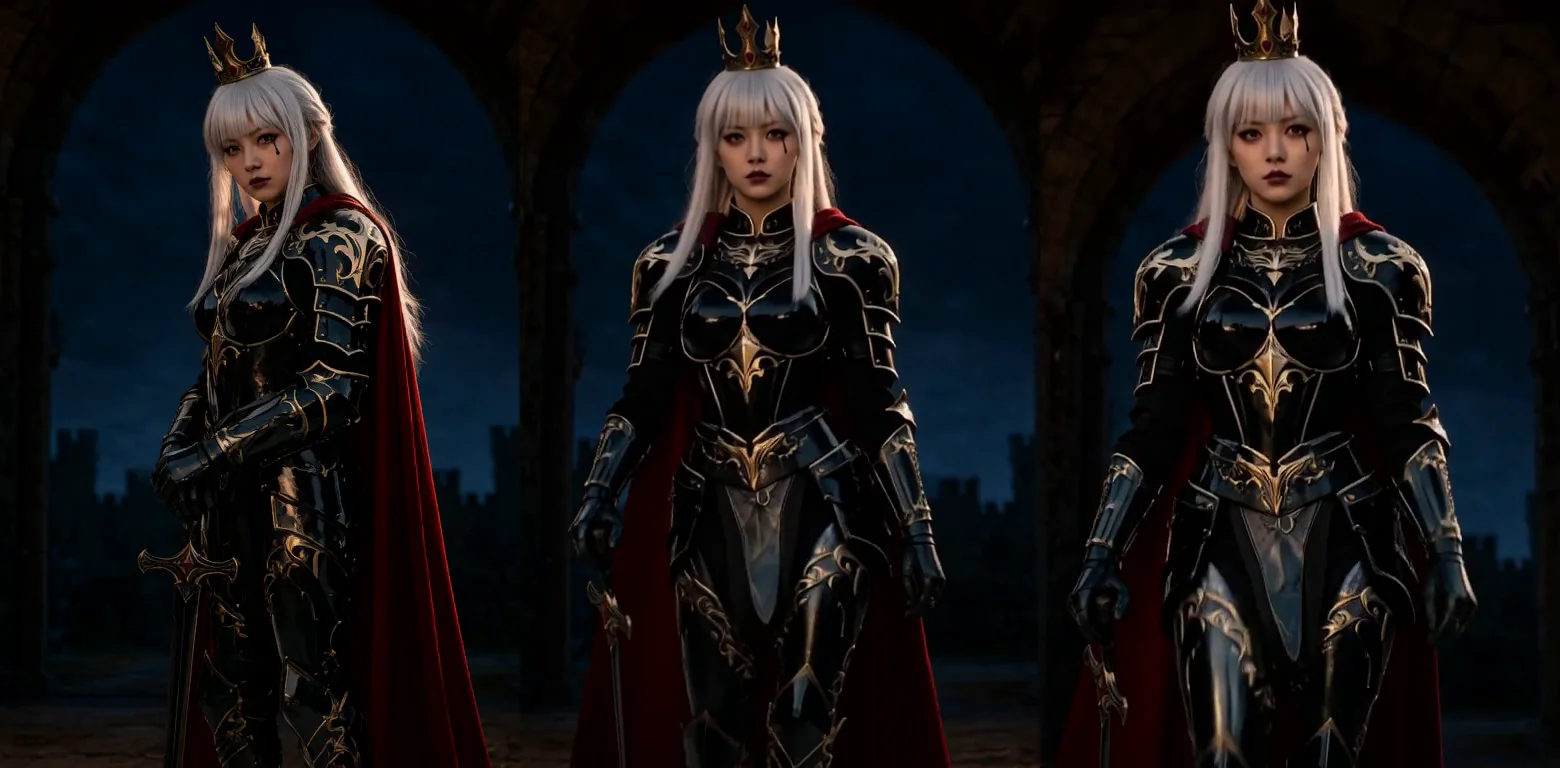
Seren is my own original character, an adult woman in her mid-twenties. She has a small black teardrop under her left eye and a single gold pauldron on her left shoulder. The rest is silver-white hair, crimson eyes, a gold crown, black-and-gold armour, a crimson cape and a black sword.
How do you build the dataset from one image?
Make one canonical full-body image of the character, then use it as the reference in Qwen-Image 2.1 by Qwen: write "the woman in <image1>" and put her in a new scene. Plain text-to-image can't do this, because every seed gives a slightly different face.
I planned 20 shots: 7 on a plain background for the angles and 13 in real scenes. It took 28 renders on the base model, not Turbo, to keep 20, in about 8 minutes. Qwen copies the reference's pose: ask for kneeling and you get her standing. Describe the pose physically instead, which knee is down and where each hand is.
How do you turn stills into training clips?
Use MiniMax H3's first-frame mode: the still is frame one and H3 animates it for 3 seconds, with one small action, one slow camera move and no speech or music. The first 20 clips took 31 renders and about 48 minutes.
I rendered them in my Stubelius Ultimate H3 workflow in Quality mode, 20 steps. Every take had a measured check, then my eyes on full-resolution crops of her face. The second check caught most of the problems:
- Calm shots came out almost frozen. The re-rolls got a big, slow push-in.
- Props drift. In the fight stance her black blade turned silver within a second. The re-roll asked for it to stay matte black.
- H3 invents what it can't see. When she squared up to the camera, H3 gave her a second gold pauldron, twice. The take that passed has her turn only her head while the camera pushes in.
What should the captions say?
A caption is the trigger word, then only what changes: the place, the light, the action, the camera and the sound. Never write her hair, eyes, teardrop, crown, armour or cape. Whatever you leave out is meant to burn into the trigger word, here S3ren, with a 3.
S3ren, a close-up of a woman standing in a golden wheat field at sunset. She smiles softly at the camera, and a breeze lifts loose strands across her cheek as her smile widens. Warm backlight glows around her against the low sun. The camera pushes in slowly. Wind whispers through the wheat with distant birdsong.What goes wrong when a dataset shows only one side?
A LoRA can't learn a side it never sees, and MiniMax H3 fills in what it can't see. I never trained the one-sided set, so that's the risk, not a measured result. Minutes after I started training, I saw that 17 of my 20 stills showed her left side: no right side, no straight front, nothing from above or below, and one back view.
I stopped the run at step 0 and added nine angles, from her right side to a worm's-eye view and a top-down shot. Both models fought me:
- Asked for her right profile, Qwen-Image 2.1 mirrored her: teardrop on the right cheek, pauldron on the right shoulder.
- Qwen-Image-Edit 2511 removed them. It could not put a detail on a chosen side, so every right-side view keeps her left eye out of frame.
- In the right-profile clip, H3 painted the teardrop back onto her visible cheek, because my shot text named it. Right-side clips now leave it out.
The nine new clips took 13 renders, which made 29 stills and 29 clips.
Which AI Toolkit settings train a MiniMax H3 character LoRA?
I used the minimax_h3_ref2va architecture, rank 16, learning rate 1e-4, Training Adapter alone and 80% layer offloading, the recipe of an earlier H3 LoRA. That took about 26 GB of VRAM, at roughly 12 seconds a step.
Install AI Toolkit from its GitHub repo: the README gives the install steps and the web UI for starting, stopping and monitoring jobs. Then set up a job with these values:
| Setting | Value |
|---|---|
| Distillation handling | Training Adapter alone (minimax_h3_ref2va_training_adapter_v2) |
| Rank and alpha | 16 and 16 (each checkpoint is 155 MB) |
| Learning rate, optimiser | 1e-4, adamw8bit |
| Steps, batch | 4,000, batch 1: about 138 passes per clip |
| Dataset | 29 clips (19 portrait, 10 landscape), audio on, 512 and 768 px |
| Saves and samples | A checkpoint (the LoRA saved at that step) every 250 steps, samples every 500 |
Trained 2026-10-09 and 2026-10-10 on an RTX 5090 (32 GB), 96 GB RAM, Windows 11 (how I test). Pace: 11.5 to 14.5 s a step.
The sample prompts say nothing about her look. Step 0 gave strangers, a man among them. Step 500, about two hours in, gave her hair, crown, armour and cape in all four.
What happens when an AI Toolkit run crashes?
A crash costs the steps since the last checkpoint, plus however long nobody notices. Mine cost 71 steps and about 13 idle hours. To pause on purpose, press save now first and only then stop: the run resumes from that exact step.
At step 571, at 07:17 in the morning, the GPU driver crashed (nvlddmkm, event 153) and the trainer died in the same second. With no Python error and the toolkit still showing the job as running, nothing restarted it. The same driver error had hit twice the evening before, so I don't blame the training.
- Save often. Every 250 steps was about an hour.
- Watch for a dead process, not only a finished job. I then ran a read-only watcher script.
- After a crash, mark the stale job as stopped, restart the toolkit and resume from the latest checkpoint.
- To free the GPU, save now, then stop. My pause wrote a checkpoint at step 1,699, and the trainer picked up there.
Which LoRA checkpoint is best?
Step 3,000, for this character on one seed, as the earlier of two that tie. Steps 3,000 and 3,500 read the same on all five rows below, so I took the earlier one. Step 2,500 lost her crown in a summer dress, and step 4,000 turned the teardrop back into a star, one render each.
The trainer's small samples can fool you: they showed her real right side at steps 2,000 and 4,000, and full-resolution renders did not. So I rendered five prompts through four checkpoints in ComfyUI, with no reference image.
| Prompt | No LoRA | 2,500 | 3,000 | 3,500 | 4,000 |
|---|---|---|---|---|---|
| Face, trigger only | A stranger | Seren, mark not a drop, brown eyes | Same | Same | Same |
| Face, eyes and mark named | – | Crimson eyes, black drop | Same | Same | Crimson eyes, star |
| From her right side | – | Her left side | Same | Same | Same |
| Market walk | A stranger | Seren, bystanders in capes | Same | Same | Same |
| Summer dress | – | Blonde, no crown | Crown, very pale hair, bangs | Same as 3,000 | Same as 3,000 |
Tested 2026-10-10 on an RTX 5090 (32 GB), 96 GB RAM, Windows 11 (how I test). Stubelius Ultimate H3 0.11.1, Hybrid mode (10 steps, lightx2v turbo LoRA at 0.75), Reference (Omni) mode, about 0.9 MP, 5 s, LoRA strength 1.0.
Two details did not burn in: the mark arrives on the correct side but as a star or a cross, and her eyes stay brown. One line fixes the eyes at all four and the mark up to step 3,500: crimson eyes and a small black teardrop-shaped mark under her left eye.
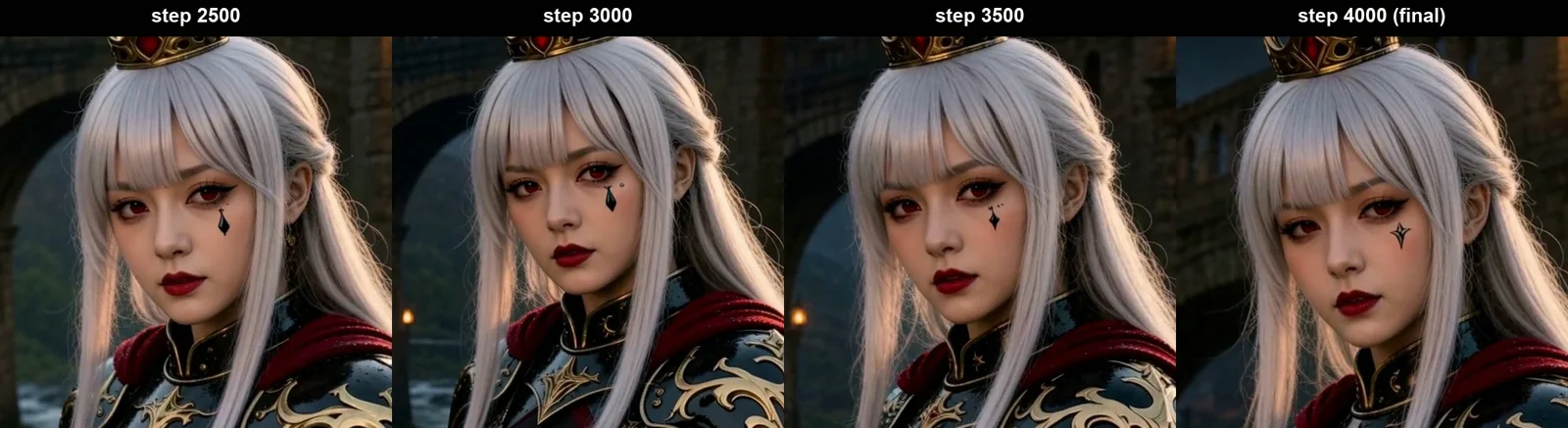
Two weaknesses remain at every checkpoint. Ask for her right side and you get her left, even after the nine new angles: the dataset's left side still wins. For right-side shots I'd start from a right-side still, which I haven't tested with the LoRA. And her look leaks in crowds. By eye I preferred the drop at 3,000, but that is one render each, and the table can't separate it from 3,500.
How consistent is the LoRA across seeds and new scenes?
Four out of four by eye: one chapel close-up prompt on seeds 42, 7, 1234 and 2026 gave four different women on the base model and Seren every time with the step 3,000 LoRA. The prompt named the eyes and the mark in both rows.
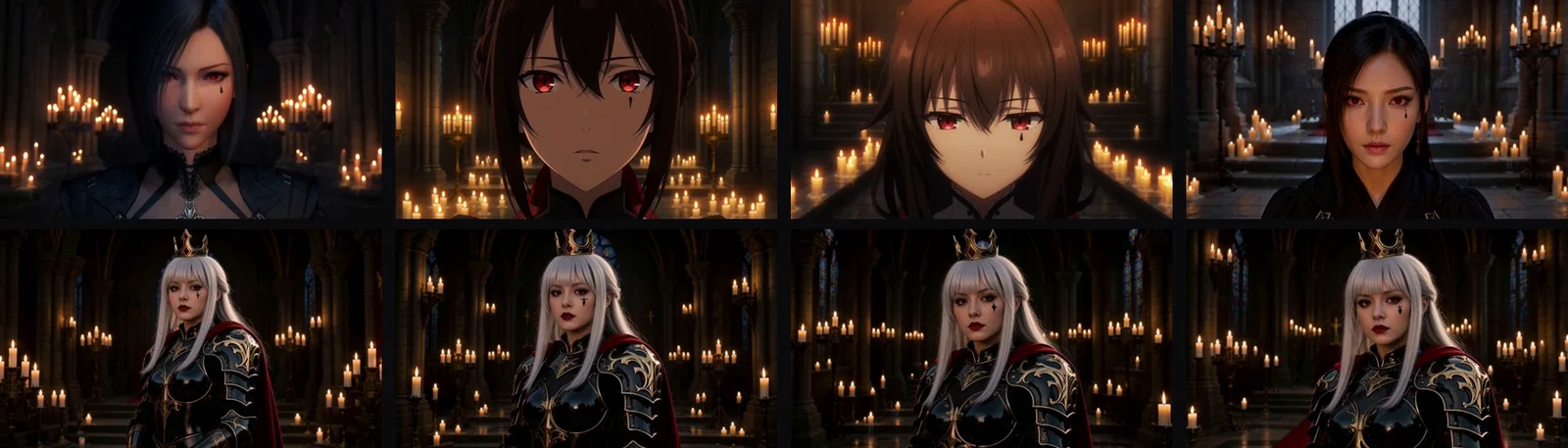
I also rendered ten new scenes on step 3,000, seed 42, from a desert city at sunset to a neon street in Tokyo. Two prompts needed a rewrite. "Instead of armor" kept the armour on, so the next version describes only the jacket. "A crowded tavern" put her face on every patron, so she now sits alone.
If you'd rather not train, see RefMods vs reference images.
What are the 5 rules for training your own character LoRA?
Give the character a one-sided detail, caption only what changes, shoot every side, never reveal a side the first frame hides, and test at full resolution. These five rules are what I'd do again after this one build:
- Give your character a one-sided detail. It's the fastest way to see drift.
- Caption what changes, never who she is.
- Shoot every side: front, back, both sides, above and below. Or the LoRA learns one side.
- Never let a clip reveal a side the first frame hides.
- Test at full resolution with one seed, and pick the earliest checkpoint that holds. For me that was 3,000, not the final 4,000.
Datasets, a training run field by field and reading the samples are in Part 3 of ComfyUI From Zero. Part 1 is free.
What are the limits of this test?
Every verdict here is a single case judged by my eye, so read the numbers as what happened in this run, not as a rule.
- One character, one training run, one RTX 5090.
- The checkpoint test is five prompts on one seed, and the four-seed test is one prompt. Every verdict is my eye.
- On the four chapel seeds at step 3,000, the mark stays on the correct side but its shape varies. The clean drop in the table is one bridge render.
- Not tested: the right-side-still route (my plan, not a measured fix), other ranks or learning rates, stills against clips for training, or other cards.
- Tests ran on Stubelius Ultimate H3 0.11.1, not re-run on the current 0.15.1.
Sources and files
- This Is How I Train a MiniMax H3 Character LoRA Locally (Full Guide, 2026): the dataset, the mistake, training, the crash, the checkpoint test and the 5 rules.
- AI Toolkit by Ostris (MIT licence).
- The MiniMax H3 model card, under the MiniMax H3 Community License.
- The Qwen-Image 2.1 model card, under the Qwen Research License.
- The Qwen-Image-Edit 2511 model card and the lightx2v MiniMax H3 Turbo model card.
- stuubszzz/Stubelius-Ultimate-H3: my free workflow (MIT).
- On this site: AI Toolkit distillation handling and the character dataset rules.
Common questions
How many clips do I need?
29 in my one run, which sits inside the 15 to 30 that my character dataset guide gives as a rule of thumb, there counted in images. I tested no other count, so 29 is what I used, not a proven minimum.
How much VRAM does training a MiniMax H3 LoRA need?
About 26 GB was in use on my 32 GB RTX 5090, with 80% layer offloading. That is not a tested minimum. The course's rule of thumb for video LoRAs is 24 GB or more, or a rented GPU.
How long does a MiniMax H3 LoRA take to train on an RTX 5090?
About 15 hours of GPU time for 4,000 steps on 29 clips, at roughly 12 seconds a step. The clock ran about 31 hours, with a crash and a planned pause.
Are AI Toolkit and the workflow free?
Yes. AI Toolkit by Ostris and Stubelius Ultimate H3 are both MIT licensed and public on GitHub. MiniMax H3 and Qwen-Image 2.1 are separate downloads under their own licences: read them before commercial use.
Can a character LoRA change her clothes in MiniMax H3?
Yes: the white summer dress worked at all four checkpoints in my one test. From step 3,000 she also kept her crown, with bangs and very pale hair. Describe only the new outfit: "instead of armor" kept the armour on at seed 42.
Does a MiniMax H3 character LoRA change other people in the shot?
Yes, in my one market test on seed 42: bystanders picked up crimson capes and black armour at all four checkpoints, and none did without the LoRA.